
Day 30 of the Week 4: Trust, Conversion & Launch Technicals series, and the final post in the series.
Roughly thirty days ago you were looking at a blank canvas.
Now you have a live website, a working checkout or booking system, and a polished design. Plus, it’s all connected with a secured custom domain.
That’s a lot of ground covered.
Key Takeaways: Final Checks Before Website Launch
- Run five final checks before website launch: your domain, SSL certificate, contact form, mobile layout, and testimonials.
- Test your domain with and without “www” in a private browser window to confirm both versions load.
- Confirm the padlock appears in Chrome, Safari, and Firefox, and send yourself a test message through your contact form.
- Scroll your homepage with one thumb on your phone, and make sure at least one real testimonial is visible.
- The whole checklist takes about 10 minutes, and each failed check has a quick fix covered earlier in the series.
Your Week 4 Roadmap: Trust, Conversion & Launch Technicals
You’ve built the site, switched on the features, and polished the design. Week 4 is about the final layer, the technical and trust signals that tell visitors and search engines your site is legitimate, secure, and ready for business:
- How to Connect Your Domain to Your Website
- New Website Says Not Secure? Here’s What to Do
- How to Connect a Domain Without Transferring It
- How to Check Your Website on Mobile: Try the Thumb Test
- Check Website Links Before Launch: Your 5-Minute Pre-Launch Audit
- Where to Put Testimonials on a Small Business Website: 3 Spots
- Do You Need a Subdomain for Your Small Business Website?
- Website Changes Not Showing? Why It’s Usually Browser Cache
- Final Checks Before Website Launch: Your 5-Point Checklist (this post)
The Problem: Small Mistakes Get Found by the Wrong People
You’re almost there. But once your link goes into your Instagram bio, business card, email signature, or WhatsApp status, your first visitors become your testers.
A domain that only half works, a “Not Secure” warning, or a contact form that never delivers messages won’t announce itself. You’ll only find out after a hundred people have visited, and some of them have quietly left.
These final pre-launch checks take about ten minutes. They’re the difference between a confident launch and an embarrassing one.
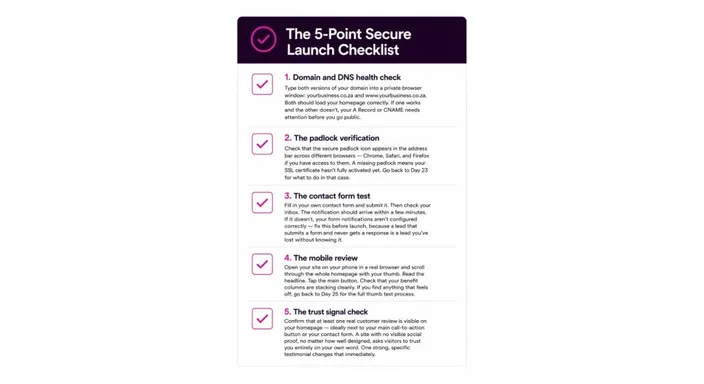
The Solution: Your 5-Point Website Launch Checklist
Work through these checks in order. Each one takes a minute or two.
1. Domain and DNS Health Check
What to do: Open a private browser window and type yourbusiness.co.za. Then type www.yourbusiness.co.za (substitute that for your real URL of course). Both should load your homepage.
What you’re checking:
- Does the root domain load your site?
- Does the www version load your site too?
- Do both show the same homepage?
If this check fails: One version works and the other shows an error. This means your A Record or CNAME needs attention. Review Day 22: How How to Connect Your Domain to Your Website. This way you can check both DNS entries, then allow up to 24 hours for propagation.
2. The Padlock Verification
What to do: With your site open in the private window, look for the small padlock icon to the left of your domain in the address bar. Click it to see your SSL certificate details.
What you’re checking:
- Is the padlock showing?
- Does it pass a quick cross-browser test (Chrome, Safari, and Firefox)?
- Is your domain name listed in the certificate details?
If this check fails: Your SSL certificate hasn’t finished activating. Most certificates activate within 15 minutes to a few hours of connecting your domain.
Review Day 23: New Website Says Not Secure? Here’s What to Do. This gives you the full timeline. If the padlock is still missing after 24 hours, contact HostAfrica support.
3. The Contact Form Test
What to do: Fill in your contact form completely, using your real name and email address. Hit Submit, then check your inbox, including your spam or junk folder.
What you’re checking:
- Does the form submit without errors?
- Does the notification arrive within a few minutes?
- Does it include everything you entered?
If this check fails: Your form notifications aren’t set up correctly. In your editor, open your contact form settings, confirm the notification email address is correct, and test again. Don’t skip this one. A lead who submits a form and never hears back is a lead you’ve lost without knowing it.
4. The Mobile Review
What to do: Open your site on your phone by typing the domain directly. Hold the phone in one hand and scroll through the homepage slowly, using just your thumb. Read the headline, tap the main button, and scroll through your benefits.
What you’re checking:
- Is the headline readable without zooming?
- Is the main button big enough to tap easily?
- Do multi-column sections stack cleanly on mobile devices?
- Is there enough space between sections?
If this check fails: Small text, hard-to-tap buttons, or cramped sections hurt the user experience. Review Day 25: How to Check Your Website on Mobile: Try the Thumb Test. The fix is usually a small padding or font size adjustment.
5. The Trust Signal Check
What to do: Look for at least one visible customer testimonial on your homepage, ideally below your main button, below your benefits section, or beside your contact form.
What you’re checking:
- Is a real testimonial visible on the homepage, not buried on a separate page?
- Is it specific, not generic like “great service”?
- Does it include the customer’s name?
If this check fails: Review Day 27: Where to Put Testimonials on a Small Business Website: 3 Spots. If you don’t have reviews yet, ask your first few customers for feedback and add the best quotes as they come in. Never write your own. A missing testimonial is easy to fix after launch, but a fake one costs you trust.
Optional Extra Checks (If You Have 10 More Minutes)
The five checks above cover the essentials. If you want to be extra thorough, these quick extras catch details that are easy to miss:
- Broken links: Click through your menu, buttons, and social icons to catch any 404 error before visitors do. Day 26: Check Website Links Before Launch: Your 5-Minute Pre-Launch Audit walks you through it.
- Placeholder text: Scan every page for leftover lorem ipsum or template copy. Templates in any website builder or content management system often ship with dummy text that’s easy to overlook.
- Page titles and meta descriptions: Make sure each of your main web pages has its own title and meta description, so search engines show something useful in results.
- Alt text: Add short descriptions to your images. Alt text helps visitors using screen readers and is part of the Web Content Accessibility Guidelines (WCAG).
- Loading time: Open your homepage on mobile data, not Wi-Fi. If it takes more than a few seconds to load, compress your largest images.
Post-Launch: Your First Steps After Going Public
Once your site is live, two free tools help you see how it’s doing:
- Google Search Console shows whether Google has found and indexed your pages, and flags any errors.
- Google Analytics shows how many people visit, where they come from, and which pages they view.
You don’t need to rerun the full checklist unless you make major changes. For small updates, just check in a private window. Day 29: Website Changes Not Showing? Why It’s Usually Browser Cache explains why.
FAQs: Website Launch Checklist
What are the most important final checks before website launch?
Check that your domain loads with and without “www,” your SSL padlock shows, your contact form delivers messages, your site works on mobile, and at least one real testimonial is visible.
Can I still launch if one of these checks fails?
It depends on the check. Fix domain, SSL, and contact form problems before you go public, because they affect whether visitors can reach you and trust you. Mobile tweaks are worth fixing too. If you don’t have a testimonial yet, though, you can launch and add one later.
How long should I wait after connecting my domain before running this checklist?
At least an hour, to give DNS propagation and SSL activation time. If your domain was connected earlier, you can run the checklist now.
What if I spot a problem after I’ve shared the link?
Fix it right away. Most problems take 5 to 30 minutes. Correct it in your editor, publish, and confirm in a private window. The sooner you fix it, the fewer visitors see it.
You’re Ready. Now Share It.
If all five checks pass, you’re not just technically ready. You’re prepared in a way most small business websites never are at launch.
You have a site that works on every device, loads securely, guides visitors toward one clear action, and gives them a genuine reason to trust you before they reach out.
That’s the whole job. Now go share the link.
Revisit the HostAfrica Website Builder Series
- Week 1: Blank Canvas: Getting your first site live
- Week 2: Feature Activation: Stores, bookings, payments, and forms
- Week 3: Layout and Polish: Navigation, spacing, and design details
- Week 4: Trust, Conversion & Launch Technicals: Domain, SSL, reviews, and your final checks
One more thing: Bookmark this checklist. Every time you make a significant update or launch a new section, run through these five checks again. Ten minutes now saves you a lot of embarrassing moments later.
Haven’t started building yet? Your free 14-day trial is still waiting. No credit card, no code, no reason to put it off any longer. You’ve just read 30 days’ worth of what to build – now it’s time to build it with HostAfrica’s Website Builder.
