
Part of Week 2: Feature Activation — Day 8.
There are two kinds of online stores. The first launches with one great product and slowly grows into something bigger. The second is still "almost ready" three years later.
If you've ever said:
"I'll launch once I've uploaded everything..."
You're not alone. It's one of the most common reasons online stores never actually open. The truth is, your first customer doesn't care whether you have 150 products. They care whether they can buy the one they came for.
Key Takeaways: How to Launch an Online Store
- You don't need a large product catalogue to launch an online store. You can start with one well-presented product and expand later.
- The cost of starting an online store depends on your platform, domain, payment setup, products and delivery requirements. Starting small helps keep those initial costs manageable.
- Your first product page should include clear photos, pricing, a useful description, important product details and delivery or collection information.
- Before launching, make sure customers can find a product, add it to their cart, pay securely and receive confirmation.
- You don't need to wait until everything is perfect. Launching early lets you test your checkout and learn from real customer behaviour and feedback.
- Free online store options may exist, but check their limitations around domains, payments, features, branding and transaction fees before choosing one.
- The best way to launch is to start with the essentials, place a test order yourself and improve the store as your business grows.
Your Week 2 Roadmap: Feature Activation
Getting your site live in Week 1 was step one. Now it's time to switch on the features that actually make your business money: stores, bookings, payments, and the small details that turn visitors into customers. Here's what's ahead:
- Why You're Putting Off Launching Your Store (this post)
- Why Clients Still WhatsApp You Instead of Booking Online
- Why Visitors Skim Past Your "About Us" Section
- Why "Setting Up Payments" Feels Scarier Than It Is
- Why You're Afraid to Turn On Online Bookings
- Why Your Photos Are Quietly Hurting Your Site
- Why Your Contact Form Isn't Getting Submissions
Let's start with the feature most business owners are most nervous to switch on: the store itself.
Do You Need Lots Of Products To Launch An Online Store?
No. You can successfully launch an online store with a single product. A well-presented product with clear photos, an honest description and a working checkout is often more valuable than a large catalogue that never goes live.
Starting small also helps you test your checkout process and learn what customers actually want before investing time uploading dozens of products.
The Problem: Waiting For "Perfect"
Many online business owners picture launch day looking something like this:
- Every product uploaded.
- Every description polished.
- Every photo professionally edited.
- Every possible variation available.
It sounds sensible. It also means many stores never launch. Perfection has a funny habit of moving the finish line every time you get close.
The One-Product Strategy
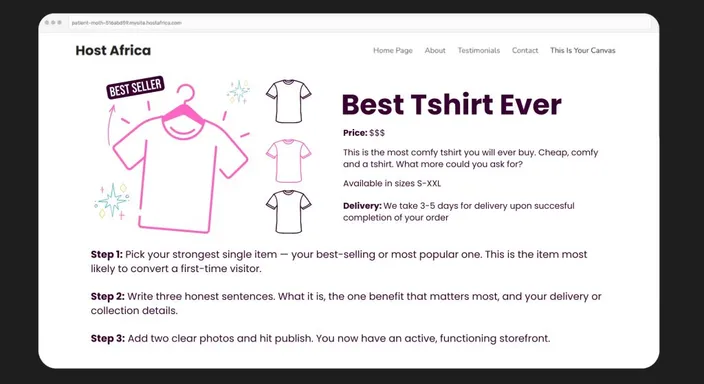
Instead of trying to build a massive catalogue overnight and managing inventory, start with your strongest product. The one people already ask for. The one that sells best. The one you'd confidently recommend to a first-time customer.
Then keep it simple:
- Add two good photos.
- Write a clear description.
- Explain delivery or collection.
- Publish it.
Congratulations. You're officially open for business.
How Much Does It Cost to Start an Online Store?
There's no single amount you need to start an online store. Our Online Store Builder currently starts from R120 per month (R89.99 with the promotion).
Your costs will depend on what you're selling and how you choose to build the store. Typical expenses can include your domain name, website or online store platform, payment processing, product stock, packaging, and delivery.
The good news is you don't need to pay for everything imaginable on day one.
Starting with one or a handful of products means you can keep your initial setup relatively simple. You don't need hundreds of product photos, complicated inventory systems, or every premium feature available.
Work out what you actually need to make your first sale, rather than what you might need when you're processing 1,000 orders a month.
You can upgrade when you have the customers to justify it.
What Should Your First Product Page Include?
Launching with one product only works if customers have enough information to confidently buy it. Fortunately, that doesn't mean writing the online shopping equivalent of War and Peace.
Your first product page should clearly show the:
- Product name
- Price
- Good-quality photos
- A short description
- Important specifications or variations
- Delivery or collection information
Most importantly, make the Add to Cart or Buy Now button easy to find.
Before publishing, imagine you've never seen the product before. Could you understand what you're buying, how much it costs and what happens after checkout without sending the business a message?
If yes, you've probably covered the essentials. Anything else can be improved once customers start telling you what they actually need to know.
Why Starting Small Actually Makes You Smarter
Launching with one product isn't cutting corners, it's gathering information. Once real customers start buying, you'll quickly discover:
- what questions they ask,
- what information they need,
- what products they want next,
- and whether your checkout works smoothly.
That's far more valuable than guessing what people might want while your store sits unpublished.
How Do You Know When Your Online Store Is Ready to Launch?
Here's the dangerous answer: it probably won't ever feel completely ready.
There's always another photo you could improve, sentence you could rewrite or product you could add. Instead of waiting for that mythical moment of perfection, give yourself a simple pre-launch test.
Can a customer find your product, understand it, add it to their cart, pay for it and receive confirmation? Are your contact and delivery details correct? Does the checkout work properly on mobile?
If those basics work, you have a functioning online store.
Place a test order yourself before launch and follow the entire journey from product page to confirmation email. If everything works, open the doors. The polishing can continue while you're trading.
What Do You Need to Launch an Online Store?
You need surprisingly little to get your first version online.
At minimum, you'll need something to sell, an online store platform, product information, a way to accept payments, and a plan for getting orders to customers.
Before launching, make sure you've covered the basics:
- Your product and price
- Clear product photos and descriptions
- Payment methods
- Delivery or collection information
- Contact details
- A working checkout
Depending on your business and market, you'll also need to consider appropriate store policies and other legal requirements.
Don't confuse launch requirements with future improvements. Discount codes, enormous catalogues, and elaborate marketing campaigns can come later.
Your first goal is much simpler: make it possible for somebody to discover your product and successfully buy it.
Quick Tip
Your first product doesn't need to be perfect. It just needs to be available. You can improve descriptions, replace photos and expand your catalogue later. You can't learn anything from a store that nobody can visit via search engines.
Frequently Asked Questions
How much does it cost to start an online store?
The cost varies depending on your online store platform, domain, payment provider, products and delivery setup.
You can keep initial costs down by launching with a small catalogue and only paying for the tools you actually need. Remember to consider ongoing costs too, such as platform subscriptions, payment processing or transaction fees, packaging, and delivery.
What is the best way to launch an online store?
Start small and make sure the basic customer journey works.
Choose your strongest product, create a clear product page, configure your payment and delivery options, and then place a test order yourself. Check the entire journey on desktop and mobile before opening the store to customers.
Once everything works, launch. You can add more products and improve the design using real customer feedback rather than waiting for perfection.
How much money do I need to open an online store?
You don't need a universal minimum amount. The amount depends heavily on what you're selling and how you're selling it.
A business holding physical inventory may need money for stock, packaging and delivery, while another business might have very different startup costs.
Instead of choosing an arbitrary budget, list everything required to make and fulfil your first sale. That gives you a much more realistic starting figure.
Can I create an online store for free?
It's possible to find platforms that let you create or trial an online store for free, but free doesn't always mean there are no costs involved.
You may still need to pay for a custom domain, payment processing, premium features or other services. Some free plans can also restrict products, features or branding.
Compare what's included before choosing a platform based purely on the word free.
How many products do I need to launch an online store?
You can launch an online store with just one product.
What matters more is whether that product is presented professionally and customers can complete their purchase without problems. Give them clear photos, pricing, useful information, delivery details and a working checkout.
Starting with one product also makes it much easier to test your store before expanding your catalogue.
Next in this series: Why Clients Still WhatsApp You Instead of Booking Online →
Ready to launch your first product? Start building your online store with HostAfrica's Online Store Builder and see how quickly "coming soon" can become "now selling."
