
Day 28 of the Week 4: Trust, Conversion & Launch Technicals series.
At some point as your online presence grows, one website won’t be enough.
Your main site covers who you are and what you do. But maybe you want a separate space for your online store. A booking portal that feels distinct from your main brand page. A help centre with its own navigation and layout.
Your instinct: buy a second domain and start from scratch.
The better option, in many cases: use a subdomain. It gives you a separate web space under the domain you’ve already built, without the cost or complexity of owning a second one.
The catch? A subdomain isn’t always the right choice either. Here’s how to tell.
Key Takeaways: Subdomain For Small Business Website
- A subdomain is an extension of your primary domain, like shop.yourbusiness.co.za, that works as a separate web space.
- Subdomains are free to create on most web hosting plans, so you don’t need to buy a new domain.
- A subdomain for a small business website makes sense for an online store, booking portal, temporary campaign, or customer support centre that needs its own platform or layout.
- Search engines often treat subdomains as separate entities, so they may not share your main site’s SEO authority.
- For most small businesses, a subfolder (yourbusiness.co.za/shop) is the simpler, more SEO-friendly option.
Your Week 4 Roadmap: Trust, Conversion & Launch Technicals
You’ve built the site, switched on the features, and polished the design. Week 4 is about the final layer, the technical and trust signals that tell visitors and search engines your site is legitimate, secure, and ready for business:
- How to Connect Your Domain to Your Website
- New Website Says Not Secure? Here’s What to Do
- How to Connect a Domain Without Transferring It
- How to Check Your Website on Mobile: Try the Thumb Test
- Check Website Links Before Launch: Your 5-Minute Pre-Launch Audit
- Where to Put Testimonials on a Small Business Website: 3 Spots
- Do You Need a Subdomain for Your Small Business Website? (this post)
- Website Changes Not Showing? Why It’s Usually Browser Cache
- Final Checks Before Website Launch: Your 5-Point Checklist
The Problem: Your Website Is Outgrowing a Single Space
What Is a Subdomain?
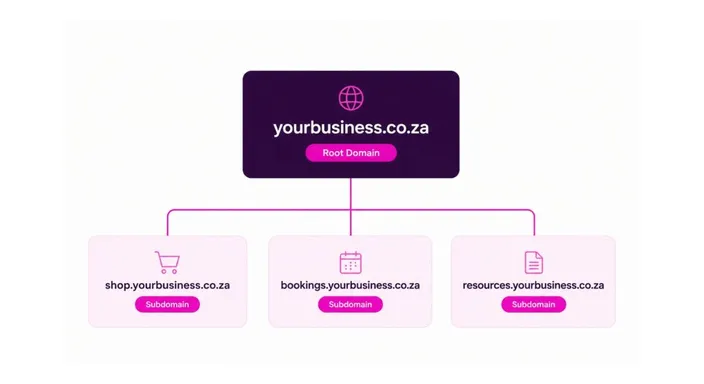
Every website address has a primary domain (yourbusiness) and a top-level domain, or TLD (.co.za). A subdomain is a prefix added in front, like shop.yourbusiness.co.za or bookings.yourbusiness.co.za.
Each subdomain works as its own web space, with its own layout, content, and navigation, while still living under the domain identity you’ve already built.
Why Growing Businesses Need Separate Spaces
As your business grows, you’ll often need sections with very different jobs:
- An online store, which has a different user flow from a service site
- A booking portal with a multi-step process
- A help centre or client resources area
- A short-term campaign or promotion
Cramming everything into one site gets overwhelming. Buying multiple domains gets expensive and splits your brand. Subdomains sit in the middle, giving you separate, purpose-built spaces under one brand.
Check out our blog explaining what subdomains are in simple terms.
The Solution: Use a Subdomain Only When It Solves a Real Problem
Not every business needs a subdomain, and adding one too early can create more complexity than it solves. Here’s when it genuinely makes sense.
Use Case 1: Your Online Store Needs Its Own Experience
Subdomain example: shop.yourbusiness.co.za
Your main site is a service business or portfolio, but you also sell products. Shopping is a completely different flow: browse, add to cart, check out.
Why this works:
- Visitors know immediately whether they’re shopping or learning about your services
- You can run a dedicated e-commerce platform built for sales
- Navigation stays focused, and shop traffic shows up separately in your analytics
When it doesn’t work: If you’re only selling a handful of products, a shop page on your main site is better.
Use Case 2: Your Booking Portal Deserves Dedicated Focus
Subdomain example: bookings.yourbusiness.co.za
Booking is a multi-step process: select a date, choose a service, enter your details, and confirm. It works better as a focused experience than buried in your main menu.
Why this works:
- You can optimise the whole flow without site-wide navigation distractions
- You can use a specialised booking platform if needed
- Analytics show exactly where people drop off
When it doesn’t work: If your model is “contact me to book,” your main contact form is enough.
Use Case 3: You’re Running a Campaign or Promotion
Subdomain example: promo.yourbusiness.co.za
A summer special or limited-time offer may need its own landing page with a distinct look.
Why this works:
- The campaign runs without changing your main site
- Campaign metrics are easy to track
- When it ends, you can take the subdomain down without touching your main site
When it doesn’t work: If it’s a permanent offering, it belongs on your main site.
Use Case 4: You Need a Customer Support Centre
Subdomain example: help.yourbusiness.co.za
If you have lots of FAQs, guides, or how-to articles, a dedicated help centre organises content into one searchable space with its own table of contents. Many support tools are built to run on a subdomain.
When it doesn’t work: If you only have a few FAQs, a single FAQ page does the job.
Subdomains vs. Subdirectories vs. New Domains
Before you choose, it helps to understand subdomains and subdirectories. A subfolder, also called a subdirectory, is a section inside your main site (yourbusiness.co.za/shop). Here’s how the three options compare:
| Option | Example | Cost | Pros | Cons | Best For |
| Subdomain | shop.yourbusiness.co.za | Free on most hosting plans | Separate space, own URL | May not share SEO authority | Distinct platforms (shop, bookings, campaigns, support) |
| Subfolder | yourbusiness.co.za/shop | Free | Stronger SEO, one site to manage | Less visual separation | Most small businesses |
| New domain | yourbusinessshop.co.za | Yearly registration fee | Fully separate identity | Splits your brand, more to manage | A completely separate business |
How Subdomains Affect Search Engine Optimisation
Here’s the important bit. Search engines often treat subdomains as separate entities. That means a subdomain may need to build its own ranking authority rather than benefiting from your main site’s reputation.
How a search engine treats domains and subdomains isn’t always clear-cut. But for most small businesses, the safest SEO strategies keep content in subfolders, where it strengthens your whole site.
Choose a subfolder if:
- Your site is small (under 50 pages)
- The new section is permanent
- Your shop or booking portal is fairly simple
- You want all your content building authority together
A subdomain is worth the trade-off if:
- You’re using a completely different platform
- The section has its own distinct purpose
- It’s temporary
- You want completely separate analytics
Do I Need a Subdomain for My Small Business? Quick Checklist
Answer these three questions:
- Is the section distinct enough? Does it have a different user flow or need a different platform?
- Is it temporary? Campaigns suit subdomains. Permanent sections usually suit subfolders.
- Does your web hosting plan support it? Most hosting plans let you create subdomains, but check yours first.
If you answered yes to most of these, a subdomain makes sense. If not, or if you’re unsure, use a subfolder. It’s simpler to manage and better for SEO.
Quick Tip
Be honest about whether the separation helps your visitors or just feels more “professional.” Subdomains add complexity, so use them when they solve a real problem, not because they seem fancier.
How to Create a Subdomain
Before you set up:
- Confirm your hosting plan lets you create subdomains
- Decide which platform will run it (the same builder or a separate tool)
- Choose a clear, short name (shop, bookings, promo, or help)
During setup:
- Create the subdomain in your hosting control panel or DNS settings
- Add your content or connect the external platform
- Make sure your SSL certificates cover the subdomain so visitors see the padlock. A certificate for your main domain doesn’t always include subdomains.
After setup:
- Link to the subdomain from your main site’s navigation
- Add it to Google Search Console to track its performance
- Test all forms, transactions, and links
If you plan to run multiple subdomains, keep the naming consistent so visitors always know where they are.
FAQs: Subdomain For Small Business Website
Does a subdomain cost extra?
No. Subdomains are extensions of your existing domain, so you don’t need to buy anything new. However, any platform you run on the subdomain, like an e-commerce or booking tool, may have its own fee.
Will a subdomain hurt my SEO?
It can. Search engines often treat subdomains as separate sites, so a subdomain may not inherit your main site’s authority. If SEO is a priority, a subfolder is usually the safer choice.
Can I use a subdomain for a temporary campaign?
Yes. This is one of the best uses for a subdomain. When the campaign ends, you can take it offline without leaving outdated pages on your main site.
Can I connect a subdomain to Shopify or another external platform?
Yes. You can point a subdomain like shop.yourbusiness.co.za to your Shopify store by adding a DNS record, so your store stays under your brand. HostAfrica’s customer support team can help you set it up.
Should my main site and subdomain look the same?
They should feel cohesive, with the same logo and brand colours, so visitors know it’s still your business. The layout and navigation can be different, and that difference often helps visitors understand each space’s purpose. Always include a clear link back to your main site.
Can I switch a subdomain to a subfolder later?
Yes, but it means moving content and updating links. If you’re unsure, start with a subfolder. It’s easier to add a subdomain later than to undo one.
Next in this series: Website Changes Not Showing? Why It’s Usually Browser Cache →
Ready to grow your online presence? Talk to the HostAfrica team about what your plan supports, and we’ll help you choose between a subdomain and a subfolder based on your goals. Get started with the HostAfrica Website Builder today!
