
Welcome to Week 3: Layout and Polish. Just finishing up Week 2? Catch up from the beginning
Remember how exciting it felt when you clicked Publish for the first time?
You probably checked the search engine results and opened your website in three different browsers. Imagined what the user experience will be like. Maybe even mapped out an entire marketing strategy.
Then something strange happened. You stopped touching it. Not the first step in keeping your website fresh and relevant.
That placeholder photo on your About page? Still there.
The "Add your text here" heading? You notice it every time you visit. But somehow... tomorrow always feels like a better day to fix it.
The funny thing is, most small business owners don't stop editing because they're lazy. They stop because they're scared. Editing a live website feels a bit like changing a tire while the car is moving.
Thankfully, that's not how websites work.
Key Takeaways: How to Update a Website
- You can update a website after publishing it by making changes in your BaseKit Website Builder, previewing them, and publishing the new version when you're ready.
- Regular updates help maintain your content, contact details, images, links, products, services, and calls to action accurate and useful.
- You don't need to redesign your entire website. Small improvements made regularly are often easier to manage.
- Updating useful or outdated content can support SEO and user experience, but simply changing something for the sake of it won't automatically improve your rankings.
- Check your website regularly for outdated information, broken links, unclear copy, old images, and anything else that no longer helps visitors.
- A simple weekly or monthly check can stop lots of small website problems from turning into one very large weekend project.
Your Week 3 Roadmap: Layout and Polish
Weeks 1 and 2 got your website online. Now it's time to make it shine.
Over the next week we'll cover:
- Why You Haven’t Touched Your Website Since You Published It (this post)
- Why Your Site Looks Cluttered Even With Good Content
- Why Your Footer Is a Missed Opportunity
- Why All Your Buttons Look Equally Important
- Why Your Navigation Menu Is Confusing People
- Why Clicking Your Own Site Reveals More Broken Things Than You Expected
- Why You’re Afraid to Experiment With Your Layout
Bookmark this page, it's your home base for Week 3.
The Problem: You're Treating Your Website Like A Printed Brochure
Imagine buying a whiteboard...and then writing on it once. Forever. That's what many business owners accidentally do with their websites. They treat Publish like it's the final chapter instead of the beginning.
A website isn't carved into stone, it's actually more like a garden.
Ignore it for a few months and little things start creeping in. A faded photo. An outdated call to action or broken link. A typo you've stopped noticing.
The best websites don't stay great because they follow the latest design trends or have the most visually appealing elements. They stay great because somebody keeps tending to them.
Don't Wait for the "Perfect Time"
Practically, there's a reason people delay renovating an entire house. It sounds like a huge project.
You imagine weeks of disruption, unexpected costs, and living in chaos while everything gets rebuilt.
So you tell yourself you'll tackle it later. Websites often fall into the same trap. The moment you think, "I should redesign the whole thing," your brain turns a handful of small jobs into one enormous project.
The result?
Nothing changes (except maybe loading times and the odd blog post). The truth is, your website probably doesn't need a complete makeover. It just needs a little attention every now and then.
The best websites aren't built in one weekend. They're improved little by little, with each update making the next one even easier.
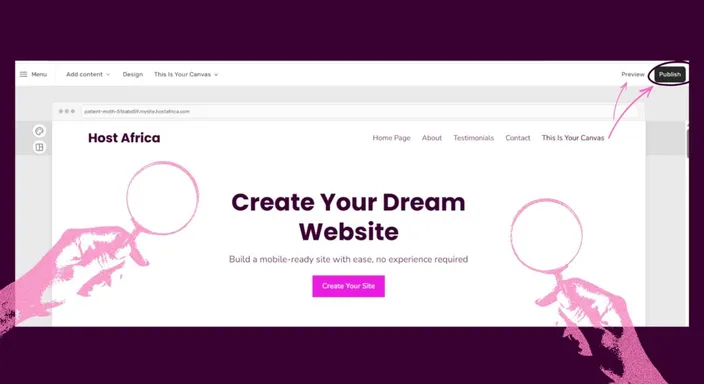
Small Changes Add Up
Instead of planning one massive redesign, try making one small improvement whenever you open your editor.
Some ideas include:
- Replacing visual elements like placeholder images with a real ones.
- Updating an outdated phone number or business hour.
- Adding a recent customer testimonial.
- Rewriting a headline that's a little unclear.
- Improving conversion rates by swapping a generic button like "Submit" for something more specific, like "Get a Free Quote."
None of these changes takes very long on its own.
After a few weeks, you'll have made dozens of improvements that make your website feel more polished, more trustworthy, and more up to date.
Your visitors may not notice every individual change. They will, however, notice how professional your website feels as a whole. Not only is that excellent for user experience, but likely also reduces the bounce rate of visitors.
Remember, a professional, user friendly website will likely have better rankings on search engines. Technical things like search engine optimization (SEO) and site speed play an important role, but making your website appealing for your visitors should be your priority.
What Should You Update on Your Website?
You don't need to rearrange the furniture every time you update your website.
Start with information that can actually become outdated or less useful. Check things like:
- Contact details and opening hours
- Products, services, and prices
- Images and team information
- Links and buttons
- Testimonials or recent work
- Headlines and calls to action
- Older website content
Pay particular attention to anything that could confuse a potential customer.
If your website says you close at 5pm when you actually close at 4pm, that's worth fixing before you spend Saturday choosing a slightly different shade of blue for your buttons.
The aim is to keep your website accurate, useful, and easy to navigate.
Does Updating Your Website Help SEO?
It can, but there's an important catch.
Search engines don't reward a website simply because somebody changed three sentences on Tuesday morning. Your updates need to make the relevant page(s) more accurate, useful, or easier for visitors to use.
For example, you might update outdated information, improve unclear copy, fix broken links, add genuinely useful information, or refresh a page that no longer answers what visitors are searching for.
Those are meaningful improvements.
So don't update pages just to make them look "fresh" to search engines. Update them when you can make them better for the person reading them.
Conveniently, that's usually a much better rule to follow anyway.
The Five-Minute Habit
Here's the secret. Don't try to improve everything. Improve one thing.
Start small. Maybe it's:
- Replacing a placeholder image
- Updating your opening hours
- Fixing one awkward sentence
- Changing one button
Open the editor then make the change.
Preview it, click Publish, and you're done. It'll likely take you a five minutes.
Repeat that once a week and, by the end of the month, your website will be noticeably better without ever feeling like a major project.
Quick Tip
Keep a note on your phone called "Website Improvements."
Whenever you spot something you'd like to change, write it down. The hardest part isn't making the edits, it's remembering them.
FAQs: How To Update Your Website
Will visitors see my website while I'm editing it?
With a Website Builder that keeps edits separate from the published site, visitors continue seeing the current published version while you make your changes.
You can work on your edits and preview how they look before publishing them. Once you publish the changes, the updated version becomes visible to your visitors.
How often should I update my website?
There's no rule saying you need to change your website every week.
A quick weekly or monthly check can help you catch outdated information, broken links, old images, or small improvements you'd like to make. More important pages may need attention sooner whenever your business information, products, services, or offers change.
What parts of a website should be updated regularly?
Start with anything customers rely on to make a decision or contact your business.
That includes contact details, opening hours, products, services, pricing, links, calls to action, images, and important page content. If something has become inaccurate, outdated, or confusing, it has earned itself a spot on your update list.
Does updating a website improve SEO?
Updating a website can help SEO when the changes make your content more useful, accurate, relevant, or easier to use.
Simply changing a few words to make a page look fresh won't guarantee better search rankings. Focus on meaningful improvements that make the page better for the people who actually visit it.
Do I need to redesign my website to keep it up to date?
Usually, no.
A website can stay useful and professional through small, regular improvements without needing a complete redesign. Fix outdated information, replace old images, improve unclear copy, and tidy up problems as you find them rather than waiting until everything needs fixing at once.
Next in this series: Why Your Site Looks Cluttered Even With Good Content →
Ready to make your first post-launch update? Open your HostAfrica Website Builder, fix one small thing, and press Publish. Your future self, and your visitors, will thank you.
