
Day 24 of the Week 4: Trust, Conversion & Launch Technicals series.
You already own a domain. Perhaps you bought it years ago. You might've registered it through a local South African registrar or a previous hosting company.
Now you're switching to a new Website Builder, and you're wondering: do I need to transfer my domain too?
In most cases, no.
You can connect a domain without transferring it by updating its DNS records. Your domain registration stays exactly where it is, while the domain points visitors to your new website.
It's the difference between moving house and simply changing the directions.
Key Takeaways: Connect a Domain Without Transferring It
- You don't usually need to transfer your domain to connect it to a new website or Website Builder.
- Domain mapping connects an existing domain to a new website by updating the required DNS records.
- Your domain registration, registrar, renewal date and billing can remain exactly where they are.
- A domain transfer moves the domain registration itself from one registrar to another.
- Mapping commonly involves updating DNS settings such as an A Record and CNAME using values supplied by your Website Builder.
- Transfer your domain only if you actually want to change the company responsible for managing its registration.
Your Week 4 Roadmap: Trust, Conversion & Launch Technicals
You’ve built the site, switched on the features, and polished the design. Week 4 is about the final layer, the technical and trust signals that tell visitors and search engines your site is legitimate, secure, and ready for business:
- How to Connect Your Domain to Your Website
- Why Your Site Might Show a “Not Secure” Warning After Launch
- Why You Think You Need to Transfer Your Domain (You Probably Don’t) (this post)
- Why Your Site Looks Perfect on Your Laptop but Loses Customers on Their Phones
- Why Your Last Check Before Launch Is the Most Important One
- Why Nobody Trusts a Website With No Reviews On It
- Why Your Site Looks Different in Your Browser Than on Everyone Else’s
- How Subdomains Let You Grow Without Starting Over
- The 5-Point Launch Checklist: How to Know You’re Actually Ready
The Problem: Confusing Domain Mapping With Domain Transfer
Domain mapping and domain transfer sound like two ways of doing the same thing.
They're not.
Domain mapping changes where your domain points.
Domain transfer changes who manages your domain registration.
If all you want is for your existing domain to load your new website, there's usually no need to transfer the domain at all.
That's good news, because it means you can leave your registration, renewal and billing where they already are.
The Solution: Connect Your Domain Without Transferring It
Instead of transferring your domain to your new Website Builder provider, you can point it to your new website using its DNS records.
Your domain stays registered with your existing domain registrar. You simply change the relevant DNS settings so visitors are sent to your new site.
This is often called domain mapping, connecting a domain, or pointing a domain.
Different name, same basic idea: keep the domain where it is and tell it where your website now lives.
What Is Domain Mapping?
Domain mapping leaves your domain registration untouched.
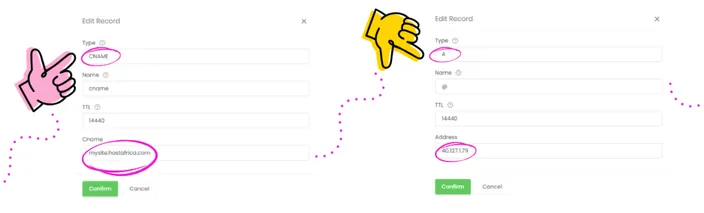
You update the DNS records required by your Website Builder, commonly including an A Record and CNAME, using the values provided for your site.
Your domain can then load the new website while your registrar, renewal billing and registration details stay where they are.
What Is a Domain Transfer?
A domain transfer is a little different.
Instead of changing where the domain points, you're moving the domain registration from one registrar to another.
That can make sense if you deliberately want your domains and other services managed by the same provider. But you don't need to transfer a domain simply because you've built a new website somewhere else.
Domain Mapping vs Domain Transfer
| Domain Mapping | Domain Transfer | |
| What changes? | Where the domain points | Who manages the registration |
| Registrar | Stays the same | Changes |
| Renewal & billing | Stay with existing registrar | Move to new registrar |
| DNS | Required records are updated | DNS management may move |
| Best for | Connecting an existing domain to a new website | Moving domain management to a new registrar |
For most beginners who simply want to use an existing domain with their new website, mapping is the relevant process.
How to Connect Your Existing Domain
We covered the full domain connection process earlier in this series, so you don't need another DNS masterclass here.
The short version is:
- Open the domain connection instructions in your HostAfrica Website Builder.
- Log into the registrar where your domain is currently registered.
- Open its DNS settings.
- Update the DNS records specified by the Website Builder using the supplied values.
- Save your changes and allow time for DNS propagation.
Quick Tip:
Take a screenshot of your existing DNS records before changing anything. It gives you an easy reference if you need to check what was there before.
Most importantly, don't start changing unrelated DNS records. Only update the entries required for your website connection.
When Should You Actually Transfer Your Domain?
Domain mapping doesn't mean domain transferring is bad. They're simply used for different jobs.
You might choose to transfer your domain later if you want to manage your domain registration, website and other services through one provider.
But that's an administrative choice, not a requirement for connecting your website.
If you're happy with your existing registrar, you can leave the domain there and point it at your new site.
Frequently Asked Questions
Will connecting my domain affect my email?
It shouldn't if you only change the DNS records required for the website connection. Avoid changing email-related records unless specifically instructed to do so.
Can I keep paying my current registrar?
Yes. That's one of the main benefits of mapping. Your domain registration and renewals can stay with your existing registrar.
Is domain mapping the same as connecting a domain?
In this context, yes. Both describe pointing your existing domain to your website without moving the registration itself.
Can I transfer the domain later?
Yes. Connecting your domain now doesn't prevent you from transferring its registration to another registrar later if you decide that's more convenient.
Next in this series: Why Your Site Looks Perfect on Your Laptop but Loses Customers on Their Phones →
Ready to connect your existing domain? Open your HostAfrica Website Builder domain connection instructions, update the required DNS records with your current registrar, and point your domain to its new home.
