
Day 27 of the Week 4: Trust, Conversion & Launch Technicals series.
You can write the most persuasive copy on the internet.
And a visitor will still trust a single sentence from a real past customer more than anything you say about yourself.
That’s not cynicism. It’s how people actually make decisions. We look for evidence that someone else already took the risk and it worked out before we take it ourselves. That’s why testimonials work: they’re social proof, and one of the strongest trust signals your site can have.
Most small business websites get this, then handle it badly. They put all their reviews on a separate “Testimonials” page that nobody visits, or at the very bottom of a long homepage that most visitors never reach.
That placement makes those reviews almost useless.
Key Takeaways: Where to Put Testimonials on a Small Business Website
- Where you put testimonials on a small business website matters more than how many you have.
- Place them in three spots: just below your main call-to-action button, beneath your benefits section, and beside your contact form.
- Each spot answers a specific doubt at the moment a visitor is most likely to leave.
- Specific testimonials (“They responded within 24 hours”) build far more trust than generic ones (“Great service”).
- Include the customer’s name, business, and a photo where possible to show the review is real.
Your Week 4 Roadmap: Trust, Conversion & Launch Technicals
You’ve built the site, switched on the features, and polished the design. Week 4 is about the final layer, the technical and trust signals that tell visitors and search engines your site is legitimate, secure, and ready for business:
- How to Connect Your Domain to Your Website
- New Website Says Not Secure? Here’s What to Do
- How to Connect a Domain Without Transferring It
- How to Check Your Website on Mobile: Try the Thumb Test
- Check Website Links Before Launch: Your 5-Minute Pre-Launch Audit
- Where to Put Testimonials on a Small Business Website: 3 Spots (this post)
- Do You Need a Subdomain for Your Small Business Website?
- Website Changes Not Showing? Why It’s Usually Browser Cache
- Final Checks Before Website Launch: Your 5-Point Checklist
The Problem: Your Testimonials Are in the Wrong Place
A visitor on the edge of clicking your contact button isn’t going to open a separate “Testimonials” page first. That’s too many extra steps. They’ll decide based on what’s in front of them right now.
Why testimonial pages don’t work:
- Nobody deciding whether to contact you thinks, “Let me go check the testimonials page first”
- Testimonials at the bottom of a long homepage are only seen by the few visitors who scroll that far
- Reviews that aren’t visible at the moment of decision can’t influence that decision
- Generic testimonials do almost nothing to build trust, wherever you put them
Having testimonials isn’t the point. Putting them exactly where a visitor is most likely to hesitate is.
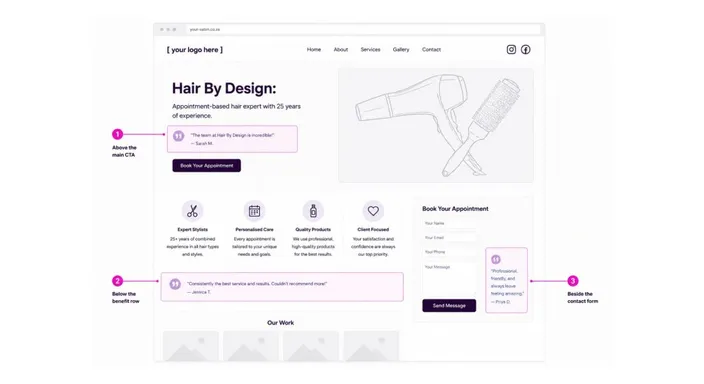
The Solution: Place Testimonials at the 3 Moments Visitors Hesitate
On a typical small business homepage, there are three moments where a visitor pauses and asks, “Should I trust this business enough to take the next step?” Put a real, specific customer testimonial at each one.
Position 1: Just Below Your Main Call-to-Action Button
Highest impact position
A visitor reads the headline in your hero section, sees your main button, and pauses. This is the first big decision point. Will they click or leave?
What they’re thinking: “This sounds good, but is it real? Will it actually work for me?”
What to place here: A short, specific testimonial directly below the button that proves your promise works.
“Got a quote within the hour and the job was done by 4pm. Exactly what you promised. Highly recommend.”
Why this works: Your visitor sees your big promise, then immediately sees proof that it’s real. It’s the fastest way to reduce doubt at the moment it’s highest.
Position 2: Directly Beneath Your Benefits Section
Credibility position
You’ve explained your three core benefits: fast turnaround, an expert team, affordable pricing, or whatever matters most about your product or service.
What they’re thinking: “I like what they say they offer. But can I believe it?”
What to place here: A customer quote that backs up one of your key claims, ideally the one you’re most worried people won’t believe.
“I was sceptical about the price until I saw the quality. Honestly surprised they charge so little for this level of work.”
Why this works: A real customer confirming your claims is far more persuasive than you making those claims about yourself.
Position 3: Beside or Above Your Contact Form
Conversion position
A visitor has scrolled to your contact form and started filling it in. They’re almost there, but one small doubt could make them close the tab instead of clicking Submit. They might be worried about wasting their time, or about never hearing back.
What they’re thinking: “I’m about to share my details. Will this actually be worth it?”
What to place here: A reassuring testimonial that answers the most common worry at this stage: will you actually respond?
“I was unsure at first, but they responded within 24 hours and the whole process was painless. Definitely worth reaching out.”
Why this works: You’re asking for their contact details. Proof that you’ll respond, and that the process is easy, gives them the final nudge they need.
What Makes a Strong Testimonial vs. a Weak One
Not all customer reviews are equally effective. Specific testimonials significantly outperform generic ones.
Strong: “They matched our budget exactly, stayed on schedule, and the results exceeded what we were expecting. Would use them again.”
Weak: “Great service, would recommend.”
Strong: “Initially nervous about the process, but they answered every question and delivered three days early. The communication was excellent.”
Weak: “Amazing experience. 5 stars!”
Any business can claim “great service.” A specific testimonial answers the actual doubts a new customer has and tells them exactly what to expect.
How to Add Testimonials to Your Website
Step 1: Gather Strong Testimonials
Ask past customers for reviews that mention:
- What they were worried about before hiring you
- How you addressed that concern
- A specific result or difference you made (time, cost, or quality)
Example: “I was worried the turnaround would be slow, but you delivered within 48 hours.”
Step 2: Match One Testimonial to Each Position
- Below your main button: a testimonial that proves your main promise works
- Below your benefits: a testimonial that backs up a key claim
- Beside your contact form: a testimonial that reassures visitors about responsiveness and process
Step 3: Add Testimonial Blocks in Your Website Builder
Drag a testimonial block into each of the three positions and include:
- The customer’s full quote
- Their name
- Their business or title (optional but helpful)
- A photo or star rating, if you have one
Then preview your site on mobile to check that each testimonial is readable and every quote is complete.
Step 4: Test and Refresh
After a few weeks, you’ll start to see which testimonials get the best response. Rotate in new ones as you collect them.
FAQs: Where to Put Testimonials
Where should I put testimonials on a small business website?
Put them at the three points where visitors hesitate: below your main call-to-action button, beneath your benefits section, and beside your contact form. Avoid hiding them on a separate page.
What if I don’t have many reviews yet?
Start with one strong testimonial beside your contact form or main button, and add more over time. One specific, genuine testimonial beats ten vague ones.
Can I use Google reviews or reviews from other sites?
Yes, as long as the review is specific and includes the customer’s name. Testimonials you collect directly give you more flexibility in wording and placement.
Should I use a photo with each testimonial?
Yes, if you have permission. A real photo shows the review comes from a real person. If you don’t have photos, include at least a name and business or title. Avoid placeholder avatars, which actually reduce trust.
Are video testimonials worth it?
Video testimonials are harder to fake, so they carry a lot of weight. A short clip works well in any of the three positions, but a strong written quote is still the quickest win for a new site.
Where do case studies fit in?
Case studies are great for showing detailed results, but they’re too long for these three spots. Use a short quote on your homepage and link to the full case study if you have one.
Is it okay to edit testimonials for clarity?
Minor edits, like fixing grammar, are fine, but don’t change the meaning or remove important details. If you need to make bigger changes, ask the customer first.
How often should I update my testimonials?
Every three to six months, or sooner if you collect new ones. Fresh testimonials show visitors your business is active.
Next in this series: Do You Need a Subdomain for Your Small Business Website? →
Ready to put your testimonials where they’ll actually work? Try HostAfrica’s Website Builder free for 14 days and drag a testimonial block into all three positions. Your conversion rate will thank you.
