
TL;DR
- A subdomain is a prefix added to your main domain (e.g.,
blog.mywebsite.com) to create a separate section of your site - Subdomains help organize content, scale large websites, and separate audiences or functionality
- They are commonly used for blogs, stores, support portals, staging environments, and APIs
- From an SEO perspective, subdomains are treated as separate sites by search engines
- Subdomains are best when content is clearly distinct; subdirectories are often better for closely related content
- Setting up a subdomain involves both hosting configuration and DNS records
- When managed correctly, subdomains are flexible, powerful, and SEO-safe
You just launched a blog for your business, and someone tells you it should be on a subdomain. You nod, but deep down, you’re wondering, “What exactly is a subdomain?” Is it necessary? What does it even do? and how do I ‘put my blog’ on it?
If you have been having any of these questions, you’ve landed at just the right place. In this guide, we’ll explain subdomains in simple terms, explore their benefits, and help you decide when (and how) to use them.
Understanding subdomains
A subdomain is an additional part added to the beginning of your main domain name. It helps you create separate sections or areas of your website. For example, if your website is mywebsite.com, you can have a blog on blog.mywebsite.com, or a support page on support.mywebsite.com.
Here are some benefits of using subdomains:
- Subdomains allow you to logically divide your website into distinct sections. This makes it easier for users to navigate and understand where they are within your broader online presence.
- For large businesses or organizations with a wide range of offerings, subdomains are a must-have. They provide the structure and scalability that would be cumbersome to manage under a single domain root.
- Subdomains can house content or functionality that may have a completely different audience. For example, developers.mywebsite.com could contain technical documentation for developers, separate from the main marketing site.
- Different subdomains can point to different hosting resources or servers. For example, you may host your main website on one server but run a resource-intensive web application on a separate server through a subdomain. Developers often also create staging or testing environments using subdomains.
What is a subdomain in web hosting?
From a web hosting perspective, a subdomain isn't something you register separately like a main domain name. Instead, it's a configuration you set up within your existing hosting account that's associated with your main domain.
This configuration tells the Domain Name System (DNS) and your web server how to handle requests for that specific subdomain prefix. For example, if you create blog.mywebsite.com, you will need an A record specifically for this subdomain. More on this in a later section.
If you're using shared hosting, your provider usually offers a simple way to create and manage subdomains through the cPanel dashboard. You will have the option to assign files, set up websites, or even install apps like WordPress to each subdomain.
If you're on a VPS hosting setup, you get even more control. You can create subdomains through cPanel, or directly from the server using command-line tools or other control panels.
Subdomain vs subdirectory vs addon domain
Three terms most commonly associated with website restructuring are subdomains, subdirectories, and addon domains. Even though they can all be used to host content, they work in different ways.
- A subdomain is like a separate section of your site, with its own unique URL that comes before your main domain.
- A subdirectory is a folder within your main domain (e.g., mywebsite.com/blog) that shares the same server and settings.
- An addon domain is a completely separate domain that you host under the same hosting account. It acts like a second website.
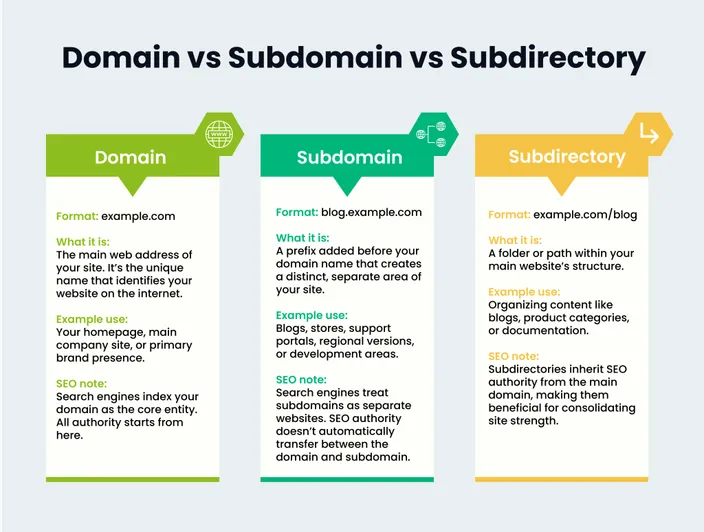
Each of these has its own use cases, pros, and cons. Here’s a detailed comparison to help you understand how they differ:
| Aspect | Subdomain | Subdirectory | Addon domain |
| URL format | blog.mywebsite.com | mywebsite.com/blog | anotherdomain.com |
| Relation to main domain | Connected, but separate | Part of the main domain | Completely separate |
| Uses same hosting account | Yes | Yes | Yes |
| Separate content/website | Yes | No | Yes |
| Search engine treatment | Treated as separate site | Treated as same site | Treated as separate site |
| Common use cases | Blogs, forums, support | Categories, pages, articles | Hosting multiple sites |
| Ease of setup | Moderate | Easy | Moderate to hard |
| Requires new domain name | No | No | Yes |
| Can have separate CMS/app | Yes | Typically, no | Yes |
| Uses different SSL certificate | Can use separate SSL | Shares SSL with main domain | Needs its own SSL |
| SEO impact | May not share SEO strength | Inherits SEO from main site | Independent SEO profile |
| DNS settings needed | Yes (needs a DNS entry) | No | Yes (full DNS setup) |
| Resource allocation | Shared or separate | Shared | Can be separate (on VPS/dedicated) |
| Billing | Covered in same plan (Typically, but some providers charge extra) | Covered in same plan | May count as extra site |
| Analogy | A specific, named department within a large company (e.g., "Company - Support Division"). | A specific filing cabinet or room within the company's main office (e.g., "Company Office - Room 101"). | A completely separate company operating out of the same office building complex. |
Common uses of subdomains
Next, let’s explore some of the common ways people use subdomains:
- Blogs: For hosting a CMS or Medium-powered blog at blog.mywebsite.com.
- E-commerce stores: For running a separate online shop (e.g., shop.yoursite.com) using platforms like Shopify or WooCommerce.
- Support & help centers: For creating a dedicated knowledge base (e.g., help.mywebsite.com) where you add your FAQs, tutorials, and customer service options.
- Mobile & regional sites: For serving location-specific content (e.g., uk.mywebsite.com) or a mobile-optimized version (m.mywebsite.com).
- Testing & development: For testing new features on staging.mywebsite.com or beta.mywebsite.com in a sandboxed environment before rollouts.
- Events & promotions: For building temporary campaign pages (e.g., event.yoursite.com) where you share information on new product launches or conferences.
- API & developer portals: For hosting documentation and tools for developers at api.mywebsite.com or dev.mywebsite.com.
How to set up a subdomain in cPanel
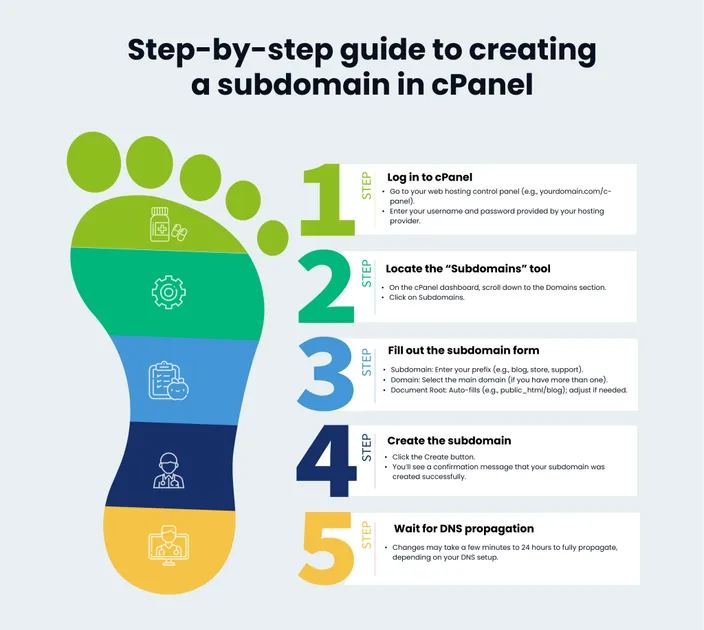
Now, let’s explore how to set up a subdomain in cPanel. If your hosting provider uses cPanel, the process is quite straightforward. Here are the steps:
- Go to yourdomain.com/cpanel and log in with your hosting account details.
- Scroll down till you find the Domains section and click Domains.
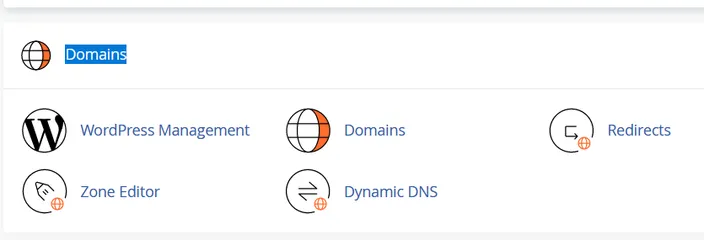
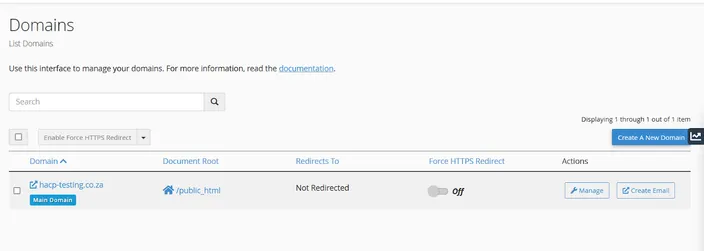
- Click the Create A New Domain button.
- In the Domain text box, type the name you want (e.g., blog or store). Make sure the Share document root (/home/username/public_html) with “domain.”. option is deselected as in the screenshot below.
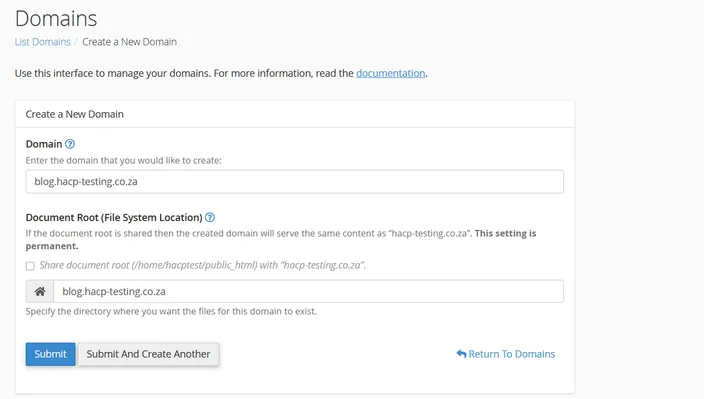
- Enter the desired directory in the Document Root (File System Location) field. This is the folder where files for the subdomain will be stored. It’s usually filled in automatically, but you can change it if needed.
- Once done, click the Submit button. cPanel will set up the subdomain and create the folder for it in your hosting account.
At this point, the address for your subdomain is set up, but you still need to add content to make it functional. Here are two ways to go about it:
- Upload your website files (HTML, CSS, images) directly to the subdomain's document root folder using cPanel's File Manager or an FTP client.
- Alternatively, you can install a CMS (like WordPress) through your hosting provider's auto-installer. *For WordPress, if you select your subdomain during the setup, it will automatically place all necessary files in the correct directory. *
How to add a subdomain to DNS/Nameservers
The next step of the subdomain creation process is to configure the required DNS records. Let’s quickly go over what that means.
DNS (Domain Name System) is what helps your domain and subdomains point to the correct server (IP address). If your domain uses your hosting provider’s nameservers, then cPanel should automatically handle the DNS setup.
However, if your domain uses custom nameservers or a separate DNS service (like Cloudflare or a domain registrar’s DNS), you’ll need to add a DNS record manually. Here are the steps to do so:
- Log in to your DNS manager. If you are using the cPanel DNS, this would be under Domains -> Zone Editor. If you are using an external DNS, you’d have to log in to its dashboard.
- Add a new A record with your desired TTL (time to live) value. An A record points the subdomain to an IP address and should be used if the subdomain is hosted on a server with a fixed IP. It’s also the recommended option for most cases.
Alternatively, you can also add a CNAME record if you want to point your subdomain to another domain name (not an IP address). This can be done when you want to point to third-party services (e.g., shop.yourwebsite.com pointing to yourstore.shopify.com), or when the target server's IP may change but its hostname won't.
- Save or apply the changes.
After saving, wait for the DNS changes to propagate before expecting the subdomain to be accessible. The subdomain propagation time can range from a few minutes to a few hours.
Tools to help you manage subdomains
Here are some tools that you can use to check if your subdomains are working, secure, and properly configured:
Subdomain checker tools
These tools let you check if a subdomain is active and resolving as expected. Two popular options are: WhatsMyDNS and DNS Checker.
Subdomain scanners
These are used to find all the subdomains that are connected to a domain. They are handy for security audits and for spotting forgotten or unprotected subdomains. Two popular options are:
- SecurityTrails: Shows all known subdomains for a domain.
- Sublist3r: A free command-line enumeration tool to find subdomains.
FTP clients
Once a subdomain is created, you need a dedicated FTP/SFTP client to upload, download, and manage the actual website files within the subdomain's document root folder. Here are two popular choices:
- FileZilla: A free and open-source client that supports FTP, SFTP, and FTPS.
- Cyberduck: A sleek, user-friendly cloud-storage browser that supports FTP and SFTP.
SSL checkers
Use SSL checkers to confirm that your subdomain has a valid SSL certificate. Two popular options are SSL Labs and Why No Padlock?
Do subdomains affect SEO?
Yes, subdomains can affect SEO—but not in a bad way if used correctly.
Search engines treat subdomains as separate entities from the main domain. This means that they see blog.mywebsite.com and mywebsite.com as two different websites. This can be good or bad based on what your SEO goals are.
Google’s official take is that both subdomains and subdirectories (folders) are fine. John Mueller from Google has said that you can use either one, and Google’s systems will crawl and index them just the same. Naturally, what matters more is the quality of your content and the structure of your site.
Pros of subdomains for SEO
- Subdomains are helpful when you have very different types of content (like a blog and an online store). Google sees them as separate sites, so you can target different keywords for each one.
- A highly focused subdomain (e.g., ai-research.yourcompany.com) could potentially develop specific topical authority in its niche (although it remains connected to the main domain's overall reputation).
- You can use subdomains to target different languages or countries (e.g., us.mywebsite.com, fr.mywebsite.com), which is helpful for international SEO.
- Problems (like penalties or slow load times) on a subdomain don’t directly harm the main domain’s ranking.
Cons of subdomains for SEO
- Since Google treats subdomains as separate websites, backlinks to a subdomain don’t always pass full authority to the main domain. This can slow down your SEO progress if you’re trying to build a single strong site.
- Each subdomain needs its own SEO setup, including meta tags, sitemaps, and tracking, etc. This increases the overall complexity and workload than simply using subdirectories.
- Navigating between a main domain and multiple subdomains can feel less intuitive to users than navigating within a single, unified website structure. This could potentially lead to higher bounce rates or lower user engagement, which can indirectly harm SEO performance.
So, what’s the final verdict? If your content is closely related and part of the same overall topic, we recommend using folders (like mywebsite.com/blog), as it’s often simpler and better for SEO.
But if you have very different sections, want to target different regions, or need to separate content for technical reasons, subdomains are a good option too. As long as you ensure that each subdomain has a solid structure, user-focused content, and a targeted SEO policy, you shouldn’t run into any SEO issues.
Frequently Asked Questions (FAQ)
What is a subdomain in simple terms?
A subdomain is an extension added before your main domain name to create a separate section of your website. For example, blog.mywebsite.com is a subdomain of mywebsite.com.
Do I need to register a subdomain separately?
No. Subdomains are created using an existing domain. You configure them through your hosting control panel and DNS settings rather than registering them like a new domain.
Is it better to put a blog on a subdomain or a subdirectory?
It depends on your goals.
- Use a subdirectory (
mywebsite.com/blog) if the blog supports your main site and SEO strategy. - Use a subdomain (
blog.mywebsite.com) if the blog targets a different audience, has a separate CMS, or needs independent scaling.
Do subdomains hurt SEO?
No, not when used correctly. Search engines treat subdomains as separate sites, which can be beneficial for targeting different topics or regions—but it also means SEO authority is not automatically shared.
Can a subdomain have its own hosting or server?
Yes. A subdomain can point to a completely different server, IP address, or hosting provider using DNS records.
Do subdomains need their own SSL certificates?
Yes. Subdomains require SSL coverage. This can be handled using:
- A wildcard SSL certificate
- A multi-domain (SAN) certificate
- A separate SSL certificate for each subdomain
How long does it take for a subdomain to start working?
DNS propagation usually takes anywhere from a few minutes to a few hours, depending on TTL settings and DNS providers.
Can I run WordPress on a subdomain?
Yes. Many websites run WordPress installations on subdomains like blog.example.com, shop.example.com, or help.example.com.
Are subdomains good for testing or staging websites?
Absolutely. Subdomains like staging.example.com or beta.example.com are commonly used to test new features before pushing them live.
When should I avoid using subdomains?
Avoid subdomains when:
- Content is closely related to the main site
- You want all SEO authority consolidated
- You want simpler analytics, navigation, and site management
Conclusion
Subdomains are a great tool to organize and separate sections of your website without getting a completely new domain. To get the best out of them, make sure that each subdomain has a clear purpose, is well-structured, and includes quality content. Also, don’t forget to manage SEO, DNS, and security settings properly for each one.
Need reliable hosting to manage your domains and subdomains with ease? Check out HostAfrica’s powerful web hostingsolutions.
Set Up and Manage Subdomains
Subdomains can help you separate sections of your website, create test areas, or connect services more neatly. These related guides will show you how to access subdomains in cPanel, manage cPanel basics, and check CNAME records when connecting a subdomain.
Related articles:
