
Part of Week 2: Feature Activation — Day 9.
You've done the hard part. You've added online booking to your website. You sit back, waiting for appointments to roll in. Instead...
"Hi, are you free on Thursday?"
Another WhatsApp message. If you're a service business, this probably feels familiar. The frustrating part is your appointment booking system works perfectly. People just aren't using it.
Fortunately, this usually isn't a technology problem. It's a people problem. And people are wonderfully predictable.
Key Takeaway: Why Aren't Customers Booking Online?
Customers usually don't ignore online booking because it's broken. They ignore it because messaging feels easier. To encourage more appointment scheduling online, place your booking widget near the top of your homepage and offer a clearly named service.
It also helps to enable instant confirmations, and actively direct customers to your booking page from WhatsApp, email, and social media. The easier booking feels, the more likely people are to use it.
Your Week 2 Roadmap: Feature Activation
Getting your site live in Week 1 was step one. Now it’s time to switch on the features that actually make your business money: stores, bookings, payments, and the small details that turn visitors into customers. Here’s what’s ahead:
- Why You’re Putting Off Launching Your Store
- Why Clients Still WhatsApp You Instead of Booking Online (this post)
- Why Visitors Skim Past Your “About Us” Section
- Why “Setting Up Payments” Feels Scarier Than It Is
- Why You’re Afraid to Turn On Online Bookings
- Why Your Photos Are Quietly Hurting Your Site
- Why Your Contact Form Isn’t Getting Submissions
Let’s start with the feature most business owners are most nervous to switch on: the store itself.
The Problem: People Follow The Easiest Path
Think about your favourite coffee shop.
If they suddenly moved the front door around the back of the building without telling anyone, you'd probably still walk to the old entrance first.
Your customers are no different.
If they've always booked through WhatsApp, that's what they'll keep doing until another option is obviously easier. Sometimes the booking button is also hiding at the bottom of the page, tucked away in a menu that nobody opens.
It's there, it's just playing an excellent game of hide-and-seek.
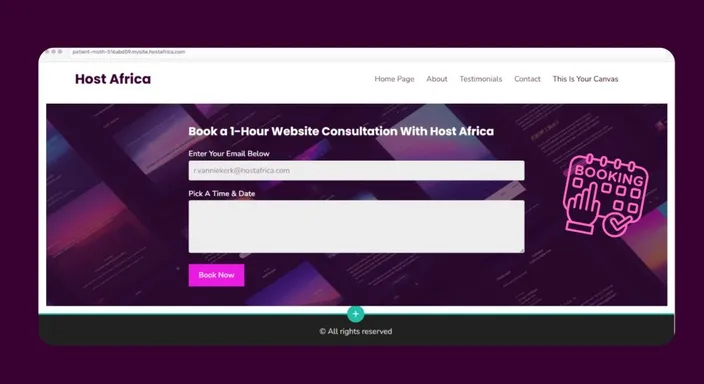
Make Booking Impossible To Miss
A few small changes can make a noticeable difference. First, make your booking button specific. Instead of Book Now, try something like:
- 30-Minute Consultation
- Hair Appointment
- On-Site Plumbing Assessment
Specific services feel easier to commit to than vague promises.
Next, move your booking widget higher up the page with the other key features. Visitors shouldn't have to scroll halfway through your website before discovering how to become a customer.
Finally, switch on instant confirmations and automated reminders. People like knowing their booking has gone through immediately. It builds confidence and saves everyone the "Did you get my message?" conversation.
What Should An Online Booking Page Include?
Getting customers onto your booking page is only half the battle. Once they arrive, don't greet them with the scheduling equivalent of an airport departure board.
Keep the choices simple.
Customers should be able to quickly see what they're booking, how long it takes, what it costs, and which appointment times are available. If you offer several services, give each one a clear name and short description so visitors don't have to guess which option applies to them.
It's also worth explaining what happens next. Will they receive confirmation? Do they need to prepare anything? Can they reschedule?
A good online booking page removes questions before customers need to ask them. Conveniently, that also means fewer WhatsApp messages for you.
Teach Your Customers A New Habit
Here's a trick that feels almost too simple. The next time a regular customer sends you a WhatsApp asking to book... Don't book them manually. Send them your booking link instead.
Do the same in:
- Your email signature,
- Your WhatsApp Business auto-reply,
- Your social media profiles.
Most people aren't avoiding your booking system.
They simply haven't been shown that it's the quickest option.
Can Online Booking Help Reduce No-Shows?
An online booking system won't magically stop every customer from forgetting their appointment. If only software could fix human memory.
It can, however, make no-shows easier to manage.
Automated booking confirmations give customers an immediate record of their appointment, while email reminders can nudge them before the scheduled time. You can also clearly communicate cancellation or rescheduling rules during the booking process instead of explaining them individually afterwards.
For businesses where missed appointments are particularly costly, accepting a deposit or payment when customers book can create an extra level of commitment.
The goal isn't to make booking stricter. It's to make the whole process clearer for both sides, from choosing an appointment to actually showing up.
Quick Tip
Think of your booking page as your digital receptionist.
If customers have to work harder to find it than they do to message you, they'll keep choosing WhatsApp every time.
Frequently Asked Questions
Will online bookings replace WhatsApp completely?
Probably not, and that's okay. Some customers will always prefer messaging. The goal is simply to give people a faster option that many will happily choose.
Should customers pay when they book?
Many businesses ask for a online payment deposit or full payment upfront to reduce no-shows, but the right approach depends on your industry and services.
Where should I place my booking button?
Ideally near the top of your homepage, where visitors can see it without searching. The easier it is to find, the more likely people are to use it.
Next in this series: Why Visitors Skim Past Your "About Us" Section →
Ready to spend less time playing calendar ping-pong on WhatsApp? Try HostAfrica's Smart Scheduler and let your website handle and accept the bookings for you.
