
Part of Week 3: Layout and Polish — Day 17.
Imagine you've just had a great meal at a restaurant.
The food was excellent, the service was friendly, and you're ready to come back. Then you ask for the bill... and nobody can find it. The waiter disappears. There's no one at the front desk.
You're left wondering what to do next. That's surprisingly similar to what happens on many websites, especially if they neglect their website footer design.
A visitor reads your page, likes what they see, scrolls to the bottom looking for your contact details... and finds an empty footer or a collection of forgotten template links.
It's a disappointing way to end an otherwise great experience.
Key Takeaways: Website Footer Design
- A website footer is the section at the bottom of a web page that gives visitors quick access to useful information and important links.
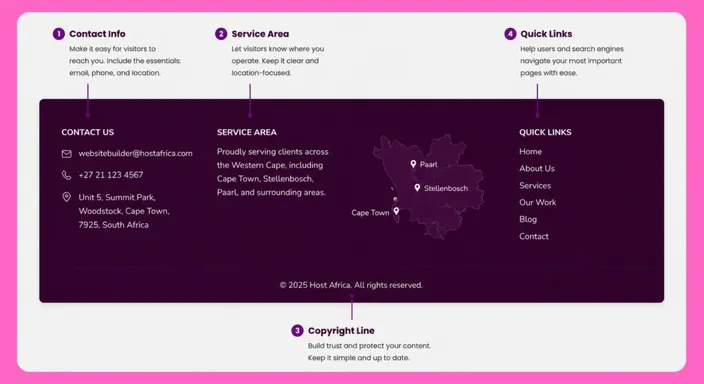
- A small business footer should usually include contact details, location or service area, important page links, and a copyright notice.
- Links to pages such as About, Contact, Privacy Policy, and Terms make important information easier to find.
- Keep your footer simple and consistent across your website rather than filling it with unnecessary links.
- Because the footer appears across multiple pages, keeping its contact information and links accurate and up to date can improve the overall visitor experience.
- A useful footer gives visitors one final place to find information, build trust, or take the next step before leaving your website.
Your Week 3 Roadmap: Layout and Polish
Weeks 1 and 2 got your website online. Now it’s time to make it shine.
Over the next week we’ll cover:
- Why You Haven’t Touched Your Website Since You Published It
- Why Your Site Looks Cluttered Even With Good Content
- Why Your Footer Is a Missed Opportunity (this post)
- Why All Your Buttons Look Equally Important
- Why Your Navigation Menu Is Confusing People
- Why Clicking Your Own Site Reveals More Broken Things Than You Expected
- Why You’re Afraid to Experiment With Your Layout
Why Website Footer Design Matters
Think of your footer as the reception desk of your website. Most visitors won't head there first.
But the ones who do are usually looking for something specific before they make a decision. Maybe they want your phone number. Maybe they want to check where you're based. Perhaps they're looking for reassurance that your business is genuine.
A good footer quietly answers those questions without making visitors hunt for the information elsewhere. Oftentimes it's the final impression your website leaves, and as with first impressions, last impressions matter too.
What to Include in an Effective Website Footer
A good footer doesn't need to be complicated. It just needs to be useful.
Start with the essentials:
- Your business phone number and email address.
- Your physical location or service area.
- Quick links to pages like About, Contact, Privacy Policy and Terms.
- A simple copyright notice showing your business is active and up to date.
Set it up once, and these details will appear consistently across every page of your website, helping visitors wherever they happen to land.
The Problem: The Footer Is Always "Something I'll Finish Later"
When you're designing websites, the footer rarely feels exciting.
You focus on your homepage. You tweak your hero image. You perfect your call-to-action. By the time you reach the bottom of the page, you're ready to hit Publish.
So the footer gets left for another day. The trouble is, your visitors don't see it as an unfinished task. They see it as part of your business.
Someone who's scrolled all the way to the bottom is usually interested enough to take the next step. They just need one final piece of information before they do.
A missing phone number, an outdated email address, or placeholder template links can quietly chip away at the trust you've spent the rest of the page building.
Your Footer Works Harder Than You Think
Unlike most parts of your website, your footer appears on almost every page. That means a small improvement there has a notable impact.
Whether someone lands on your homepage, a blog post, or a service page, they'll always know where to find your contact details and important links.
It's one of the few parts of your website that works around the clock without asking for any extra effort.
Quick Footer Checklist
Before you publish your website, make sure your footer answers these simple questions:
- Can visitors contact you without searching?
- Does it clearly show where you operate?
- Are important pages like Privacy Policy, Terms, About, and Contact & Social media links easy to find?
- Is your copyright notice up to date?
If you answered "yes" to all four, you're already ahead of many small business websites.
Quick Tip
After updating your footer, visit a few different pages on your website and scroll to the bottom of each one.
Everything should look consistent.
If one page has a different footer, you may have edited a page-specific section instead of the global footer template.
Frequently Asked Questions
Does every page need the same footer?
Usually, yes. Keeping the same footer across your main website pages gives visitors a familiar place to find contact details and important links.
It also creates a more consistent, professional-looking website.
Do I need a Privacy Policy?
If your website collects personal information through contact forms, accounts, analytics, or other tools, you may need a Privacy Policy depending on the laws that apply to your business.
Even for a simple small business website, making your privacy information easy to find helps visitors understand how their information is handled.
What links should I put in my website footer?
Start with useful pages visitors may want to find quickly, such as About, Contact, Privacy Policy, and Terms.
You can also include important service pages or social media links, but don't turn your footer into a second sitemap unless those links are genuinely useful.
Should I put my contact details in the footer?
Yes, especially if customers regularly need to call, email, or find your business.
A phone number, email address, location, or service area gives visitors an easy way to find those details from almost any page.
Does a website footer help SEO?
A well-organised footer can help visitors and search engines navigate important parts of your website, but it isn't an excuse to squeeze in dozens of keywords or links.
Keep your footer useful and natural, with links to genuinely important pages rather than trying to turn the bottom of every page into an SEO toolbox.
Next in this series: Why All Your Buttons Look Equally Important →
Ready to improve your website footer? Open the HostAfrica Website Builder, spend ten minutes updating your footer, and you'll improve every page on your website in one simple change.
