
Generative AI has radically reduced the complexity, time, and effort needed to bring digital ideas to life. One area where this is especially clear is website development. AI website builders have turned what was once a labour-intensive process (that required design sense, coding skills, and patience) into a few clicks and conversational prompts.
But here’s the problem: today, almost every website builder claims to be “AI-powered.” Some of them are just legacy platforms that have retrofitted their old tech with a semi-intelligent AI chatbot. Others are actually next-gen tools that can build entire sites from scratch. So, how do you tell the real deal from the hype? How do you choose an AI website builder that actually fits your style, budget, and technical comfort?
Don’t worry. We've got you covered. After reviewing dozens of AI website builders, we've picked the top six easiest website building platforms worth your time. In this guide, we’ll break down what each one does, where they shine, and where they fall short. Let’s get started!
What is an AI website Builder and how Does it Work?
An AI website builder is a tool that uses artificial intelligence to help people create websites quickly. Most modern AI website builders use large language models (LLMs) to understand natural language input, generate content, and suggest layouts, styles, and features based on user preferences.
The main goal of an AI website builder is to simplify the site creation process and make it accessible to anyone. Here’s how they do it:
- No coding required: Users can describe what they want in plain English, and the builder handles the rest.
- Automatic design suggestions: Based on your industry or goals, the builder suggests color schemes, fonts, and images.
- Instant content creation: Many tools generate headlines, about pages, blog posts, and even product descriptions using AI.
- Faster turnaround: What used to take hours or days can now be done in minutes.
- Built-in SEO and optimization: Some AI builders offer automatic keyword suggestions, image optimization, and mobile responsiveness.
Key differences between traditional and AI website builders
There’s a world of difference between traditional and AI website builders:
Setup process
- Traditional: You choose a template, then manually add sections and content.
- AI: You describe your business or idea in a few sentences, and the builder creates a site structure automatically.
Design customization
- Traditional: You pick from preset themes and tweak them as needed.
- AI: The builder can adjust colors, layouts, and design elements based on your preferences or brand style.
Content creation
- Traditional: You write and upload all the content yourself.
- AI: The tool can write text for you based on simple prompts, including home page copy, blog posts, and FAQs.
Speed of building
- Traditional: Can take several hours to get a decent-looking site.
- AI: Often generates a first version of your site in under 5 minutes.
Learning curve
- Traditional: May require some design knowledge or familiarity with drag-and-drop tools.
- AI: Designed for anyone, even if they’ve never built a site before.
Do you Actually Need an AI Website Builder?
It's natural to wonder whether you really need an "AI" website builder or if a more traditional platform, or even hiring a professional, would be better. The truth is, the answer depends on your specific needs, goals, and resources.
AI website builders are a great fit for:
- Small business owners who want to get online fast without having to hire a developer or designer.
- Freelancers and consultants who need to quickly launch a personal site or portfolio.
- Non-technical users who have never built a site before and don’t want to mess with templates, plugins, or hosting.
- People with tight deadlines who need a site up today or by the end of the week, not “sometime soon.”
- Those who want a starting point they can later improve or hand off to a pro.
But there are also some limitations to consider:
- False sense of security: AI can make it seem like everything’s taken care of—design, copy, SEO—but that’s not always true.
- Generic results: The first version of an AI-built site can feel plain or too broad. You’ll still need to refine it.
- Hallucinations in content: AI might generate text that sounds good but is factually wrong, off-brand, or legally risky.
- Limited control: Some AI builders don’t let you make fine-tuned changes or fully customize layout and features.
- Not always good for complex sites: If you need custom logic, e-commerce features, or integrations, AI builders may not cover everything.
…and here are some alternatives to consider if you are on the fence about using AI:
- Traditional, no-frills website builders like HostAfrica’s website builder that are easy to use and offer more control over design and structure.
- Hiring a freelancer or agency. This option is best for custom needs or if you want a unique design and hands-on support.
- Static site generators (like Hugo or Jekyll) are good for developers who want speed and full control.
- No-code website building platforms (like Framer) are ideal for users who want more design freedom but don’t want to code.
How we Chose the Best AI Website Builders
We looked at some of the most talked-about and highly rated AI website builders out there, tested them hands-on, and filtered them down to the six that actually deliver. Here’s the criteria we used:
Speed and ease of use
We looked for tools that can get you from idea to live website in as little time as possible, with a smooth setup and no steep learning curve.
Real AI features or gimmickry?
Some builders throw in AI for marketing reasons, like a chatbot that generates (robotic) copy for you. We focused on tools where AI actually builds layouts, creates content, and saves real time.
Customization and design flexibility
A good builder should give you control, whether you want to tweak colors and fonts or fully rearrange sections. We picked tools that balance automation with flexibility.
SEO and mobile responsiveness
Every site today needs to look good on mobile and be optimized for search. We tested how each builder handles both, including things like meta tags, headings, and image optimization.
Pricing and value for money
Some AI builders charge a premium for very little. We looked at what you actually get for the price—free plans, upgrade paths, and whether the paid tiers are worth it.
Integrations and scalability
We also checked how well these tools integrate with external apps, like email platforms, analytics, forms, and payment systems.
The Best AI Website Builders in 2026 (Reviewed)
Without further ado, here’s our detailed review of the best AI website builders that are making waves in 2026.
Wix
Wix has been part of the “best website builder” conversation for years, and for good reason. It’s easy to get started with, doesn’t require any coding skills, and gives users a wide range of design and customization options.
What we liked:
- The dashboard and editor are easy to navigate.
- The free plan offers you: one website, 500 MB of storage, 800+ customizable templates, SSL certificates, hosting, mobile optimization, and up to 1GB of bandwidth.
- There’s a 14-day money back guarantee for all paid plans.
- Tons of add-on apps and integrations to extend your site, including Klaviyo, QuickBooks, and Trustpilot.
- If you get stuck, you can hire vetted experts directly through Wix to help with design, SEO, or marketing.
- Their AI tool got the structure and layout right in the first draft.
Interface:
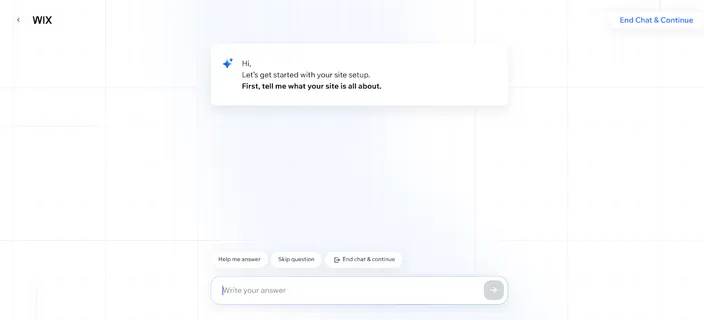
The AI website builder interface
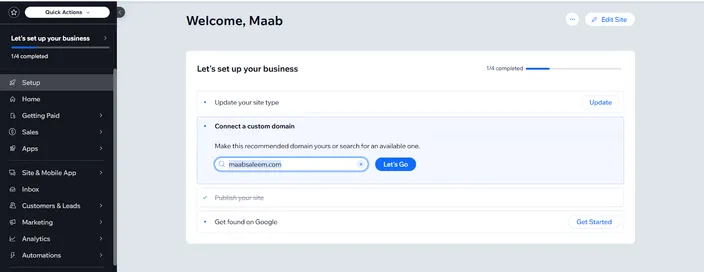
Main dashboard
What we didn’t like:
- 1GB of bandwidth on the free plan is not enough for most practical use cases.
- The first draft is quick, but follow-up edits through the AI can take a bit of time.
- Upgrading from Light to Core or Business doesn’t add much beyond extra storage and collaborators. Most advanced features are locked behind the expensive Business Elite plan.
Pricing:
- Light: $17/month
Includes 1 free domain, 2GB storage, multi-cloud hosting, and 2 site collaborators.
- Core: $29/month
Everything in Light plus 50GB storage, basic e-commerce tools, and up to 5 collaborators.
- Business: $36/month
Everything in Core plus 100GB storage and up to 10 collaborators.
- Business Elite: $159/month
Adds unlimited storage, up to 100 collaborators, and access to Wix’s advanced developer tools.
Best for:
Wix can be a strong choice for small business owners, freelancers, and anyone who wants a professional-looking site without hiring a developer. The AI gets you started fast, and the template library and app store give you room to grow.
HostAfrica AI Website Builder
The HostAfrica AI Website Builder takes a straightforward approach to AI website creation: describe your business in a sentence and let the AI create the first version of your site. You can start from scratch with AI or choose from hundreds of ready-made templates and customise the result without touching any code.
One thing that makes it particularly practical for small South African businesses is that the website-building and hosting side of things are handled in one place. You can connect an existing domain or register a new one with HostAfrica, edit your site, and publish it without having to set up separate web hosting.
What we liked:
- The AI can generate a complete first draft from a simple description of your business.
- You can choose between AI generation and hundreds of mobile-friendly templates rather than always starting from a blank page.
- The visual editor lets you add or remove widgets, rewrite content, rearrange sections, and publish changes without coding.
- Useful business features such as WhatsApp buttons, WhatsApp Shop, social links, and email forms can be added directly from the builder.
- Hosting is included, and you can connect your own domain or use the included free subdomain.
- Pricing is in rands, making costs easier to understand for South African businesses.
- HostAfrica backs the service with a 99.9% uptime guarantee, customer support, and a 30-day money-back guarantee.
Interface:
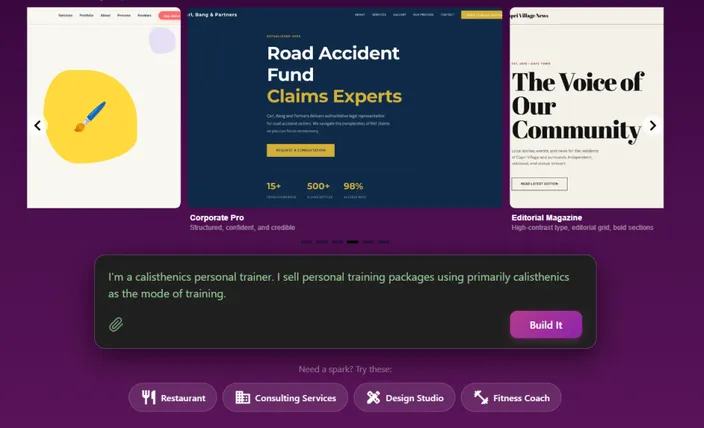
AI prompt and website generation
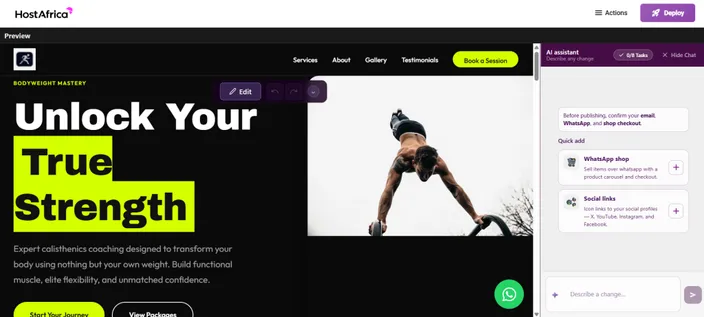
Drag-and-drop website editor
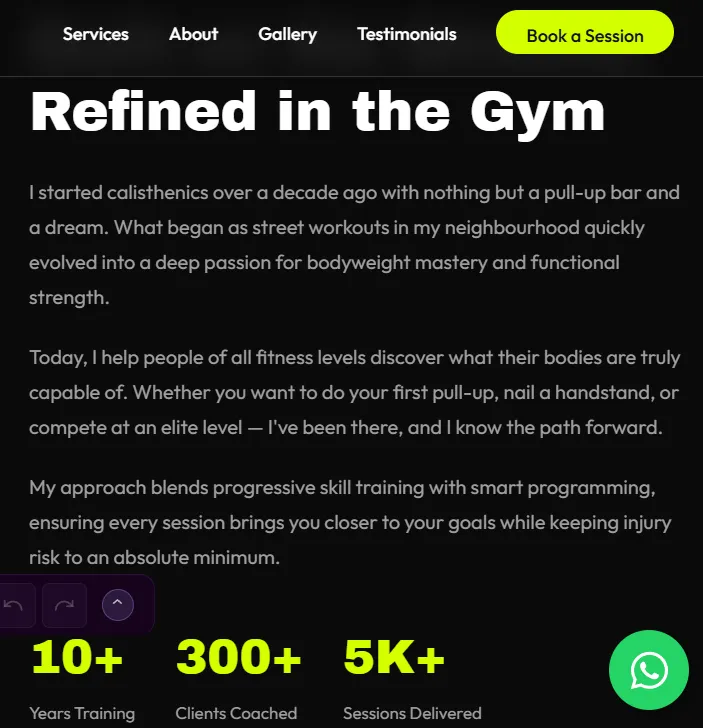
Quick Add business tools
What we didn't like:
- It's primarily designed for straightforward business websites, so developers building complex web applications will find platforms such as Replit more flexible.
- Users looking for the extensive third-party app ecosystems available from established platforms such as Wix may find the available integrations more limited.
- While the AI provides a quick starting point, you'll still want to review and personalise the generated copy, images, and design before publishing.
Pricing:
- HostAfrica AI Builder: R96/month (currently on special R29/month)
Includes the AI website builder, no-code editing, AI prompting, widgets, fast publishing, a free subdomain, and a 30-day money-back guarantee.
Best suited for:
HostAfrica's AI Website Builder is best suited to small businesses, entrepreneurs, freelancers, and first-time website owners who want to get a professional website online quickly without learning WordPress or hiring a developer. It's particularly appealing to South African businesses that want AI website creation, hosting, domains, and local support available from the same provider.
10Web
The next name on our list is 10Web. Similar to Wix, it's an all-in-one platform where you can use AI to build your website, host it, and even scale it with their AI-powered solutions.
What we liked:
- The AI generated an editable, tentative structure for the site after the first prompt, giving us a chance to get it right from the very start. It also took our input regarding style and color themes before generating the first draft.
- The editing interface is very smooth and rapid.
- You can migrate your website using an automated tool, or a backup zip file.
- You can update all the plugins and themes of your site with a single click, directly from the dashboard.
- You can test your changes in a staging environment before publishing them.
Interface:
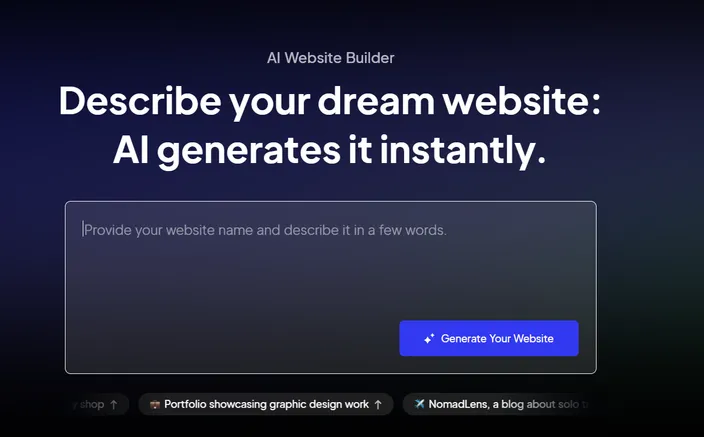
The AI website building tool
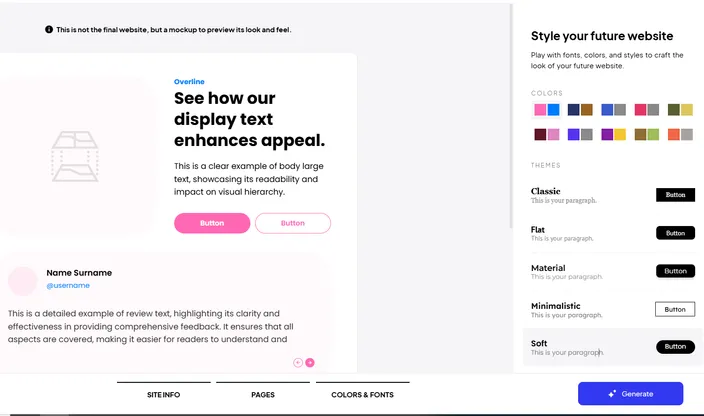
Style preferences screen before first draft
What we didn’t like:
- There’s no free version, just a 7-day free trial.
- You have to enter your card details to edit your site. Without it, the free trial only lets you build a first draft.
- Even their AI Ultimate plan has limitations, including a cap on monthly visitors and only 20GB of storage.
Pricing:
- AI Starter: $10/month
Includes 10GB SSD storage, SSL certificate, SEO tools, 1-click migration, and up to 10,000 monthly visitors.
- AI Premium: $15/month
Everything in Starter, plus 15GB storage and support for up to 50,000 monthly visitors.
- AI Ultimate: $23/month
Includes all Premium features, 20GB storage, support for up to 100,000 monthly visitors, and VIP priority support.
Best for:
10Web is best for users who want to build and manage WordPress-based websites using AI. It’s a good fit for freelancers, agencies, or small business owners who are familiar with WordPress but want to speed things up with automation.
Durable
Next up, we have Durable. It claims to generate your site and get it live in just 30 seconds, and our tests confirmed this claim was not too far off – we got our first draft within 45 seconds.
What we liked:
- We were able to land on the actual editor in under a minute.
- The features to rearrange, edit, and add sections on a page are very smooth.
- You can configure and use AI agents to automate tasks like SEO and content creation.
- CRM and marketing-related features (like brand management, ads, and social media posts) are offered built-in.
- Website analytics are also available in the main dashboard.
Interface:

The editor
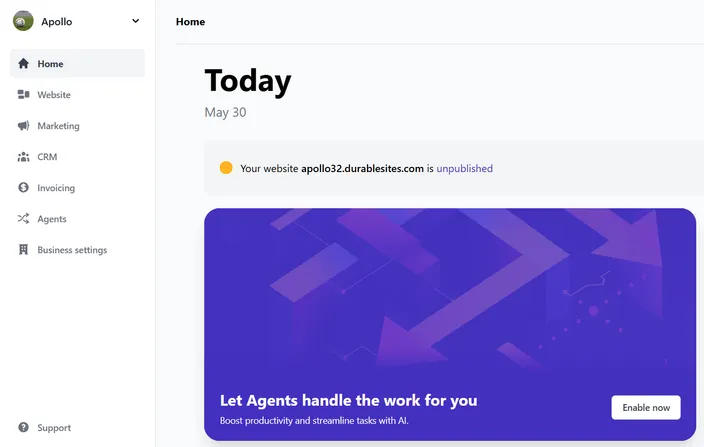
The dashboard
What we didn’t like:
- There’s no free plan, only a 7-day free trial
- The dashboard doesn’t offer a way to integrate with third-party solutions, or install plugins.
- The Business plan, the highest tier, only supports 5 users.
Pricing:
- Starter: $15/month
Includes a custom domain name, unlimited pages, 1 user, and unlimited contacts.
- Business: $25/month
Everything in Starter, plus unlimited invoices, a Google ad generator, and support for up to 5 users.
Best suited for:
Durable is a solid pick for people who want more than just a website. It’s best for solo founders, freelancers, or small businesses that also need invoicing, CRM, brand tools, and marketing features—all in one place with a fast AI site builder.
Replit
Our next pick is Replit. It is an AI app builder used to create and maintain enterprise-grade, production-ready applications. Even though it's not specifically built for generating websites, it’s worth featuring because it allows developers to quickly spin up full-stack web apps using AI, with built-in collaboration, hosting, and deployment tools.
What we liked:
- You are asked to review the initial site structure and add/remove any features before the AI generates the first draft.
- As you work on improving your site, Replit automatically creates checkpoints, which can later be used to rollback changes.
- You can actually access and edit the code files generated by the platform.
- You can import your code from GitHub and use that as a starting point for your website.
- You get access to a console to run/compile your code, a database with 10GB of storage to hold your data, and deployment options to publish your site.
- There’s a free version, albeit with a limited feature set.
Interface:
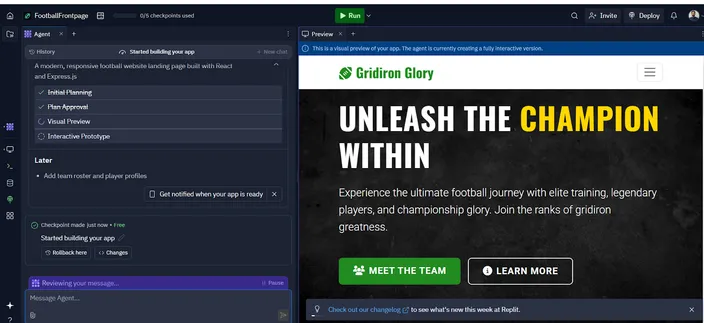
Website preview + chat
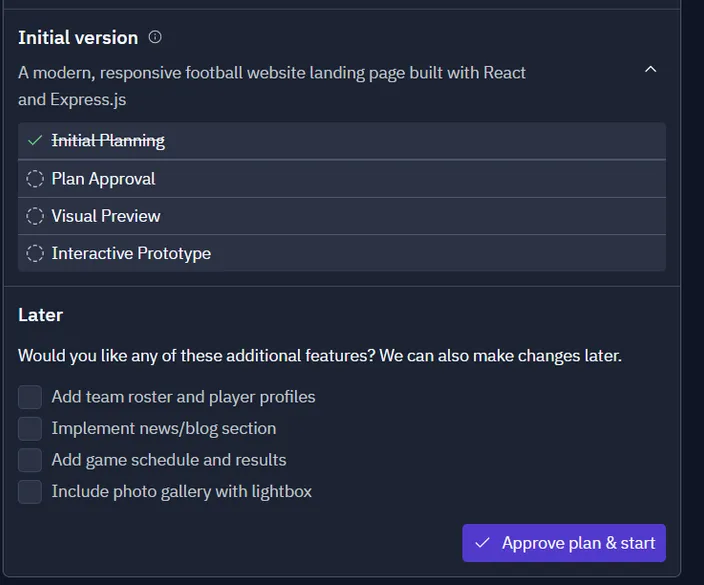
Ability to review and approve structure
What we didn’t like:
- The AI can sometimes take a few minutes to understand and respond to a prompt.
- It took a lot of time for the first draft of the website to become an interactive prototype that can be edited.
- The visual editing interface is not as smooth as the other featured apps.
Pricing:
- Replit Core: $25/month
Full access to Replit AI agent, unlimited public and private apps, and the ability to deploy and host live apps.
- Teams: $40/user/month
Includes everything in Core, plus centralized billing, role-based access control, and private deployments.
- Enterprise: Custom pricing
Everything in Teams, along with SSO/SAML, SCIM, dedicated support, and advanced privacy and compliance controls.
Best suited for:
Replit is mainly for developers or semi-technical teams who want to build and ship apps quickly. It’s especially useful if you're working on multiple full-stack apps and need a powerful AI-assisted workflow, live hosting, and team collaboration built in.
Squarespace
Last but not least, we've got Squarespace. Squarespace has been a major player in the website development space for decades. As you’d expect, they offer a pretty good website builder that deserves a feature in this list.
What we liked:
- The AI asked us the most relevant questions while we were getting started. It also allowed us to pick and choose the sections and pages we wanted to have on our website. This led to a draft that was the most accurate depiction of our preferences and needs among all the builders we tested.
- The editing interface is really clean and smooth.
- All the key metrics, like visits, bounce rate, unique visitors, page views, and traffic sources are available in the built-in analytics dashboard.
- Several third-party extensions are available to extend your site's capabilities, covering categories like sales & marketing, shipping & fulfillment, invoicing, payments, and business tools.
- You can use AI to generate text and images, and improve your site’s SEO.
Interface:
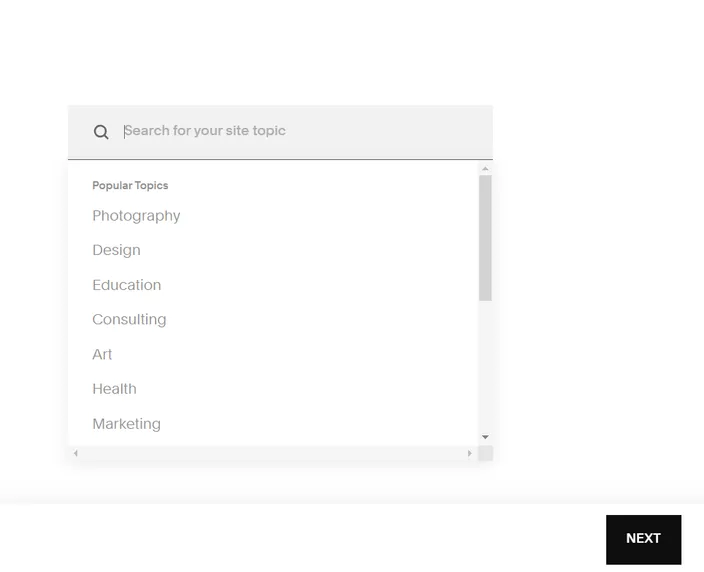
Selections while getting started
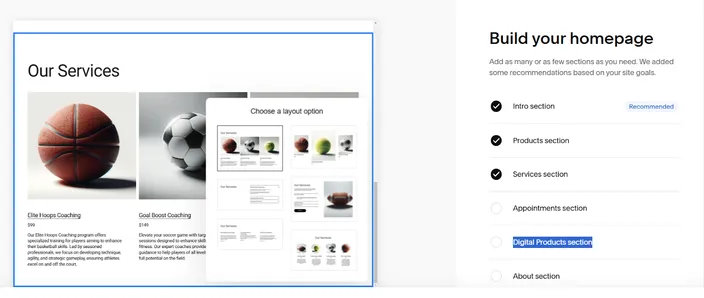
Interactively build your homepage
What we didn’t like:
- There’s no free plan, only a 14-day free trial.
Pricing:
- Personal: $25/month
Mobile-optimized sites, hundreds of templates, and 0% transaction fees on invoices.
- Business: $36/month
Everything in Personal + advanced website analytics, advanced shipping, checkout on your domain, 3% fee on online store transactions.
- Commerce Basic: $40/month
Everything in Business + merchandising tools, 0% fee on store transactions.
- Commerce Advanced: $72/month
Everything in Commerce Basic + sell subscriptions, advanced discounting, commerce APIs, abandoned cart recovery.
Best suited for:
Creatives, artists, small businesses, and e-commerce entrepreneurs who prioritize stunning design, user-friendliness, and a strong all-in-one solution with AI assistance for initial setup.
Comparison table – Top AI website builders at a glance
Comparison table – Top AI website builders at a glance
| Platform | Best suited for | Feature set | Integrations | Ease of use | Speed (Time to first draft) | SEO tools | Free Plan | Ideal user skill level | AI Control Over Layout | Pricing starts at |
|---|---|---|---|---|---|---|---|---|---|---|
| Wix | Small businesses, freelancers | Extensive | Many (Klaviyo, QuickBooks) | Easy | ~2–3 minutes | Yes | Yes | Beginner to intermediate | Good | $17/month |
| HostAfrica | Small businesses, entrepreneurs, freelancers | AI builder + business tools | WhatsApp, social links, email forms | Very Easy | Under 1 minute | Not specified | No | Beginner | Good | R96/month (R29/month) |
| 10Web | WordPress users, agencies | Moderate | WP plugins & themes | Very Easy | ~1 minute | Yes | No | Intermediate (familiar with WordPress) | High | $10/month |
| Durable | Solo founders, small businesses | All-in-one CRM & web builder | None (limited) | Very Easy | ~30–45 seconds | Yes | No | Beginner to intermediate | Medium | $15/month |
| Replit | Developers, technical users | Developer-grade | Yes, extension library available | Medium | Several minutes | No | Yes | Intermediate to advanced developer | Very High | $25/month |
| Squarespace | Creatives, e-commerce, small businesses | Extensive | Sales, marketing, shipping | Very Easy | ~1–2 minutes | Yes | No | Beginner to intermediate | Good | $25/month |
How to build a website with AI (step-by-step guide)
Next, let’s break down into 6 clear steps, the entire process of building a website with AI.
Step 1: Enter your business or website idea
Start by telling the AI what your website is about. The better your input, the better the output.
- Include your business name, target audience, and what you want visitors to do
- Mention any pages you want (Home, About, Contact, etc.)
- Add any branding details like color, tone, or industry
Step 2: Answer any follow-up questions
The AI might ask you for more details. Give clear and honest answers.
- Be specific about your goals (selling products, getting leads, showing work)
- Mention what makes your business different
- If possible, provide examples (Some AI builders allow you to point to existing websites that you like).
Step 3: Let the AI generate your layout and content
Once it has what it needs, the AI will create a full site draft.
- This usually includes the homepage layout, text, images, and even menus
- Some platforms may give you multiple style options to pick from
Step 4: Customize the design and text
Review what the AI created and make it your own.
- Edit the text to better match your voice
- Swap out stock images for your own where possible
- Change colors, fonts, or sections to fit your brand
Step 5: Sort out hosting and scalability options
To get your site live, you’ll need a place to host it.
- Ideally, you should go with an option that offers built-in hosting and dedicated scalability features
- Make sure that the plan supports traffic spikes and growth
- Check if backups, security, and maintenance are included
Step 6: Connect a domain and publish
Once you're satisfied with your website's design and content, it's time to make it live for the world to see.
- Buy a domain name or connect one you already own
- Preview the site before publishing
- Once live, test it on both mobile and desktop
AI website builders for different use cases
Finally, here are some AI-powered website builders built for different needs. These tools can help you build niche websites faster.
- Ecommerce: Shopify Magic, Wix AI
- Blogs: WordPress.com AI,, Ghost
- Portfolio sites: Framer AI, Adobe Portfolio
- Business and service sites: HostAfrica AI Website Builder, Durable
- Helpdesk: HelpSite, Document360
- WordPress websites: 10Web
Conclusion
Using an AI tool is very much the 2026 way of building websites. With so many options available, however, it can be difficult to land on one that fits your exact needs. The purpose of this guide wasn't to name one outright winner, but to highlight six different AI website builders and show where each one performs best. Ultimately, the right choice depends on your budget, goals, technical experience, and how much control you want over the finished site.
If you're comparing AI website builders and modern website creation tools, these related resources can help you understand website builders, compare options, and choose the right solution for your needs:
- What Is a Website Builder
- Website Builder vs Hiring a Developer – What’s Right for You?
- Website Builder
- Best Website Builder for Beginners (Guide for South Africa)
- 10 Best Website Builders for Artists
- Website Builder vs WordPress: Which Should You Choose?
- Create a Freelancer Website
- Website Builder for Fashion Industry
- Create an eCommerce Website or Online Store
- Website Builder for Accountants
