
If you are an artist looking to showcase your work online, you’ve landed at just the right place. In this piece, we will walk you through 10 of the best website builders for artists, covering their pros, cons, pricing, sample websites, and much more.
Our aim is not to declare the outright “best website builder for artists”—because honestly, it doesn’t work that way. Each builder has its strengths and weaknesses, and what works for one artist might not work for another.
What we will do is help you figure out which website builder fits your goals, budget, and style best.
Let’s get started.
Best website builders for artists
We reviewed more than 20 website builders to shortlist the following 10 that, in our opinion, cater best to artists' needs:
HostAfrica
HostAfrica has an artist-friendly, drag-and-drop website builder that you can use to launch your online presence in hours.
Key features
- Create simple websites, blogs, and online stores
- Option to get your site professionally designed by their team
- Built-in SEO tools to help your site rank better on search engines
- 100s of ready-made templates to choose from
- AI writer to help you generate content quickly
- Hosting included in all plans
What we liked
- Affordable starting price of just $4/month
- Sleek and easy-to-use interface
- Wide range of templates suited for different art styles
- Simple integration with Zapier and payment gateways
What we didn’t like
- No free plan; only a 14 day trial
Interface
Onboarding screen
Editing screen
Pricing
- Website and Blog – $4.05/month: Includes templates, mobile-ready site, AI writer, SEO tools, and hosting.
- Website and Online Store – $4.87/month: Everything in the Website and Blog plan + store features, inventory tools, payment gateways, Zapier integration.
- Website and Scheduler – $4.87/month: Everything in the Website and Blog Plan + event management, calendar integration, and booking tools
Squarespace
Squarespace has been around for years and is known for its polished, all-in-one website builder. For artists, it's a solid choice if you want good design, smart tools, and a smooth setup process.
Key features
- AI assistant helps build a personalized layout based on your needs
- Clean, drag-and-drop editor that's easy to use
- Built-in analytics for tracking visits, bounce rate, page views, and more
- AI tools for generating text, images, and improving SEO
- Extensions available for marketing, shipping, invoicing, payments, and other business tasks
What we liked
- The editor is clean and responsive
- Strong built-in analytics with useful metrics
- Good selection of third-party extensions
- Solid AI features for content and SEO
- Arguably the best option for visual artists
What we didn’t like
- No free plan; only a 14-day trial
Interface:
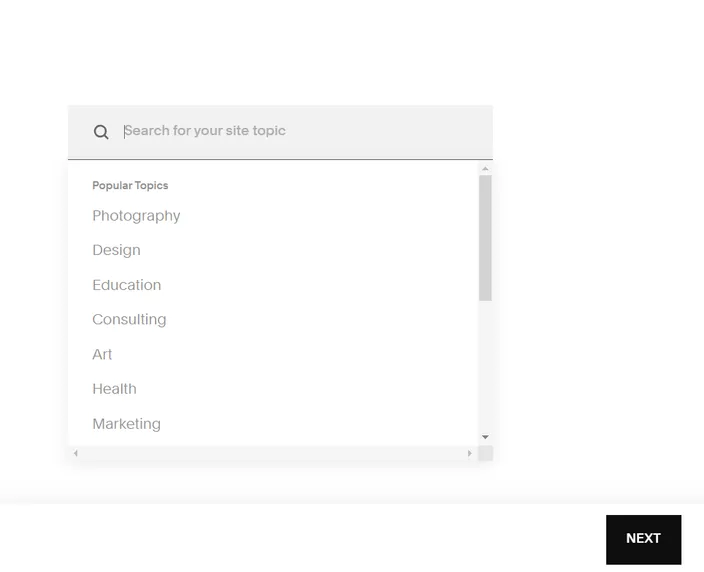
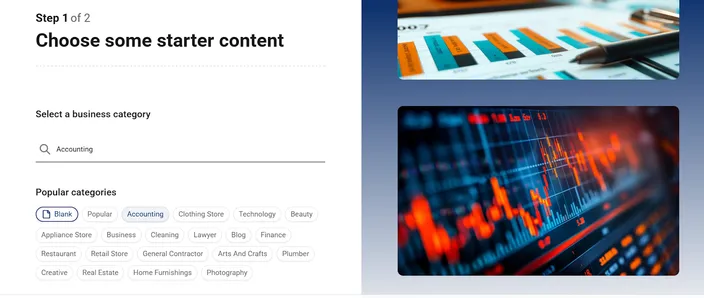
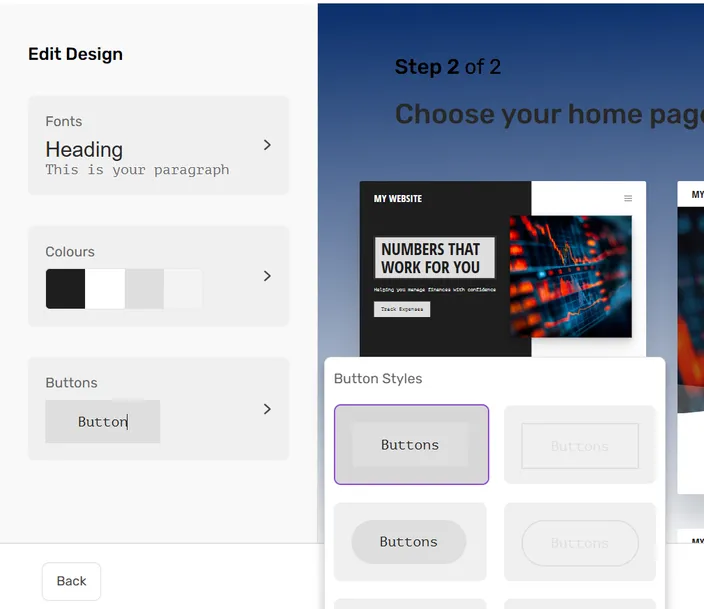
Selections while getting started
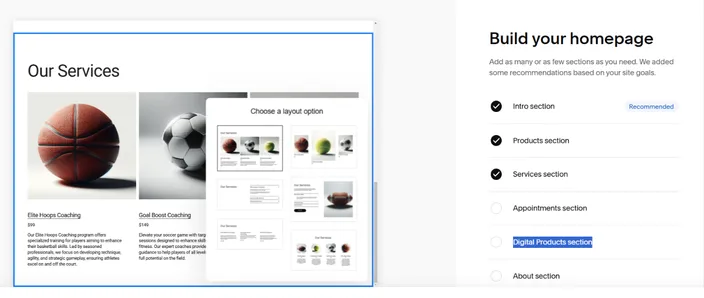
Interactively build your homepage
Pricing
- Personal – $25/month: Mobile-optimized site, full access to templates, no transaction fees on invoices
- Business – $36/month: Everything in Personal + advanced analytics, shipping tools, and 3% fee on store transactions
- Commerce Basic – $40/month: Everything in Business + merchandising tools and no transaction fees on store sales.
- Commerce Advanced – $72/month: Everything in Commerce Basic + subscriptions, advanced discounts, APIs, and cart recovery features
Wix
Wix is one of the most well-known website builders, and it’s a popular choice for artists who want a good mix of ease, design freedom, and built-in tools. You don’t need any coding skills to get started, and their templates and AI tools make the setup process smooth.
Key features
- 800+ customizable templates for different creative styles
- Free plan includes hosting, SSL, mobile optimization, and a decent starting toolkit
- AI website builder that creates a basic layout based on your answers
- Large app marketplace with tools like Klaviyo, QuickBooks, and Trustpilot
- You can hire design or marketing experts directly through Wix
- Built-in SEO features and e-commerce options
What we liked
- Editor and dashboard are simple and beginner-friendly
- AI tool often gets the layout right on the first try
- The free plan is quite generous for testing things out
- 14-day money-back guarantee on all paid plans
- You can get expert assistance at any step of the way, without having to leave the platform
What we didn’t like
- Mid-tier plans don’t add much. To unlock many of the advanced features, you need to update to the top-tier Business Elite plan
Interface
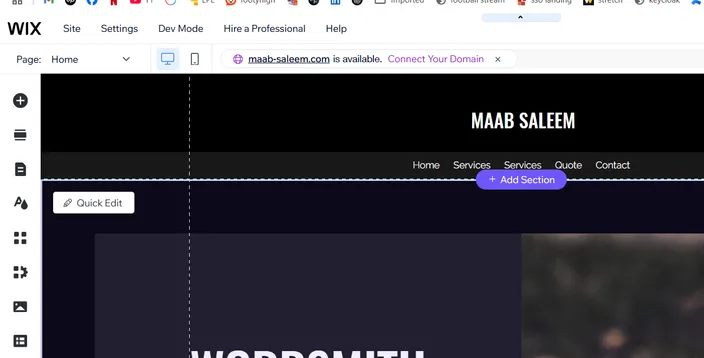
The editor
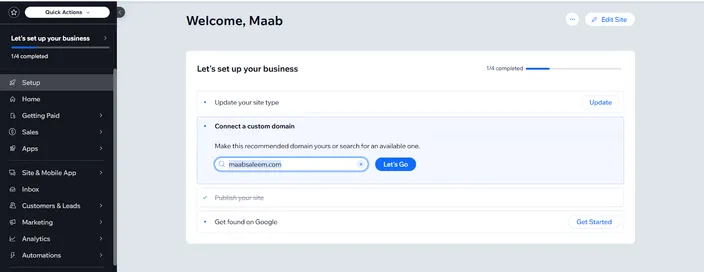
Main dashboard
Pricing
- Light – $17/month: 1 free domain, 2GB storage, hosting, and 2 collaborators
- Core – $29/month: Everything in the Light package + 50GB storage, basic store tools, and up to 5 collaborators
- Business – $36/month: Everything in Core + 100GB storage and up to 10 collaborators
- Business Elite – $159/month: Everything in Business + Unlimited storage, up to 100 collaborators, and access to advanced developer tools
Shopify
Shopify is best known as an e-commerce platform, but it also works well for artists who want to sell their work online. Its website builder is clean and simple, and the setup process is fast. If selling prints, merchandise, or digital files is a big part of your plan, Shopify can be a great option.
Key features
- Modern templates with a focus on selling
- Built-in payment processing, inventory tracking, and shipping options
- App store with tools for marketing, SEO, email, and more
- Fully hosted with built-in security and performance features
- Point-of-sale (POS) tools if you also sell at events or galleries
- Mobile app to manage orders, products, and customers on the go
What we liked
- The interface is one of the cleanest and most responsive
- It’s also possible to edit the source code of the store directly. This is great for artists who have development experience, or want to onboard an expert for deeper customization.
- You can add products, set up marketing, and track analytics directly from the dashboard.
- It’s very simple to integrate with external apps.
What we didn’t like
- Only a 3-day free trial, which feels a bit short for testing
- Too expensive for artists just starting out
Interface
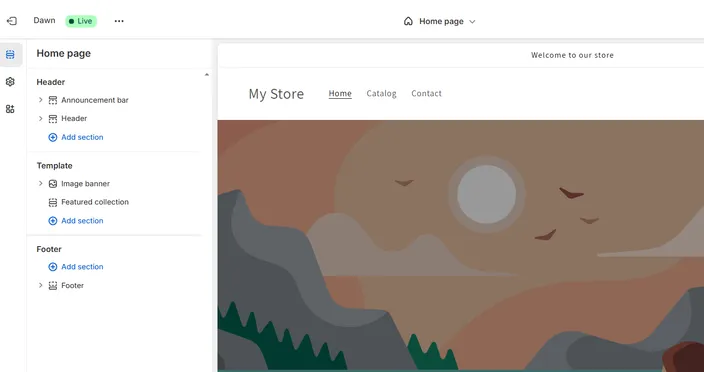
The editor
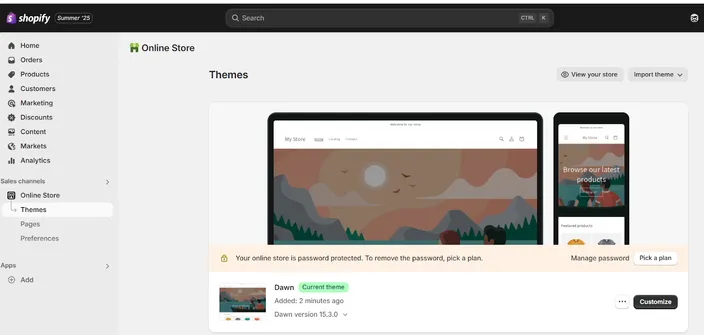
The dashboard
Pricing
- Basic – $25/month: 10 inventory locations, POS Lite, 24/7 chat support. Card rates from 2% for third-party payment gateways
- Grow – $65/month: Adds 5 staff accounts, lower card fees (from 1%)
- Advanced – $399/month: Adds up to 15 staff accounts, custom reporting, and market-specific storefronts. Card rates from 0.6%
- Shopify Plus – $2300/month: Designed for high-volume sellers, with up to 200 inventory locations, unlimited staff, and B2B feature
Hostinger
Hostinger is best known for its hosting plans, but it also has a full-featured website builder that works well for artists who want a fast, AI-powered setup.
Key features
- A built-in AI assistant that helps generate page layouts, text, and images
- Free domain name included with all website builder plans
- Marketing and ecommerce tools are also offered out-of-the-box.
- Fully mobile editing support, so you can make changes on the go
- Supports up to 25 or even 50 websites on a single plan
What we liked
- You can either start with AI-generated pages or choose from a large set of clean, modern templates
- The AI builder creates a working draft of your website in just a few minutes
- The drag-and-drop editor is smooth and beginner-friendly
- The "AI Page" and "AI Section" tools let you quickly add content to specific parts of your site
- The ability to build up to 25 websites (or 50 on the higher plan) offers great value, especially if you manage multiple projects
- There's a 30-day money-back guarantee if you want to try it risk-free
What we didn’t like
- The AI-generated images often didn’t fit the artistic tone or style we were aiming for
- Some features, like third-party app support, are still limited compared to more mature builders
Interface
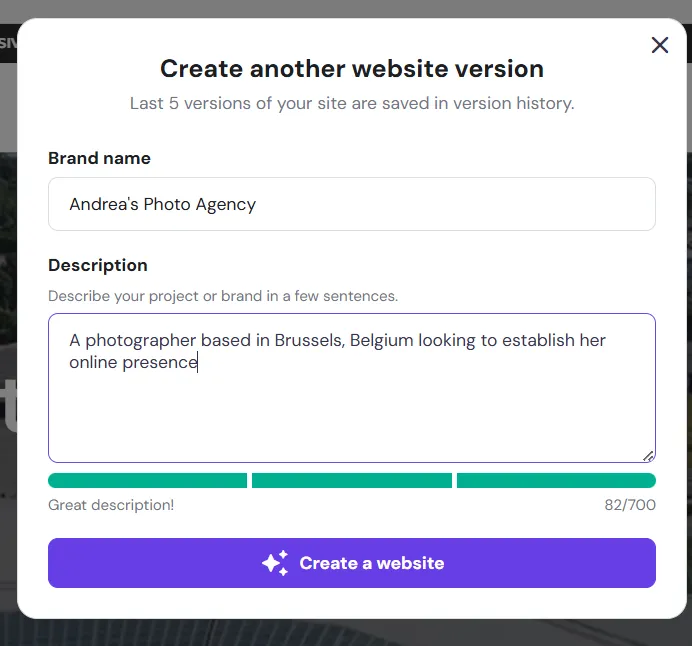
AI website generation
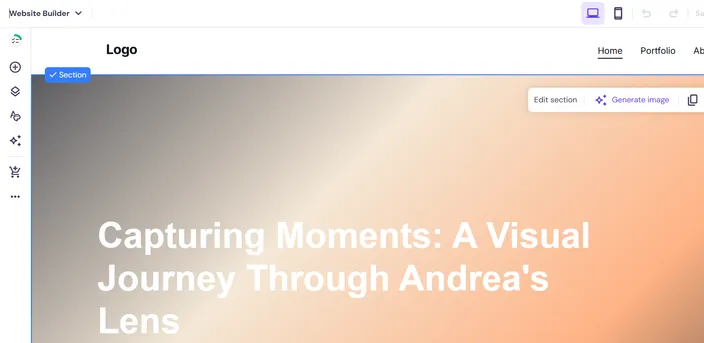
The editor
Pricing
- Premium Website Builder – $2.99/month (with 48-month term): Build up to 25 websites, includes 150 templates, free domain, mobile editing, email marketing tools, and 24/7 customer support
- Business Website Builder – $3.99/month (with 48-month term): Everything in Premium, but supports up to 50 websites.
Format
Format is built specifically for creative professionals like artists, photographers, and designers. It's a portfolio-focused platform that also includes built-in tools to sell your work online
Key features
- All websites are mobile-optimized by default, so your work looks good on any screen
- Ecommerce features like product galleries, inventory tracking, and payment options
- Integration with Adobe Lightroom is offered out-of-the-box
- Built-in SSL and copyright protection to help secure your site and your work
- A dedicated content manager where you can upload, organize, and manage all your images from one central place
What we liked
- The onboarding experience is simple; after answering a few questions, Format suggests a theme that fits your style and goals
- Customization options are plenty, especially for visuals like layout, image display, and typography
- Lightroom integration is a big plus for artists and photographers
What we didn’t like
- You don’t get a starter website layout. Instead, you have to manually add all pages like About, Shop, or Contact before your site starts to feel complete
- The editor is broken into separate areas for different page types, which means you can’t edit the whole site in one unified view like you can in Wix or Hostinger
Interface
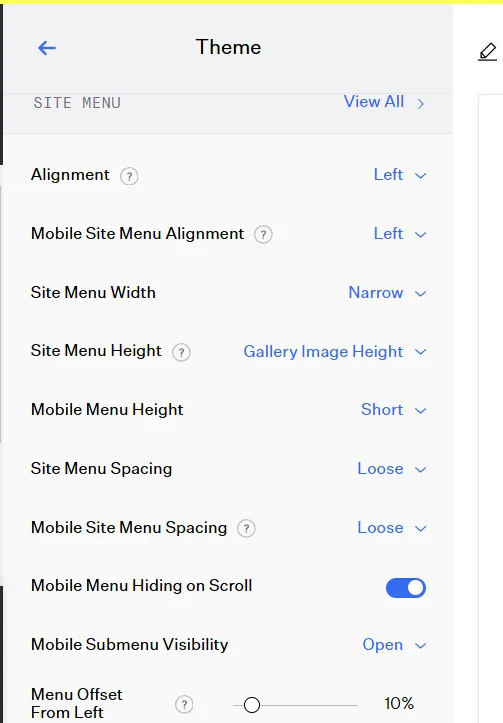
Theme customization options
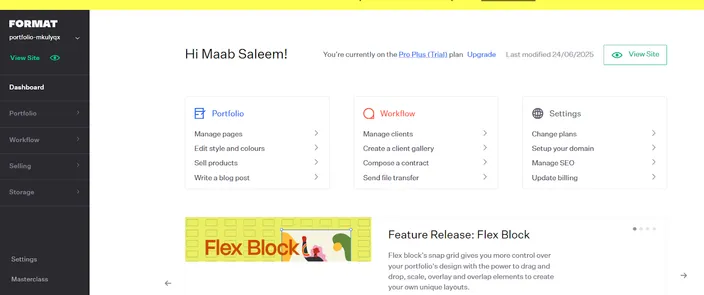
The dashboard
Pricing
- Basic – $12/month: Mobile app, Lightroom integration, SSL, copyright protection, and basic social media tools
- Pro – $24/month: Everything in Basic plus a custom font library, custom domain (free for 1 year), online store setup, and access to a custom code editor
- Pro Plus – $36/month: Everything in Pro plus the ability to sell up to 1000 products, priority support, and higher limits on storage and features
Pixpa
Pixpa has been a part of the “best website builder for artists” conversation for a while now. It’s a stylish and easy-to-use platform that focuses on helping creatives build portfolios, sell their work, and even run blogs.
Key features
- 30-day money-back guarantee gives you plenty of time to try it out and get a refund if it doesn’t meet expectations
- Free custom domain and SSL certificate included with all plans
- Support for blogging, which is useful if you want to share your process or updates
- You can hire Pixpa experts directly for help with setup or customization
- Built-in SEO features for better visibility in search engines
What we liked
- The templates look modern and elegant, with a strong focus on images and layout
- You can choose your color palette, fonts, and other visual settings during onboarding, which makes it feel more personal right from the start
- The editor is drag-and-drop, well-organized, and easy to get used to even if you’ve never built a website before
- You get a solid range of tools for portfolios, galleries, and client pages
- Even the lower-tier plans offer custom CSS support, which is a plus for users with basic coding knowledge
What we didn’t like
- The editor is missing some advanced design controls that other builders offer
- Trial websites are private by default, so if you want someone to review your work-in-progress, you’ll need to share a special access code
Interface
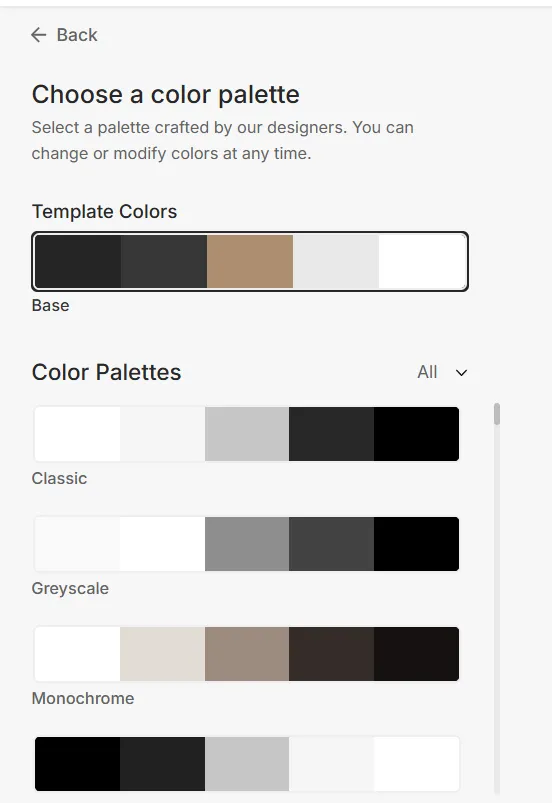
Choose a color palette
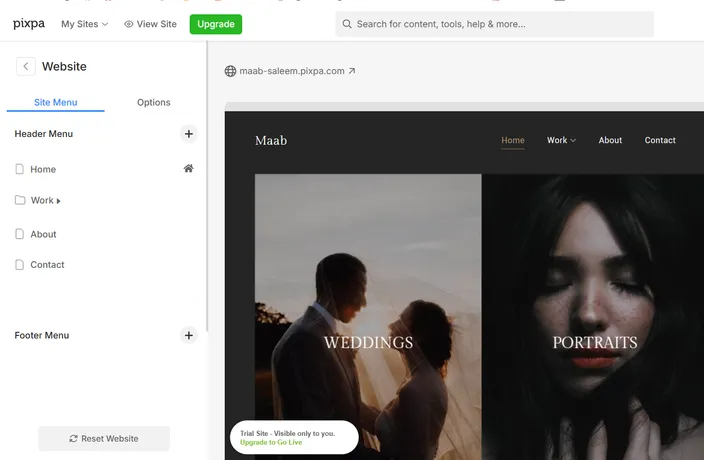
The editor
Pricing
- Basic – $8/month: Mobile-optimized sites, 10 pages, up to 200 images, SSL certificate, custom CSS, and 24/7 support
- Creator – $15/month: Everything in Basic plus unlimited pages and images, review forms, and contact management
- Professional – $20/month: Everything in Creator plus custom fonts, payment forms, and auto-replies for form submissions
- Advanced – $25/month: Everything in Professional plus features like customer account creation, inventory management, abandoned cart recovery, and more advanced ecommerce tools
Jimdo
Jimdo is another famous website builder that artists can use to build portfolio websites, online shops, or small business sites.
Key features
- HTTPS security is included in every plan, even the free one
- You can connect your own custom domain, or use a free subdomain
- All templates are mobile-optimized by default
- Includes a built-in image library to help you populate your site faster
- Advanced SEO features like meta tags and fast Google indexing
- Website analytics tools are included to help track performance
What we liked
- The ability to choose between a visual editor and a code editor is handy.
- The onboarding questionnaire is detailed. It asks about your site’s purpose, desired color scheme, and what types of pages you need, and then sets everything up accordingly
- You get multiple layout options right from the start, which makes it easier to find a style that fits your work
- The editor interface is conducive to swift updates
- The free plan is quite generous. You get features like HTTPS and a .jimdosite.com subdomain without needing to upgrade
What we didn’t like
- Jimdo places ads on free plan sites. However, since it's a free forever plan, it’s not really a major downside
- The lower-tier plans have strict limits on bandwidth and storage, which may push users toward the top-tier plan sooner than expected
Interface
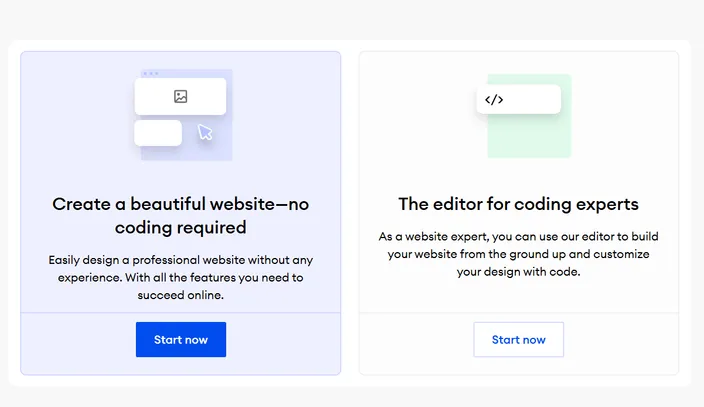
Choose between a visual or coding editor
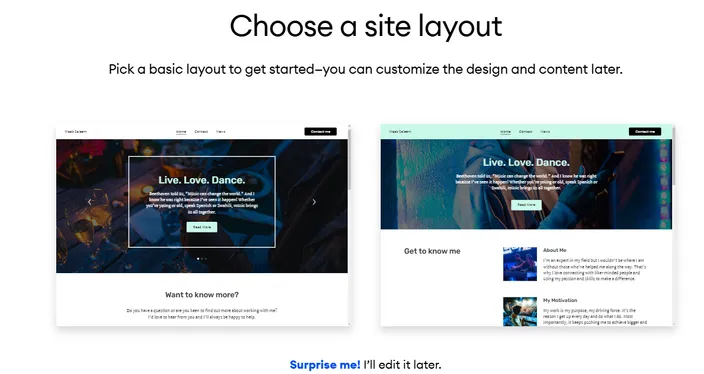
Initial site layout selection
Pricing
- Start – $11/month: Includes HTTPS, domain and email connection, 10GB bandwidth, 5GB storage, and standard support (1–2 business days)
- Grow – $18/month: Everything in Start plus 15GB storage, 20GB bandwidth, and faster support response (within 4 hours)
- Unlimited – $45/month: Everything in Grow plus unlimited storage and bandwidth, priority support within 1 hour, and additional advanced tools for professionals
SmugMug
SmugMug is primarily known as an image hosting platform, but photographers can use it to build fast, professional-looking websites.
Key features
- Unlimited image storage on all plans, making it ideal for high-resolution portfolios
- 24/7 human support via chat or email for help when needed
- Watermarking and image theft protection tools to safeguard your content
- Advanced ecommerce tools like coupons, download packages, and price lists
- Ability to sell both prints and digital downloads directly from your site
What we liked
- The site creation process is focused on image presentation, which helps your work stand out right away
- Templates are built for photographers and visual artists, making them more relevant than generic website builder designs
- Watermarking and privacy settings are easy to apply across large image sets
- You can manage photo sales, gallery access, and image delivery without needing third-party tools
What we didn’t like
- The sign-up process was buggy; we had to try multiple times to activate our free trial.
- The platform is almost entirely focused on photography, so if you work in another medium, it may feel too limiting
Interface
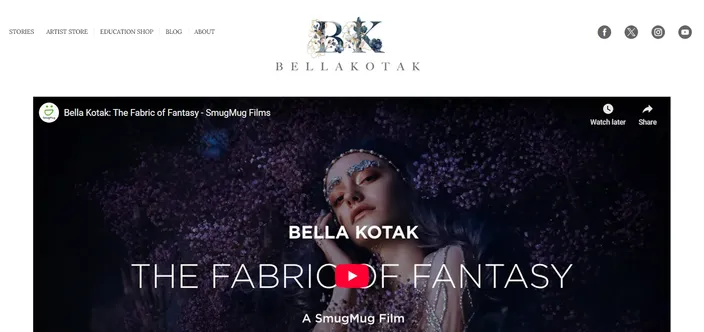
A live SmugMug site
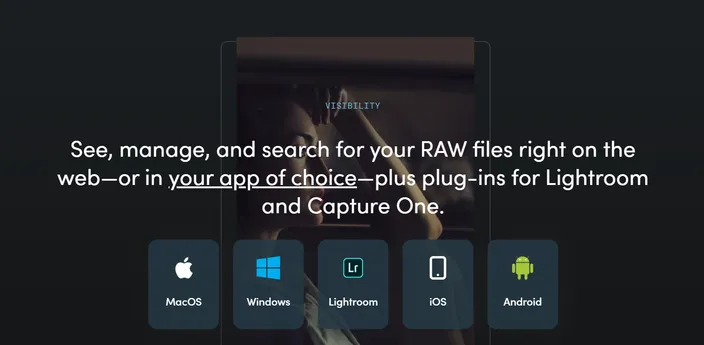
Multi app support
Pricing
- Direct – $25/month: Unlimited image storage, privacy controls, basic gallery layouts, Lightroom integration, and 24/7 support
- Portfolio – $31/month: Everything in Direct plus watermarking, photo theft protection, and full-service print order fulfillment
- Pro – $45/month: Everything in Portfolio plus custom price lists, client favoriting features, download limits, marketing tools, and advanced store settings
Webnode
Last on our list is Webnode. It’s a sleek website builder with plenty of templates for artists to choose from, whether you're building a portfolio, a blog, or an online store.
Key features
- Use your own custom domain, even on the lowest paid plan
- Supports online stores with product pages, cart, and payment tools
- Integrates with Google Analytics and AdSense for tracking and monetization
- Includes an AI assistant to help build and fill in your site’s content
- Backup and recovery tools to help restore your site if needed
What we liked
- The AI Wizard gives you multiple starter layout options to choose from, which is a nice touch
- Once your starter website is generated, it already includes the key pages and sections you’ll likely need
- The editor is clean and intuitive, making it easy to adjust layouts, text, and visuals without much effort
- The AI assistant is useful for quickly generating placeholder content, which speeds up the setup process
What we didn’t like
- The initial rendering of the website after setup took noticeably longer compared to other platforms
- The editor, while easy to use, lacks the depth and flexibility of more advanced builders like Wix or Shopify
- Storage limits on the entry-level plans are very low and will likely not be enough if you have a large portfolio
Interface
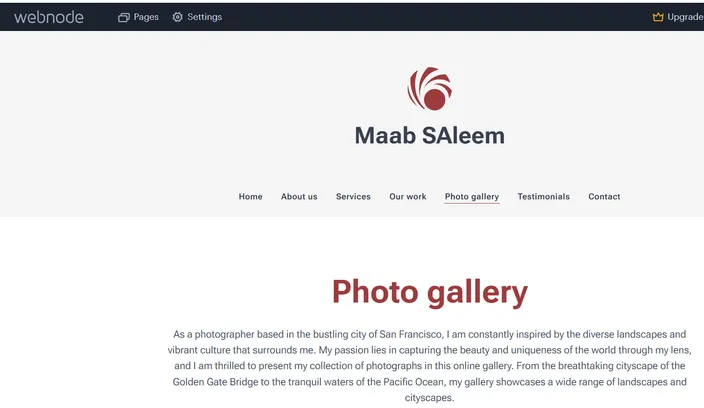
Editor interface
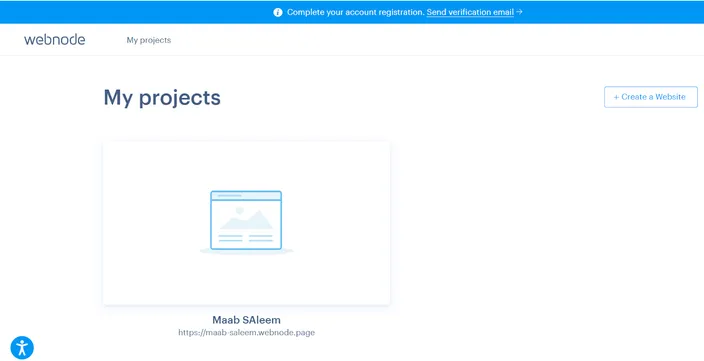
The dashboard
Pricing
- Limited – $5.50/month: 200MB storage, 1GB bandwidth, connect your domain, premium support, basic form builder
- Mini – $10/month: Everything in Limited plus 1GB storage, 3GB bandwidth, video backgrounds, and 1 email account
- Standard – $16.90/month: Everything in Mini + 3GB storage, 10GB bandwidth, up to 20 email accounts, full online store support, Google Analytics integration
- Profi – $26.50/month: Everything in Standard + 7GB storage, unlimited bandwidth, 100 email accounts, Google AdSense, Google Tag Manager, and extra tools like site search
Best website builders for artists
| Platform | Best for | Starting Price | Free Plan | Ease of Use | Portfolio Templates | Selling Options |
|---|---|---|---|---|---|---|
| Wix | Artists who want creative control and flexibility | $17/month | Yes | Very easy | 900+ templates | Built-in e-commerce on paid plans |
| Shopify | Artists focused on selling physical or digital work | $25/month | No(3-day trial available) | Easiest for setting up selling | Limited visual templates | Full e-commerce suite |
| Hostinger | Quick setup with AI tools for multi-site use | $2.99/month | No (30-day money back) | Easy with AI help | A large collection of templates | Store builder included |
| Format | Photographers and visual artists needing a curated look | $12/month | No (14-day trial) | Moderate | Clean, image-focused | Portfolio + online store |
| Pixpa | Creatives who want design structure and ecommerce | $8/month | No (15-day trial) | Very easy | Elegant and modern | Store features from mid-tier up |
| Jimdo | Beginners who want quick setup and basic tools | $11/month | Yes (free forever) | Easy | Limited but clean | Store and payment tools included |
| SmugMug | Professional photographers managing large image sets | $25/month | No (14-day trial available) | Moderate | Photo-focused | Print + digital sales, watermarking |
| Webnode | Artists who want AI setup and multilingual support | $5.50/month | Yes | Easy | Decent variety | Store support on higher plans |
| HostAfrica | Artists needing hosting + basic site builder in Africa | $4/month | No(14-day trial available) | Easy | 100s of templates | Store features available mid-tier and up |
| Squarespace | Artists who want polished design with ecommerce tools | $25/month | No (14-day free trial available) | Very easy | Several options offered | Available in the higher tier plans |
How to choose the right website builder for artists?
By now, you’ve seen the strengths, weaknesses, pricing, and key features of the 10 best website builders for artists. Before you make your final decision, ask yourself the following key questions:
What kind of art do you create?
Different platforms work better for different types of artists. If you’re a photographer, SmugMug and Format are built specifically with your needs in mind. If you create digital illustrations or crafts, platforms like Wix, HostAfrica, or Shopify may suit your needs better as you get more control over layout and product display.
Do you need ecommerce tools?
It goes without saying, but if you need to set up an online store, focus on builders with solid ecommerce features. Shopify is the strongest in this area, especially for full-fledged online stores. Squarespace and HostAfrica also offer built-in selling tools, but they are obviously not as commerce-focused as Shopify.
What’s your budget?
Some platforms are more budget-friendly than others. HostAfrica, Pixpa and Webnode start under $10/month and offer solid features for the price. Hostinger gives you a full website builder and up to 25 sites for just $2.99/month on long-term plans. If you have a higher budget, Squarespace and Shopify do offer more features, but their monthly costs add up.
How tech-savvy are you?
If you want something simple and easy to maintain, look at Wix, Squarespace, or Pixpa. These are designed with beginners in mind. If you’re more comfortable editing code or want deeper control, Jimdo or Shopify can be solid choices.
Do you want to build and manage multiple websites?
If you need to create and manage more than one website, make sure to choose a platform that supports it. Some builders let you manage multiple sites under a single plan, while others only allow one site and place limits on storage and bandwidth. For example, Hostinger’s Premium plan supports up to 25 websites, and the Business plan increases that limit to 50. This can be a big advantage if you manage client projects or run multiple art brands.
6 tips for building a portfolio that sells
By now, you’ve likely answered the “what is the best website builder for artists” question based on your own goals, budget, and creative style. We’ll finish off this guide with six practical tips to help you build a portfolio that not only looks good but also helps you sell your art:
- Curate with intent: Don’t upload all the projects you have done so far. Choose your best work and arrange it in a way that highlights your style and strengths.
- Use high-resolution images: Blurry or pixelated images can hurt your credibility. Make sure your visuals are crisp and properly sized for web viewing.
- Tell a story: Use your About page, project descriptions, or captions to give your work context. This helps people connect with it.
- Add prices: If you’re selling your work, be upfront about pricing. It makes the buying process smoother and builds trust.
- Optimize for SEO: Configure page titles, image alt text, meta descriptions, and other SEO settings, so your site can be found on search engines.
- Add client testimonials: Social proof helps. Even one or two short testimonials can build confidence in your skills and service.
Wrapping up – Best website builder for artists in 2026
In 2026, there’s no shortage of website builders designed to help artists share their work and tell their story. As we mentioned earlier, our goal wasn’t to pick a single winner—but to give you all the information you need to make the right choice based on your own goals, budget, and creative needs.
We hope this guide helped you get closer to that decision.
If you're looking for the best way to showcase your creative work online, these related resources can help you choose the right website builder and find solutions tailored to your industry:
