
TL;DR: How to Build a Website
- Creating a website is easier than ever and requires no coding skills.
- You need four basics: a domain name, hosting, a website builder, and content.
- Follow six simple steps: choose your type, register a domain, pick a builder, design, add content, and publish.
- Free website options exist but come with limits like ads and no custom domain.
- An AI Website Builder is the fastest and most beginner-friendly way to launch a professional site in South Africa.
If you’re wondering how to create a website, you’re not alone. Many small business owners and beginners in South Africa feel overwhelmed before they even start.
The good news? Creating a website today is much easier and more affordable than it used to be. You don’t need coding skills. You don’t need to hire an expensive developer. And you don’t need weeks of technical training.
In this guide, you’ll learn:
- What a website actually is
- What you need before building one
- A simple step-by-step process
- The easiest way to get online quickly
Let’s break it down in plain English.
What Is a Website? (Quick Explanation)
A website is a collection of web pages that people can visit online using a domain name (like yourbusiness.co.za).
Think of it as your digital storefront. Just like a physical shop has a location and signage, your website has:
- A domain name (your address)
- Hosting (where your files are stored)
- Pages (home, about, contact, etc.)
Types of Websites
Here are the most common types:
- Business website – Shares services, contact details, and builds trust
- Blog – Publishes articles and helpful content
- eCommerce website – Sells products online
- Portfolio website – Showcases your work
For South African businesses, having a website increases credibility and makes it easier for customers to find you through Google or other search engines.
If someone searches for your business and finds nothing, that’s a missed opportunity.
What You Need Before Creating a Website
Before we get into how to create a website step by step, let’s simplify what you actually need.
There are only four core things:
1. A Domain Name
This is your website address (for example: yourbusiness.co.za).
It should be:
- Easy to remember
- Easy to spell
- Related to your brand
2. Web Hosting
Hosting is where your website “lives.”
It stores your files and makes them accessible on the internet.
If you’re unsure what hosting includes, you can explore our web hosting options
3. A Website Builder or CMS
This is the tool you use to design and build your website.
Traditionally, people used platforms like WordPress, which can require plugins and setup. Today, AI-powered tools make it much simpler.
For example, the HostAfrica AI Website Builder allows you to generate a professional site in minutes without coding.
We’ll talk more about this option shortly.
4. Basic Content
Before building, prepare:
- Your business description
- Services or products
- Contact details
- Logo (if you have one)
You don’t need everything perfect right now. You can always update later.
Step-by-Step Guide: How to Create Your Own Website
Now let’s answer the primary question: how to create a website for beginners in simple steps.
Step 1 – Choose Your Website Type
Ask yourself:
- Is this for my business?
- Am I selling products?
- Do I need booking functionality?
Your goal determines your layout and features.
If you’re creating a business website, keep it simple:
- Homepage
- About page
- Services page
- Contact page
Step 2 – Register a Domain Name
Search for your preferred domain name and register it.
If your .com isn’t available, consider:
- .co.za (great for South African businesses)
- .net
- .online
Try to avoid:
- Long names
- Hyphens
- Numbers
Step 3 – Pick a Website Builder
This is where many beginners get stuck.
You might ask:
- How do I create my own website by myself?
- Do I need coding skills?
- Is building a website too technical?
The answer depends on your tool.
Here's the two main paths:
Option 1: Traditional CMS (More Technical)
- Requires setup
- May need plugins
- Can require manual updates
Option 2: AI Website Builder (Beginner-Friendly)
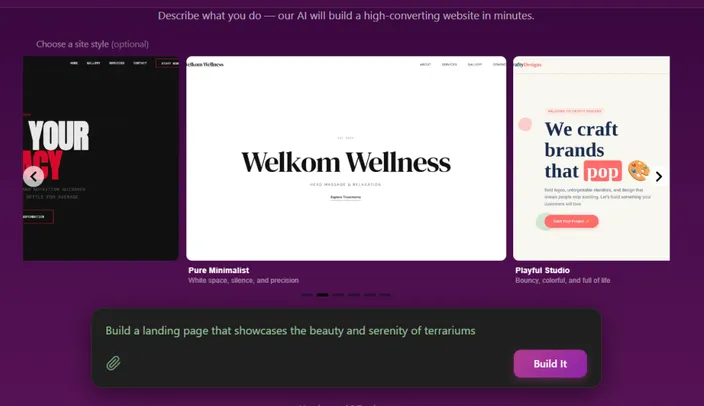
AI builders generate your website automatically based on a few questions about your business.
For example, the HostAfrica AI Website Builder:
- Requires no coding
- Designs your site automatically
- Includes hosting
- Is built for beginners
If your goal is speed and simplicity, this is often the easiest route.
Step 4 – Design Your Website
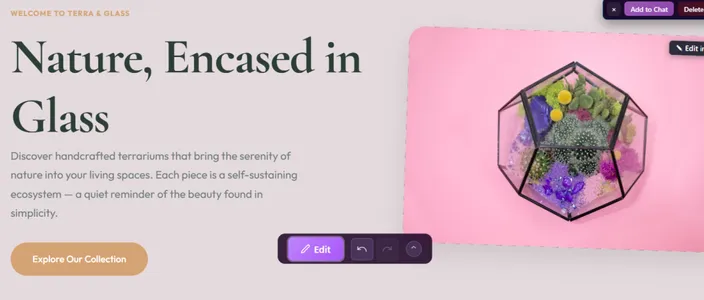
With modern builders, you don’t design from scratch.
Instead, you:
- Choose a template (or let AI generate one)
- Adjust colours
- Add your logo
- Edit text
Keep it clean and simple.
Common beginner mistake: adding too many colours, fonts, or animations.
Less is more.
Step 5 – Add Content (Pages)
Every basic website should include:
- Home – What you do and who you help
- About – Your story and credibility
- Services or Products – What you offer
- Contact – Phone, email, map
If you’re unsure what to include, this guide may help:
Write in simple language. Speak directly to your customer.
Step 6 – Publish Your Website
Once everything looks good:
- Preview your site
- Test links
- Check mobile view
- Click publish
That’s it. Your website is live.
Most builders will allow you to publish in one click.
How to Create a Website for Free (Pros & Cons)
You’ve probably searched how to create a website for free or how to build a website for free.
Yes, free options exist. But it’s important to understand what “free” really means.
What Free Website Builders Usually Include
- A subdomain (example: yourname.builderplatform.com)
- Limited storage
- Basic templates
- Platform branding on your site
The Limitations of Free Websites
Free plans often come with:
- No custom domain name
- Ads displayed on your website
- Limited design control
- No advanced features (like eCommerce)
- Restricted SEO tools
For hobby projects or testing ideas, free can work.
But if you’re building a serious business website in South Africa, investing in a professional solution gives you:
- Your own domain
- Full control
- Better trust from customers
Free is good for experimenting. Paid is better for growth.
How to Create a Website for Your Business (Use Case Breakdown)
If you're wondering "how to open website for my business", the structure depends on your goals.
Let’s look at common scenarios.
Small Business Website
Perfect for:
- Plumbers
- Hair salons
- Consultants
- Local service providers
You’ll need:
- Homepage
- Services page
- Testimonials
- Contact page
- WhatsApp or contact form
Focus on:
- Clear contact details
- Professional layout
- Fast loading speed
Online Store (eCommerce Website)
If you want to sell products online, your website needs:
- Product pages
- Shopping cart
- Secure checkout
- Payment gateway integration
Make sure your builder supports eCommerce functionality before choosing it.
Personal Brand or Portfolio
Ideal for:
- Freelancers
- Designers
- Photographers
- Coaches
Key pages include:
- About
- Portfolio or gallery
- Services
- Contact
In all three cases, the goal is the same: clarity and professionalism.
If you're unsure which route to take, this guide explains a simple one-click approach.
Common Problems Beginners Face (Troubleshooting)
Even when you follow the steps, challenges can pop up.
Here’s how to handle the most common ones.
“My website looks unprofessional.”
This usually happens when:
- Too many fonts are used
- Colours don’t match
- There’s too much text
Solution:
- Stick to 1–2 fonts
- Use consistent brand colours
- Keep paragraphs short
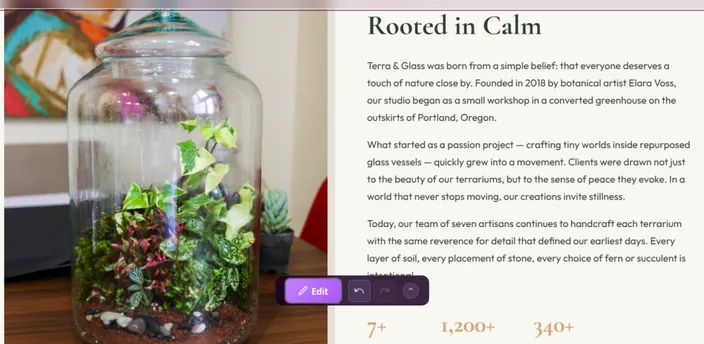
Modern AI builders automatically apply professional layouts, which reduces this risk.
“I don’t know what pages to include.”
Start simple:
- Home
- About
- Services
- Contact
You can always add more later.
“It’s taking too long.”
If you’re manually designing everything, it can feel slow.
AI website builders dramatically reduce setup time by generating structure and layout instantly.
“I’m not technical.”
You don’t need to be.
Most modern website builders are drag-and-drop or AI-driven. You don't need to code anything.
If you’re thinking, how do I create my own website by myself without coding?, the answer is choosing the right tool.
FAQ: How to Create a Website
How do I create my own website by myself?
Choose a website builder, register a domain, add your content, and publish. No coding is required with modern tools.
Can I create a website for free?
Yes, but free plans usually include ads and limited features. A paid plan offers more control and professionalism.
Do I need coding skills?
No. Website builders and AI tools handle the technical side for you.
How long does it take to build a website?
With an AI website builder, you can launch within a few hours. Traditional methods may take days or weeks.
How much does it cost in South Africa?
Basic website packages can start at a few hundred rand per month, depending on features and hosting.
The Easiest Way to Create a Website (Recommended Option)
If your goal is simplicity, speed, and zero technical stress, an AI website builder is the most beginner-friendly path.
The HostAfrica AI Website Builder is designed specifically for users who:
- Don’t know where to start
- Don’t want to code
- Want a professional result quickly
- Prefer local South African support
Benefits include:
- AI-generated design
- Hosting included
- No coding required
- Beginner-friendly dashboard
- Fast setup
You can explore our HostAfrica AI Builder here.
If you'd like to compare options, visit the main website builder page.
For more insight into why it’s considered one of the easiest tools locally, read this.
Final Thoughts
Learning how to create a website may feel overwhelming at first.
But once you understand the basics, it becomes simple:
- Choose your website type
- Register a domain
- Pick a builder
- Add content
- Publish
That’s it. The hardest step is starting.
With modern tools, especially AI-powered website builders, creating a professional website is no longer technical, expensive, or complicated.
Take the first step today. Your business deserves to be online.
If you’re ready to build your first website, these related guides and tools can help you choose a website builder, create an online store, understand costs, and launch faster:
- Best Website Builder for Beginners Guide for South Africa
- Best Business Website Builder in South Africa
- Create a eCommerce Website or Online Store
- Create a Freelancer Website
- Website Builder for Fashion Industry
- A step by step guide to a get your own website
- How Much Does Web Design Cost in South Africa?
- How Much Does It Cost to Build a Website in South Africa?
