When every WordPress hosting provider boldly claims to be the fastest, most secure, and best overall, how do you choose WordPress hosting that truly works for you? In reality, there’s no single best option for everyone, the right WordPress hosting choice depends on what you’re building, how much traffic you expect, and how much control you need.
If you get this decision right, your website will load faster, climb to better Google positions, and handle growth without issue. Get it wrong, and you’ll deal with slow speeds, downtime, and constant technical headaches.
In this guide, you’ll learn how to evaluate WordPress hosting based on what actually matters for your project, understand the different WordPress hosting types, and choose a setup that fits your website today with room for future growth.
What is WordPress Hosting and Do You Really Need It?
WordPress hosting is exactly what it sounds like - a type of web hosting that’s specifically optimized to run WordPress websites efficiently. Why is this specific type of hosting needed? Because there are close to 300,000 websites in South Africa that are built on WordPress, so solutions designed for their needs have naturally appeared.
While you can technically run WordPress on almost any hosting plan, WordPress hosting is configured to deliver better speed, security, and reliability for this particular platform. In other words, it is not mandatory to choose WordPress hosting just because you’re using WordPress, but going with a hosting environment that’s tailored for it will save you time, improve performance, and make scaling much easier later on.
In practical terms, WordPress hosting solutions are unique if compared to other hosting types because they have:
- Pre-installed WordPress or one-click setup
- Enhanced security that targets to WordPress vulnerabilities like outdated plugins
- Built-in caching systems, like server-side page cache, object cache, and CDN integration, are pre-configured to speed up WordPress sites without extra plugins.
- Server-level WordPress optimization specifically tuned for WordPress, including optimized PHP versions, database queries, and memory allocation for better load times and stability.
- WordPress support that understands the platform deeply and will help resolve plugin conflicts, tune performance, and troubleshoot rare errors.
So do you actually need it?
If you’re running a simple website with low traffic, a basic shared hosting plan with WordPress support is usually enough. You won’t notice a major difference early on.
But as soon as your site starts growing in visitors, content, or added functionality like eCommerce, hosting becomes a critical factor. That’s when WordPress-optimized hosting starts to make a real impact on performance and stability.
How to Choose WordPress Hosting: Quick Overview
Choose the right hosting type
Choose a WordPress hosting solution that fits your project scope, site size, special needs like eCommerce or memberships, and other requirements.
Pick a server location close to your audience.
If most of your visitors are in South Africa, choose a local data centre for faster load times.
Make sure essential features are included
Look for SSL certificates, automatic website backups, basic security protection, and caching. These are non-negotiable.
Prioritize performance over extras.
Fast loading times matter more than long feature lists. SSD storage and optimized servers are more important than add-ons you won’t use.
Ensure there’s an upgrade path
Your hosting should make it easy to scale without migrating your entire website.
Check support availability
24/7 support with real expertise can save you when something goes wrong.
This checklist covers everything you actually need. If a hosting provider ticks these boxes, you’re making a solid choice. Now let’s get into each section with more guidance and details.
Types of WordPress Hosting Explained and Which One You Need
All reputable WordPress hosting providers will offer you a very similar package of technical support, including one-click WP installation, automated backups, SSL, and other features. What differs is the capacity of the hosting.
Instead of thinking in technical categories that are largely similar, it’s more useful to choose based on how much storage, how many websites, and how much flexibility you actually need.
Here’s an example of how each HostAfrica plan fits real use cases.
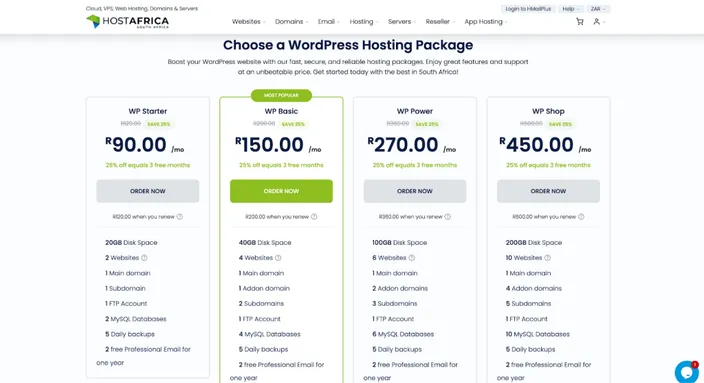
WP Starter (best for getting online quickly) - from R99.00/mo
This is the entry point and covers everything you need to launch a simple WordPress site. You get enough storage, a free domain, SSL, daily backups, and an easy-to-use control panel all set up for you.
You’ll want this WordPress hosting plan if:
- You’re building your first website
- You only need one website
- Your traffic is still low
- You want the simplest, most affordable setup
This is ideal for small business sites, portfolios, or personal projects that just need to work reliably without too much management complexity.
WP Basic (best for small growth and multiple sites) - from R150.00/mo
This plan gives you more storage and the ability to host more than one website while keeping everything simple and manageable.
You’ll want this if:
- You’re running more than one website
- Your content is growing (blogs, landing pages)
- You need more databases or flexibility
It’s a natural step up when your first site starts expanding or when you’re managing multiple small projects.
WP Power (best for performance and flexibility) - from R270.00/mo
At this level, you’re moving into a more serious setup. You get significantly more storage, unlimited databases, and the ability to handle more complex or content-heavy websites.
You’ll want this if:
- Your website has consistent traffic
- You’re running a content-heavy site or platform
- You need more control over how your site is structured
This is where most growing businesses and established websites should be. It gives you the space and resources to cover you even during traffic surges while keeping costs and management reasonable.
WP Shop (best for eCommerce websites and agencies) - from R450.00/mo
This is the most powerful WordPress plan in the lineup. It’s designed for websites that need maximum resources, multiple installs, and consistent performance under heavier loads.
You’ll want this if:
- You’re running an eCommerce store (like WooCommerce)
- You manage multiple websites, especially in a professional agency setting
- Your site has very high traffic or resource demands
With large storage, unlimited databases, and support for multiple websites, this plan is built for projects where performance directly impacts revenue.
Which one should you choose?
Keep this decision practical practical:
- For one small site go with WP Starter
- A few growing sites consider WP Basic
- Established or content-heavy site benefits from WP Power
- eCommerce or multiple high-demand sites will usually need WP Shop
The key is not to overthink it. Start with what fits your current needs, and choose a plan that makes it easy to scale as your website grows.
Key Factors to Consider When Choosing WordPress Hosting Provider
Most hosting providers highlight a bunch of flashy features, but only a handful actually make a real difference to your website’s performance, reliability, and growth. If you focus on the factors below, you’ll avoid 90% of common hosting mistakes.
Speed and performance
Website speed directly affects user experience, conversion rates, and even your Google rankings.
Look for:
- Server-level caching (not just plugins)
- SSD or NVMe storage
- Optimized database handling
- A data centre close to your audience
If your audience is in South Africa, hosting your site locally can significantly reduce load times compared to overseas servers. Distance matters more than most people realize.
Uptime and reliability
Uptime equals how often your website is online and accessible. Even small amounts of downtime can cost you traffic, leads, and sales.
A reliable hosting provider should guarantee at least 99.9% uptime, which means your website will be down for under an hour per month. But you need to make sure these are not just empty numbers, meaning they have the infrastructure to back that up.
Here’s how to check if those claims are real:
- Uptime guarantees (and whether they’re realistic). Don’t just look at the percentage on the homepage. Check if there’s an uptime SLA (service level agreement) in their terms. A serious provider will clearly state what happens if they fail to meet it (for example, service credits). You can also look for independent uptime monitoring reviews or feedback from past clients to see if they consistently deliver on that promise.
- Multiple systems and backups. Look for signs that the provider has their own fail safes in place. This includes things like multiple servers, backup systems, and automatic daily backups. If one component fails, another should take over. You can usually find this information on their product pages, knowledge base, or by asking support directly.
- Data centre quality. A reliable provider should use or own professionally managed data centres with backup power, cooling systems, and strong network connectivity. Look for mentions of Tier-level infrastructure, power redundancy, or partnerships with established data centre providers. If this information is hard to find, that’s not ideal, but you can always ask for support directly.
The idea is simple - don’t trust the advertised numbers alone. Look for proof that the provider has built their infrastructure to support it.
Security features
Website security is always among top priorities. WordPress is widely used, which unfortunately also makes it a common target for attacks. Your hosting provider should actively help protect your site, not leave everything up to you. You still need to take care of your tech setup, like themes and plugins, but the WordPress hosting company of your choice should do all the heavy lifting in the background.
Essential security features include:
- Free SSL certificates
- Regular backups
- Malware scanning and removal
- Firewall protection
Without these, even the smallest vulnerability can turn into a serious issue.
Scalability and growth
Your hosting should always support your growth. One of the biggest frustrations is outgrowing your hosting and being forced into a complicated migration.
Make sure your provider allows:
- Easy upgrades between plans
- Access to higher-tier options like VPS or dedicated servers
- Flexible resource allocation as your traffic increases
As you grow your website, always be one step ahead and know how you and your hosting provider will handle your increasing needs.
Ease of use
Managing an online business or website is already challenging. Add complicated management of WordPress hosting to that and very quickly you can find yourself overwhelmed.
To make sure your WordPress hosting provider makes it easy, look for:
- Simple control panels
- One-click WordPress installation
- Clear dashboards for managing domains, emails, and backups
The goal is to spend less time figuring things out and more time working on your website.
Customer support quality
Support is often overlooked, but just until something breaks.
When that happens, fast and knowledgeable support can be the difference between a minor issue and hours of downtime.
Prioritize providers that offer:
- 24/7 support
- Multiple channels (live chat, email, phone)
- WordPress-specific expertise
Common Mistakes to Avoid When Choosing WordPress Hosting
A lot of WordPress hosting decisions go wrong for the same reasons. Most people either focus too much on price or get distracted by features that don’t actually matter for their website.
Here are the most common mistakes to avoid:
- Choosing based on price alone. Suspiciously cheap hosting most often comes with slower performance, limited resources, and weaker support. It may work short term, but it is bound to create problems as your site grows.
- Ignoring server location. If your audience is in South Africa but your server is overseas, your website will load slower. Server location has a direct impact on performance, so choose providers like HostAfrica that can host your site where your audience is.
- Overpaying for features you don’t need. Advanced features are useful, but only if your site actually requires them. Paying for high-end hosting too early just increases costs without any real benefits.
- Not planning for growth. Some hosting plans work fine at the start but become limiting as traffic increases. Make sure your provider allows easy upgrades.
- Overlooking support quality. Unless you really know what you’re doing, you will eventually need support. Make sure they will show up when you need them.
The key is to stay practical. Focus on what your website needs today, while making sure you won’t run into limitations tomorrow.
Choosing the Right WordPress Hosting: Final Thoughts
Choosing the best WordPress hosting doesn’t have to be complicated if you focus on what actually matters.
Start by understanding your website’s needs. If you’re just getting started, a reliable shared hosting plan is enough. As your traffic grows or your site becomes more important to your business, upgrading to higher capacity plans is crucial.
When choosing a provider, pay attention to the fundamentals: speed, uptime, security, and scalability. These have a far bigger impact than any extra features or marketing claims.
If your audience is in South Africa, choosing a local hosting provider can give you a clear advantage in terms of speed and support. If your audience is global, consider a setup that can deliver consistent performance across regions.
Most importantly, think long term. The best hosting choice isn’t just about where your website is today, it’s about where it’s going next.
If you get this right, your hosting becomes a strong foundation for everything you build on top of it.
If you're choosing WordPress hosting, these related resources can help you compare hosting solutions, secure your website, and select the right infrastructure for your needs: