How AI is making WordPress easier to build and manage in 2026 and how to decide between AI-assisted WordPress and a standalone AI website builder.
Key Takeaways: AI for WordPress
- AI can now generate a WordPress website’s initial layout, structure, design, and copy, so you’re editing a real starting point instead of staring at a blank installation.
- Modern WordPress platforms simplify the traditionally technical parts: installation, backups, staging, updates, security, and multi-site management from a single dashboard.
- Tools like Extendify bring AI onboarding and site creation into WordPress, using native blocks, so you keep working inside the normal WordPress ecosystem afterwards.
- WordPress still matters in the AI builder era because you keep the themes, plugins, WooCommerce, and customisation options that standalone builders can’t match.
- Standalone AI builders optimise for simplicity. WordPress optimises for flexibility. AI-assisted WordPress is the first setup that gives you a serious share of both.
- Building the site is one afternoon. Running it is years, which is where automatic backups, staging, managed updates, and security matter far more than how the site was created.
Two people set out to build a business website on the same Monday morning.
The first signs up for an AI website builder, types one sentence about her catering business, and has something that looks like a real website before her coffee goes cold.
The second installs WordPress. He’s now staring at a blank dashboard, a default theme he doesn’t like, a plugin directory with tens of thousands of options, and a block editor he’s never seen before. By Wednesday he still hasn’t published anything, and he’s starting to wonder whether WordPress is just… old.
It isn’t. But that first hour is brutal, and for years nobody in the WordPress world seemed particularly bothered by it.
That’s the part that’s finally changing.
So when people ask “is WordPress still worth using now that AI can build a website for me?” The short answer is yes. The longer answer is that the WordPress experience in 2026 looks quite different from the one that gave it a reputation for being complicated.
The Short Answer
Want the quick version? Yes, AI can build you a WordPress website, and if you've bought hosting recently, you may already have the tool.
The one you're most likely to meet is Extendify, which most WordPress hosts now bundle into their setup flow. Describe your business in a sentence or two, and it generates a full starting point: homepage, services, about, and contact pages, with draft copy and design choices already made. From there you edit it like any other WordPress site.
Three things worth knowing up front:
- It builds with native WordPress blocks, so uninstalling it later doesn't take your website with it.
- It's not just setup; there's an AI writing assistant and a design library for ongoing work.
- It normally comes with your hosting rather than as a separate purchase.
The rest of this article covers what that actually changes, what it doesn't, and how to choose between WordPress and a standalone AI builder
| 41.2% of all websites on the internet run on WordPress, according to W3Techs, around 59% of every site using a detectable CMS.Why it matters: AI isn’t quietly improving a niche tool. It’s changing the starting experience for the platform a huge slice of the web is already built on. Worth noting: that figure has slipped slightly from its 2025 peak, the first meaningful decline in over a decade- and a fair hint at why the WordPress ecosystem suddenly cares so much about onboarding. |
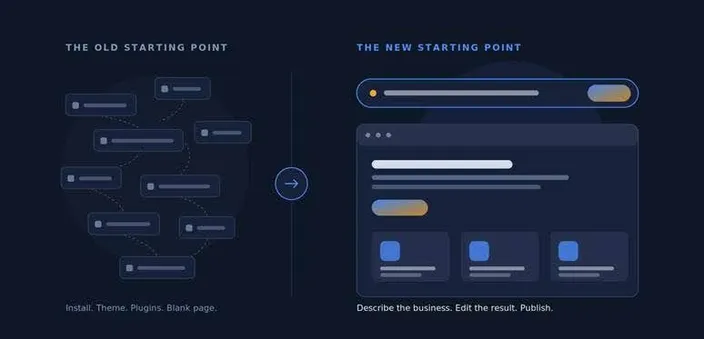
The shift isn’t what WordPress can do. It’s where you begin.
Why People Think WordPress is Becoming Outdated
Let’s be fair to the criticism, because most of it is earned.
A fresh WordPress install gives you a working CMS and almost nothing else. To get from there to a publishable business website, you typically need to:
- Pick a theme, then work out whether it uses the block editor or its own page builder.
- Install plugins for contact forms, SEO, caching, backups, and security.
- Learn enough of the Gutenberg editor to build a homepage that doesn’t look like a 2013 blog.
- Write every word of copy yourself.
- Work out a hosting control panel that was designed around servers, not websites.
- Take responsibility for updates, backups, and security from day one.
None of those steps are hard. There are just a lot of them, and they all arrive before you’ve seen anything that feels like progress. That’s the blank-page problem, and it’s the single biggest reason first-timers bounce off WordPress.
| GOOD TO KNOW Gutenberg is WordPress’s block editor. Instead of editing one big slab of HTML, you build pages from individual blocks: headings, paragraphs, images, buttons, columns. It’s more powerful than the old editor, but it’s also where many first-time users quietly give up. |
Meanwhile, a prompt-based AI builder asks three questions and shows you a website. It’s not a fair fight on first impressions.
Here’s the distinction that matters, though: almost every complaint on that list is about the experience of getting started, not about what WordPress can actually do. Nobody abandons WordPress because it can’t run an online store, handle 40,000 monthly visitors, or support a custom booking flow. They abandon it because week one felt like homework.
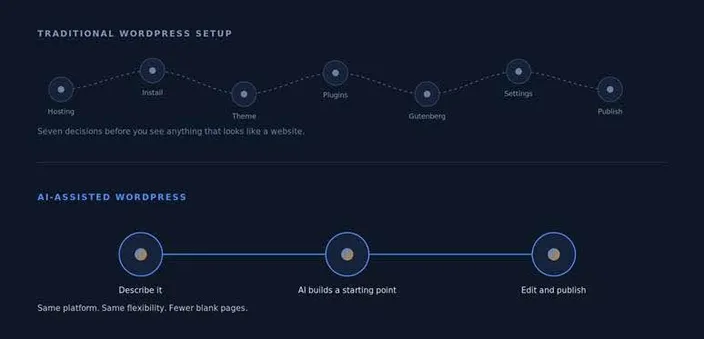
Same destination. Very different first hour.
| THE IMPORTANT DISTINCTION WordPress isn’t becoming less capable. It’s becoming less annoying to start. Those are very different things, and only one of them was ever actually broken. |
What Does AI Actually Add to WordPress?
Strip away the marketing, and AI does four genuinely useful things in a WordPress context.
- AI-assisted website creation. Describe the kind of site you need and get a complete starting-point homepage, about, services, and contact assembled from real WordPress blocks, instead of building every page manually from an empty canvas.
- AI-generated content. Draft copy in the right places, in the right tone bracket, so your job becomes editing rather than writing from nothing. The same applies to rewriting existing pages.
- Design assistance. Layout, spacing, fonts, and colour decisions get made for you based on the type of business you described. For anyone without a designer, this removes a genuinely paralysing set of choices.
- Easier onboarding. Guided setup inside the dashboard: what to do next, which pages you’re missing, what still needs attention, instead of dropping a new user into wp-admin and hoping they work it out.
Notice what’s not on that list: AI doesn’t decide what your business should say, who it’s for, or whether the site is any good. It gets you to a first draft faster.
| THE SHORT VERSION AI doesn’t replace WordPress. It removes some of the friction around using it. |
What that looks like with a real business
Say you run a small plumbing business in Durban, and you describe it like this:
| “I’m a plumber in Durban. I do emergency callouts, geyser installations, and leak detection for homes and small businesses. I need a five-page site with a services page, a contact form, and an obvious way for people to book me.” |
An AI-assisted WordPress workflow turns that into:
- A homepage with a hero section, a services summary, trust signals, and a prominent emergency-callout CTA
- Separate sections or pages for emergency callouts, geysers, and leak detection
- Draft service descriptions written in plain language, ready to edit
- A contact page with a working form, and a booking or “call now” CTA repeated where it makes sense
- A sensible starting plugin set installed, rather than a directory for you to browse
What you then do, and this is the part that matters, is fix the things only you know. The AI has no idea that most of your work comes from WhatsApp referrals in three specific suburbs, that geysers are where your margin lives, or that “24/7” is a promise you can’t actually keep on Sundays.
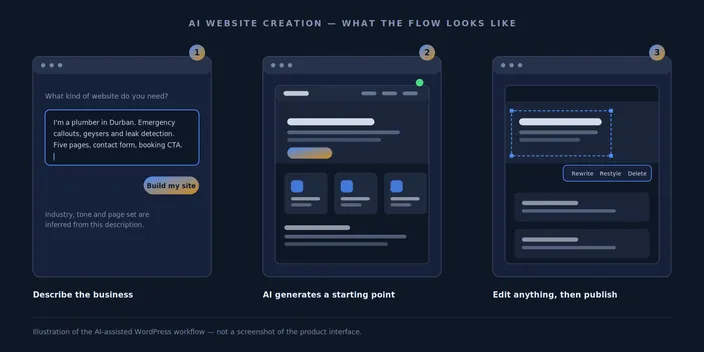
| TIP Don’t publish the first version the AI generates. Treat it as scaffolding: check the page structure, rewrite the headline and service copy in your own words, replace any generic imagery, and make sure the call to action matches how customers actually contact you. |
AI is in WordPress core now but not the way people think
In May 2026, WordPress 7.0 (“Armstrong”) shipped with AI infrastructure built into core: an AI Client and an Abilities API.
Some coverage framed this as “WordPress has AI now”, which overstates it considerably. What landed is plumbing. The AI Client is a provider-agnostic interface that lets plugins talk to AI models through one shared, standardised path, so every plugin no longer needs its own API key field and its own half-baked integration. The models themselves stay external.
For developers, that’s significant. For a small business owner, the effect is indirect but real: AI features inside WordPress should become more consistent and easier to switch on, because they’re no longer a dozen separate bolt-ons fighting each other.
| WATCH OUT “AI in core” doesn’t mean WordPress builds your website out of the box. Core provides the connection layer. The actual site-generation experience still comes from your host or a plugin, so what you get depends heavily on where you buy your hosting. |
So, Where Does Extendify Fit in?
If you’ve signed up for WordPress hosting recently and been met by a friendly setup wizard asking what kind of site you’re building, there’s a decent chance you’ve already used Extendify without knowing its name.
Extendify is one of the technologies bringing AI-assisted onboarding and website creation into WordPress. It’s built for hosting providers, like HostAfrica, rather than sold to end users, which is why it tends to appear as part of your host’s WordPress experience. In practice, it covers:
- AI onboarding: a guided setup that asks about your business instead of dumping you into a blank dashboard
- AI website creation: Launch AI generates a full site from a description of what you do
- AI writing assistance: generate or rewrite copy inside the editor
- A design library: industry-specific block patterns you can drop into a page
- Native Gutenberg integration: it works with the standard block editor rather than replacing it
The detail worth knowing: Launch AI builds pages using core WordPress components rather than a proprietary page builder. Remove the plugin later, and the site keeps working exactly as it did. That’s a meaningful difference from builder platforms where uninstalling the builder means uninstalling your website. It also means your themes and plugins behave normally afterwards, because nothing exotic is rendering your pages.
| WHY THIS MATTERS Lock-in usually shows up years later, when you want to change hosts or hire a developer. A site built from core WordPress blocks stays portable. A site built inside a closed builder generally doesn’t. |
Building the Website is Only Half the WordPress Problem
Here’s where most AI-website articles stop, and where the more useful half of the story starts.
AI has made the first hour much easier. It’s done nothing at all about hours two through ten thousand. A WordPress site owner still has to think about backups, core, and plugin updates, security patching, staging changes before they go live, performance and caching, plugin sprawl, SSL, managing several sites at once, and the hosting environment underneath all of it.
That’s the real reason WordPress earned its reputation, and it’s the part that doesn’t show up in any demo. So the interesting question isn’t just “can AI build my site?” It’s whether the platform underneath makes running that site something you don’t have to think about.
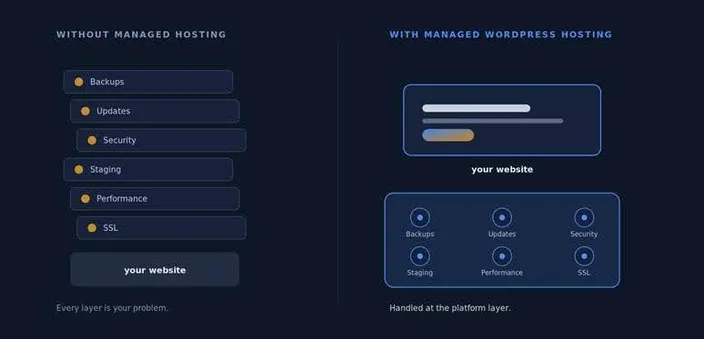
AI changes the first hour. Managed hosting changes the next three years.
What a Simpler WordPress Experience Looks Like
Using HostAfrica’s WordPress Hosting in South Africa as the practical example, here’s what “managed” should actually mean in 2026:
- One-click WordPress installation. WordPress running without manually setting up databases, users, and file permissions first.
- One dashboard for all your sites. Every WordPress install in a single view, with one-click login to each admin rather than navigating a server-focused control panel to find the thing you actually wanted.
- Automatic backups and one-click restore. Daily backups run without you remembering, plus manual restore points before big changes. When a plugin update breaks a page at 9 pm, you roll back instead of panicking.
- Safe staging environments. Test a theme, a plugin, or a redesign on a copy of the site, then push it live when it works. The single most underrated feature in managed WordPress.
- Smart automatic updates. Core, themes, and plugins kept current, with control over when updates land.
- Security by default. Free SSL, automatic core security updates, server-level firewalling, and malware scanning, rather than three overlapping security plugins doing it badly.
- Performance without constant tweaking. SSD storage, an optimised PHP and database stack, server-level caching, and compression, plus local South African infrastructure, which matters more than people expect when your visitors are local too.
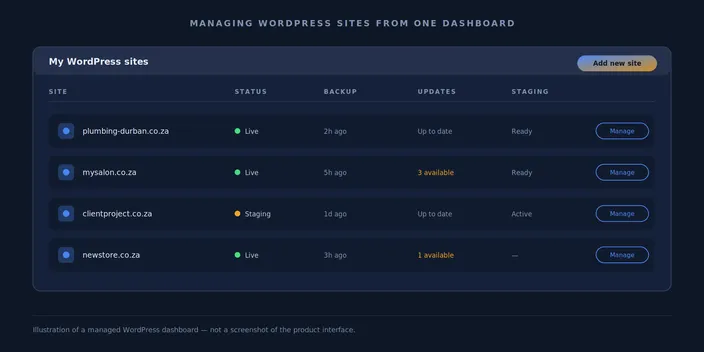
| WHY THIS MATTERS An AI builder makes the first 30 minutes easier. Managed hosting makes the next three years easier. Most people only budget for the first one. |
The key point: the easier WordPress becomes behind the scenes, the more useful AI becomes at the front. Generating a beautiful site is worth very little if you’re then left alone with backups, patching, and a staging environment you don’t have.
| TIP Before installing a plugin, ask whether your host already covers it. Caching, backups and basic security are often handled at server level; running plugin versions of the same thing on top usually adds risk, not protection. Fewer plugins means fewer things to maintain and fewer things to break. |
What WordPress Still Gives you That AI Builders Don’t
None of this is an argument that WordPress is universally better. It’s an argument about what you keep.
- Theme freedom. Thousands of themes, plus the option to have one built for you. No waiting for a platform to add the layout you need.
- The plugin ecosystem. Tens of thousands of plugins covering bookings, memberships, multilingual sites, learning platforms, advanced forms, and CRM integrations most of the things you’ll only discover you need in year two.
- WooCommerce. A full open-source ecommerce platform you own, with your product data in your own database. Worth reading up on before committing to a builder’s proprietary store: how to set up a WooCommerce store on WordPress.
- Ownership and control. Your site, your files, your database. You can export it, move it, or hand it to a developer.
- Customisation and developer access. When you need something specific, someone can build it. That’s not always true on a closed platform.
- SEO flexibility. Full control over URLs, schema, redirects, metadata, and site structure.
- Scalability. The same platform runs a five-page plumbing site and a publication with millions of monthly visits. You don’t outgrow it.
The trade-off in one line: standalone AI builders prioritise simplicity, WordPress prioritises flexibility, and AI-assisted WordPress increasingly gives users access to both.
WordPress AI Builder vs Standalone AI Website Builder
| AI-assisted WordPress | Standalone AI website builder | |
| AI website generation | Yes | Yes |
| Beginner friendly | Increasingly | Yes |
| Plugins | Extensive WordPress ecosystem | Platform dependent |
| Themes | Extensive | Platform dependent |
| WooCommerce | Yes | Usually proprietary ecommerce |
| Hosting management | Depends on provider | Usually included |
| Customisation | High | Varies |
| Ownership and control | High | Platform dependent |
| Best for | Sites that need room to grow | Fast, straightforward websites |
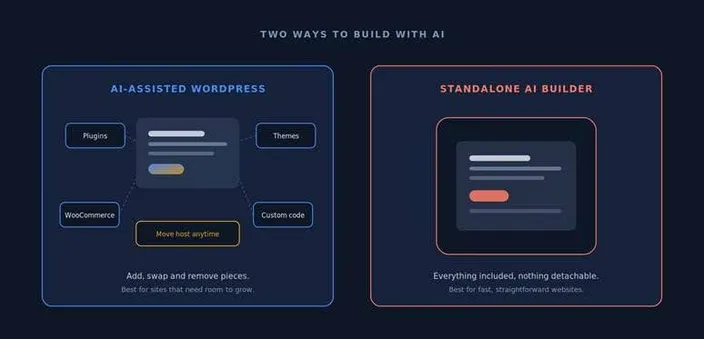
Modular and portable, or sealed and simple. Both are valid; they just fail differently.
Don’t over-engineer this decision. If you need a five-page site with your services, your photos, and a contact form, and you’re confident that’s all you’ll ever need, an AI Website Builder is a perfectly sensible choice, and it’ll be less work.
Just check the limits before you commit. HostAfrica’s builder, for example, is upfront that the basic plan doesn’t handle online stores or bookings. That’s exactly the kind of thing you want to know on day one rather than in month eight.
| TIP Ask yourself one question: is there any realistic chance this site will need to sell products, take bookings, run a membership, or support a second language within two years? If yes, start on WordPress. Migrating later always costs more than starting in the right place. |
Who is AI-assisted WordPress Best For?
First-time website creators. People drawn to what WordPress can do but put off by the setup. AI removes the blank page; managed hosting removes the maintenance. What’s left is mostly just writing your own content.
Small businesses. You want a simple site now, but you can’t promise your requirements won’t grow. Starting on WordPress means “add a booking system” is a plugin decision, not a rebuild.
Online stores. If WooCommerce is anywhere in your future, this is the route. Full ecommerce, your own data, and a starting point you didn’t have to build by hand.
Freelancers and agencies. Multiple client sites in one dashboard, with staging, automatic backups, and role-based access. The AI onboarding also cuts down the “how do I edit my own homepage?” support calls from clients.
Existing WordPress users. You don’t need AI to rebuild a site that already works. But AI content tools, a design library, and better management tooling can make ongoing work noticeably less tedious.
| WordPress didn’t need replacing. It needed a better starting point. |
Things AI Still Won’t do for you
Balance matters here, so let’s be direct.
It won’t tell you whether your positioning makes sense. AI will happily generate confident, fluent copy for a business strategy that doesn’t work.
It won’t check the design against your actual customers. Generated layouts look professional in the abstract. Whether they work for someone on a slow mobile connection in Pinetown is a different question entirely.
It won’t understand your site structure for you. You still need a rough sense of what pages you need and how they connect. If that’s unfamiliar territory, start with a walkthrough like how to create a WordPress website.
It won’t stop you installing eleven plugins that do overlapping things. Plugin sprawl is still the most common reason WordPress sites get slow and break.
It won’t maintain your security. According to Patchstack’s annual WordPress security research, the overwhelming majority of newly disclosed WordPress vulnerabilities are found in plugins rather than core, and disclosures have been climbing year on year. A beautifully generated homepage does nothing about that.
It won’t monitor performance. Or notice that your contact form stopped sending emails three weeks ago.
It won’t make customer-experience decisions. Where the CTA goes, what you promise, how you handle enquiries those are judgement calls.
| WATCH OUT AI-generated copy is fluent, which makes it easy to skim past. Read every line out loud once before publishing. If it sounds like a brochure written by someone who has never met your customers, that’s because it is. |
| AI gives WordPress users a better starting point. It doesn’t remove the need for human judgement. |
Is WordPress Outdated in 2026?
We think not.
It still runs around 41% of all websites and roughly 59% of sites using a CMS. Its share has dipped slightly from the 2025 peak, and that’s worth acknowledging; honestly, growth has levelled off. But “no longer growing” and “outdated” are not the same claim.
The more interesting development is what’s actually happening: WordPress is absorbing AI into the core platform while hosting providers strip out the technical work that made it intimidating. The CMS beginners remember: blank install, mystery theme, plugin roulette, and manual backups. That’s not the CMS you sign up for today.
Platforms don’t usually die because something easier appears. They die when they stop adapting. WordPress shipped its biggest architectural release in years in May 2026, added AI infrastructure to core, and the wider ecosystem spent the year rebuilding onboarding. That’s not the behaviour of a platform in retreat.
FAQ: AI for WordPress
Can I use AI with WordPress?
Yes. You can use AI to generate an entire site during setup, write and rewrite content inside the block editor, generate images, and get guided help with admin tasks. WordPress 7.0 also added core AI infrastructure that plugins build against, so integrations are becoming more standardised across the ecosystem.
Is WordPress outdated in 2026?
No. It still powers around 41% of all websites and roughly 59% of sites using a CMS. Its share has slipped slightly from its 2025 peak, but the platform shipped a major release in May 2026 with AI infrastructure, a redesigned admin and new design tools, and the beginner experience has improved more in the past two years than in the previous ten.
Can AI build a WordPress website?
It can build a complete starting point page structure, layout, design choices, and draft copy usually within a few minutes of describing your business. What it can’t do is verify that the result is accurate, on-brand, or strategically sensible. Treat the output as a first draft, not a finished website.
What is Extendify for WordPress?
Extendify is an AI-powered onboarding and website-creation platform that hosting providers bundle with WordPress. Its Launch AI product generates a full site from a description of your business, and it includes AI writing tools and a design library. Because it builds with native WordPress blocks, the site continues to work normally if the plugin is removed.
What is the best AI plugin for WordPress?
There’s no single answer, because they solve different problems. Site-generation tools like Extendify’s Launch AI handle setup and onboarding; content assistants help with writing and editing inside Gutenberg; SEO plugins increasingly include AI features for metadata and internal linking. Pick the specific job, and resist installing three overlapping tools.
Is a WordPress website builder free?
WordPress itself is free and open source, and the block editor is included. Many block-based builders and starter tools have free tiers, but AI site-generation features are usually bundled with paid hosting rather than sold separately, which is why the same tool can feel free on one host and be unavailable on another. Either way, you’ll need hosting and a domain.
Do I still need WordPress hosting if I use an AI builder?
If you use a hosted standalone builder, hosting is normally included in the plan. If you’re building on WordPress, yes, and the quality of that hosting determines your backups, staging, security, updates, and speed. That’s the layer AI doesn’t touch.
WordPress is Changing, not Disappearing.
AI website builders raised expectations about how easy creating a website should be. That’s a good thing. The WordPress ecosystem needed the pressure.
What emerged isn’t a replacement. It’s a better starting point: tools like Extendify remove the blank-page problem, WordPress core is standardising how AI plugs in, and managed hosting handles the backups, staging, updates, and security that used to be your problem alone.
Put those together, and WordPress looks considerably different from the intimidating CMS beginners may remember, without giving up the flexibility that made it worth using in the first place.
If you’re deciding today: pick the standalone builder if you want simple and finished. Pick AI-assisted WordPress if you want a fast start and somewhere to grow into.