
TL;DR: Supabase Explained
- Supabase simplifies backend development: It’s an open-source backend-as-a-service built on PostgreSQL that lets you quickly build apps without managing infrastructure.
- All-in-one backend features: It provides a database, authentication, APIs, storage, edge functions, and real-time sync—covering most backend needs out-of-the-box.
- Strong fit for modern & AI apps: With features like vector support and real-time updates, Supabase is well-suited for AI-powered and interactive applications.
- Flexible deployment options: You can use managed hosting (easy), self-host (more control), or a hybrid approach depending on your scalability and infrastructure needs.
- Supabase vs Firebase choice depends on preference: Supabase uses SQL and is open-source with less lock-in, while Firebase is NoSQL, fully managed, and tightly integrated with Google services.
In today’s no-code and AI-first world, building release-ready software is easier than ever. You no longer need to set up complex backend systems or manage infrastructure just to get a simple app off the ground. With the right tools, you can go from idea to working product in a much shorter time.
Today’s post will be about one such tool: Supabase. It is an open-source backend platform that gives you everything you need to build modern applications out-of-the-box: a database, authentication, APIs, and edge functions etc.
We will explain what Supabase is, its key features, how it differs from Firebase, when you should use it, and how to get started.
What is Supabase?
Supabase is a backend-as-a-service platform built on top of PostgreSQL, a widely used open-source database.
It is popular with both developers and non-technical users because it brings everything you need to get started into one place, with a clean interface and simple setup. It also has a strong community, which makes it easier to find examples and support when building applications.
Key Features of Supabase
Here’s what Supabase includes:
Postgres Database
At its core, Supabase uses PostgreSQL, which is known for being reliable and flexible. You can store structured data, run complex queries, set up production-grade views, and manage your data using standard SQL.
Authentication
Supabase makes it easy to add user login and signup to your app. You can handle user sessions and manage access without needing to build your own authentication stack from scratch.
Edge Functions
You can run server-side code close to your users using edge functions. This helps you handle backend logic like processing requests or running custom workflows.
Storage
Supabase provides file storage for large files, including images and videos. You can upload and serve files directly from your application.
Realtime Data Sync
It allows your app to receive updates instantly when data changes. This is useful for features like live chats or multiplayer experiences.
Data APIs
Supabase automatically creates APIs for your database. This means you don’t have to build a separate backend layer for your frontend to interact with your data.
Vector Support
Supabase supports vector data, which is useful for AI-based features like similarity search or recommendations. This feature is why it’s often used to build modern AI-powered apps.
Easy Integration with Frontend Frameworks
Supabase works well with popular frontend tools and frameworks, such as Next.js, Flutter, React, Svelte, and Nuxt.
How to Get Started with Supabase
Getting started with Supabase is simple. Follow these steps:
- Create an account on the Supabase website and set up a new project by filling out necessary details like name, database password, organization, and region. Once created, Supabase will automatically provision a PostgreSQL database for you.
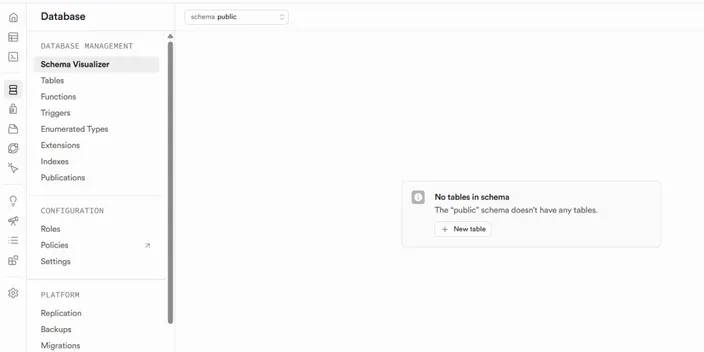
- Open your project dashboard and review the database section where you can create tables and manage your data using a visual interface or SQL editor.
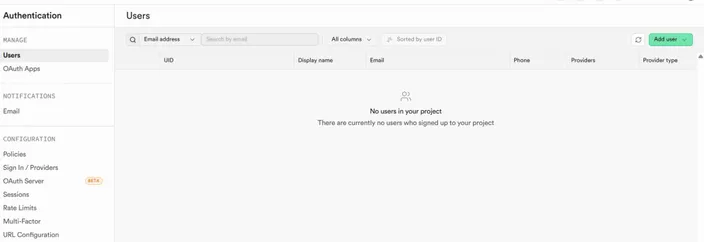
- Set up authentication by enabling the login methods you want, such as email and password. You can manage users directly from the dashboard.
- Connect your frontend app by installing the Supabase client library for your framework and adding your project URL and API key. This will allow your app to interact with your backend services.
- Take advantage of the Supabase UI library, which offers ready-made building blocks for common interface elements like authentication screens.
- Start building your app features by reading and writing data, and calling APIs generated by Supabase.
- If your app needs them, add file uploads by configuring storage buckets and connecting them to your frontend.
- Use edge functions if you need custom backend logic such as handling webhooks or processing data before saving it.
Supabase Deployment Options and Considerations
Supabase can be deployed in different ways depending on how much control, scalability, and setup effort you want.
Managed Supabase (Cloud)
This is the easiest option where Supabase hosts everything for you. You don’t have to worry about infrastructure or maintenance. It is a good choice for beginners or small teams.
Note: This option is available on both free and paid tiers with different resource limits.
Self-Hosting Supabase
If you want more control, you can host Supabase on your own infrastructure. This option gives you full access to configuration and data but requires more setup and maintenance.
If you want a simple and affordable deployment, you can run Supabase on a Virtual Private Server. For larger applications, you may want to go with a dedicated server, a cloud hosting, or more sophisticated architectures like Kubernetes-based setups.
Hybrid Approach
Some teams use a mix of managed and self-hosted setups depending on their needs. For example, they may start with the managed version and later move parts of their system to their internal infrastructure as the app grows.
Advanced Supabase Offerings
If you are a developer or a more advanced user working on production-grade apps, these are some Supabase features that you should know:
Replication
Supabase supports database replication, which allows you to keep copies of your data across different instances. This helps improve availability and can reduce load on your primary database.
Backups
You can set up automated backups to protect your data from loss. This ensures that you can restore your database to a previous state if something goes wrong.
Bucket Storage Policies
Supabase lets you define access rules for your storage buckets. This means that you can control who can view or modify files based on user roles or authentication status.
Vector Buckets
Vector buckets allow you to store and manage vector data for AI-related use cases. This is useful for tasks like similarity search or semantic matching.
Broadcast Messages
You can send messages to a channel directly from your client application or trigger them from your database. This is useful for real-time updates like live activity feeds.
Supabase vs Firebase
The main difference between Supabase and Firebase is that Supabase is open-source and built on PostgreSQL, while Firebase is a proprietary platform owned by Google and uses a NoSQL database model.
Here’s a quick comparison of other key differences:
| Aspect | Supabase | Firebase |
|---|---|---|
| Database Type | Relational (PostgreSQL) with SQL support | NoSQL (Firestore, Realtime DB) |
| Open Source | Yes | No |
| Hosting Model | Managed or self-hosted | Fully managed by Google |
| Querying | SQL-based queries | Document-based queries |
| Vendor Lock-in | Lower, since it’s open-source | Higher, tied to Google ecosystem |
| Realtime Support | Built on Postgres replication | Native real-time database |
| Authentication | Built-in and flexible | Built-in with deep Google integration |
| Scalability | Depends on setup and hosting choice | Automatically handled by Google |
| Learning Curve | Easier for those familiar with SQL | Easier for those used to NoSQL |
When to Use Supabase vs Firebase
Go with Supabase if:
- You prefer working with SQL and relational databases like PostgreSQL
- You want an open-source solution with less vendor lock-in
- You may want to self-host your backend now or later
- You need more control over your database structure and queries
Go with Firebase if:
- You are comfortable working with NoSQL and document-based data
- You are already using other services from Google
- You want built-in scaling without managing infrastructure
FAQs About Supabase
Finally, here are some frequently asked questions about Supabase.
What is Supabase used for?
Supabase is used to build modern applications in scenarios where you don’t want to build a backend from scratch. It handles common backend needs (database, authentication, APIs, delivery etc.) so you can focus more on building your app.
Is Supabase free to use?
Supabase offers a free tier that is suitable for small projects and testing. As your app grows, you can move to paid plans for more resources and advanced usage.
Can I self-host Supabase on a VPS?
Yes, you can self-host Supabase on a Virtual Private Server if you want more control over your setup. This option requires you to manage maintenance and scaling on your own.
Is Supabase better than Firebase?
It depends on your needs, as Supabase and Firebase follow different approaches. Supabase is better if you prefer SQL and open-source tools, while Firebase works well if you want a fully managed system.
Do I need backend experience to use Supabase?
No, you can get started without deep backend knowledge. The platform is designed to be simple enough for beginners while still offering flexibility for developers.
Can Supabase handle production applications?
Yes, Supabase can be used for production apps if set up correctly. Many teams use it for real-world projects with proper scaling and monitoring in place.
Does Supabase support AI applications?
Yes, Supabase supports vector data which is useful for AI-related use cases. This makes it easier to build features like search, recommendations, and semantic matching.
Conclusion
Supabase is a handy no-code tool that makes it possible for less-or-non-technical teams to build release-ready applications. We hope that the insights shared in this guide help you understand how it works and decide if it’s the right fit for your next project.
You can power your Supabase projects with HostAfrica’s high-performance VPS hosting in South Africa—giving you full control, faster local response times, and complete data ownership. If you want to take that control even further, you can also explore self-hosted AI and build private AI-powered workflows around your own apps, data, and infrastructure.
