A terminal-first guide to deploying Node.js and Next.js applications on a HostAfrica Linux VPS.
AI can write your application. The question that gets less attention is where it runs.
For many developers, the default answer is Vercel: connect a repository, click deploy, done. For frontend and serverless work, that’s a sensible choice. However, if your application doesn’t fit the serverless model or a persistent Node.js backend, you may spend more time adapting to platform constraints than building the actual product. A long-running worker and Next.js application with substantial server-side logic also turns the clock arms a fair bit.
Developers spend just 24% of their time actually writing code. The rest goes on debugging, configuration, and getting things shipped. Nearly a third of teams take a full week to move an app from development to production. That gap is exactly what this workflow closes.
This guide’s for developers who want the speed of AI-assisted development with Claude Code, deployed to infrastructure they control.
Key Takeaways: Vercel Alternatives
- Self-hosting gives you control Vercel can't. A Linux VPS supports persistent processes, SSH access, and custom configuration, with predictable resource-based pricing that serverless platforms aren't built for.
- Claude Code and MCP turn deployment into a conversation. Provisioning, SSH config, Nginx setup, and SSL certificates can all be handled through a single terminal session. So you don’t require a browser or hosting dashboard.
- Next.js doesn't need Vercel to run in production. Build with npm run build, serve with PM2, proxy with Nginx, and add free HTTPS via Let's Encrypt. The workflow matches any standard Node.js deployment.
- AI accelerates deployment but doesn't replace security judgment. Before going live: disable password SSH, lock down firewall ports, protect your .env file, audit dependencies, and take a pre-launch snapshot.
- The full workflow runs from prompt to production in one session. Claude Code generates and deploys the app; the MCP integration handles the infrastructure. You stay in control of every step that matters
Why Agentic Coding Changes the Deployment Problem
Claude Code isn't autocomplete. It works directly in your terminal: inspecting a codebase, running commands, making changes, and iterating on the result. That's a meaningfully different category of tool.
And it shifts where the friction sits. For most AI-assisted developers today, writing the first version of an app isn't the main bottleneck anymore. Deployment, security, configuration, and ongoing operations are.
| THINK OF IT THIS WAY Imagine hiring a contractor to build you a kitchen, but they hand over the blueprints and leave. You've still got to source the materials, wire the electrics, pass the inspection, and figure out the permits. AI coding tools that only write code are that contractor. Claude Code stays on the job site. |
The Model Context Protocol (MCP) is what makes this possible for infrastructure. It gives Claude Code a structured way to talk to external services. This way provisioning a server, configuring Nginx, and setting up SSL can all happen inside the same terminal session as the code itself.
You're not context-switching between your editor, a hosting dashboard, and three browser tabs. It's one conversation from the first line of code to a live URL.
That said, MCP isn't a safety net. It's a connection. You should still review what Claude's doing, restrict credentials to what's actually needed, and confirm anything destructive before approving it. Speed and control aren't opposites here; you get both if you stay in the loop.
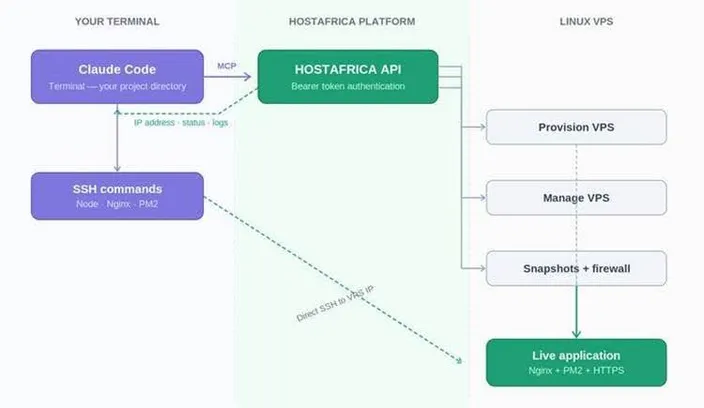
Illustrative example: Claude Code connecting to HostAfrica infrastructure via MCP.
What You'll Build
By the end of this guide, you’ll have a repeatable workflow that:
- Connects Claude Code to HostAfrica through MCP
- Provisions a Linux VPS from the terminal
- Installs dependencies and configures the server over SSH
- Clones and deploys your application
- Configures Nginx as a reverse proxy
- Runs the application under PM2
- Serves it over HTTPS with a Let’s Encrypt certificate
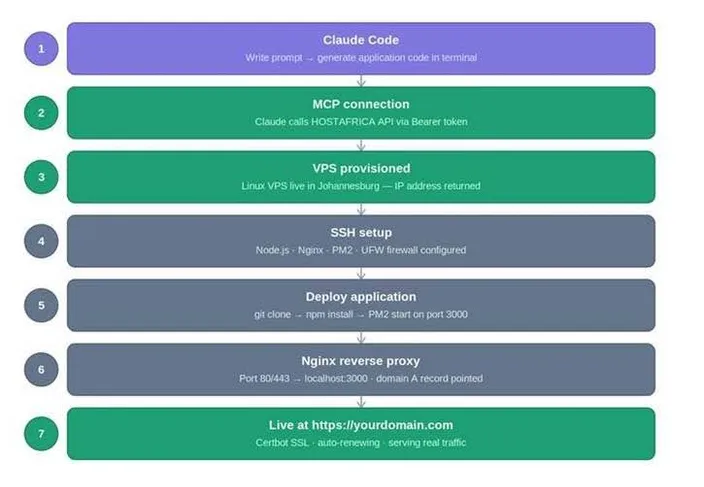
Illustrative overview of the deployment journey from terminal prompt to live HTTPS application.
Most of this workflow runs from a single terminal session. This reduces the need to switch between your development environment and a hosting dashboard. You may still need a browser for initial authentication, domain registration, and account-level actions.
Because Claude Code can talk directly to your VPS via MCP, you can quickly spin up, test, and tear down manual preview environments using simple terminal commands.
Vercel vs VPS: Which One Do You Need?
The goal here isn’t to argue against Vercel. It’s to help you make the right call for what you’re actually building.
| Vercel | HostAfrica Linux VPS | |
| Best suited to | Next.js, frontend applications, managed functions, and teams wanting integrated deployments | Most application stacks supported by the operating system and available VPS resources; persistent processes and full-stack applications |
| Next.js support | Managed, first-party platform integration | Can be deployed with Node.js, PM2, Docker, and Nginx |
| Pricing model | Plan-based pricing with usage and service limits | Recurring cost based on selected resources; storage, backup, bandwidth, or service charges may apply |
| Backend processes | Platform-managed functions with execution limits that depend on plan and configuration | Persistent processes can run within VPS resources and provider limits |
| Data residency | Depends on Vercel's deployment and service configuration | Available HostAfrica regions, subject to product and current availability |
| SSH/root access | No general server-level SSH access | Administrative access according to the VPS configuration |
| Configuration control | Platform-level configuration | User-managed operating system and server configuration |
| Operations burden | Lower | Higher |
| Free tier | Available on eligible Hobby usage | No general free VPS tier |
Vercel and HostAfrica Linux VPS compared across key deployment criteria.
When a VPS is The Wrong Choice
| Use Vercel when… | Use a VPS when… |
| You’re building a standard Next.js or frontend application | You need persistent backend processes |
| You want zero infrastructure management | You run Docker, background workers, or databases |
| You want automatic deployments on every push | You need custom server configuration |
| Serverless functions cover your backend needs | You need SSH or root access |
| You have no long-running processes | You need server-level control and regional choice |
Choose the platform that matches what you're building.
Prerequisites
- Claude Code, installed globally with npm (requires Node.js 22 or later on your development machine)
- A HostAfrica account
- A HostAfrica API token, generated from the API key management page after enabling public API access
- A Git repository containing your application code
- Basic Linux familiarity: SSH, file permissions, and shell commands
| PROTECT YOUR API TOKEN Never paste your HostAfrica API token into source code, commit it to Git, or expose it in screenshots or terminal recordings. Store it in an environment variable or a Secrets Manager and treat it like a password. |
Step 1 - Install Claude Code and Authenticate
If you haven’t installed Claude Code yet:
npm install -g @anthropic-ai/claude-code
claude
On the first run, Claude Code will prompt you to authenticate. Follow the browser prompt, or set your API key directly:
export ANTHROPIC_API_KEY=your_api_key_hereAvoid pasting a real key into a public terminal recording or committing it to a shell script. Aim for browser-based authentication where you can.
Verify the installation:
claude --versionStep 2 - Connect Claude Code to HostAfrica via MCP
Once the HostAfrica MCP server is registered, Claude Code can work with your VPS infrastructure from any session. Replace the placeholder with the Bearer token you generated from the API key management page:
claude mcp add \
--transport http \

  -s user \

  hostafrica \

  https://api.hostafrica.com/mcp \

  --header "Authorization: Bearer <your-token>"
Avoid exposing the token in shell history where possible: use a secure terminal session, restrict access to your machine, and rotate the token if it’s ever exposed.
The -s user flag stores the configuration in your global user config, so it’s available in every Claude Code session. Be sure to check that it registered:
claude mcp list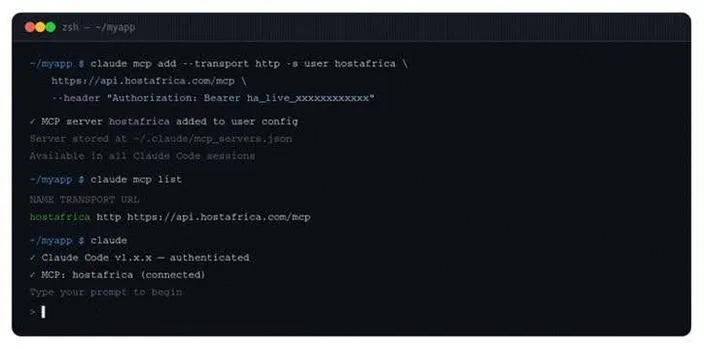
Illustrative example of an MCP connection registered in Claude Code.
A listed server is not necessarily an authenticated one. Start a Claude Code session, run /mcp, and make a read-only request to confirm that authentication and tool access work:
> List all my HostAfrica VPS servicesStep 3 - Provision Your Linux VPS
With Claude Code finally connected, provisioning becomes a conversation. Open a session in your project directory and describe what you need:
> I need to deploy a Node.js application to a new Linux VPS.
> Can you help me provision a suitable server and confirm when it is ready?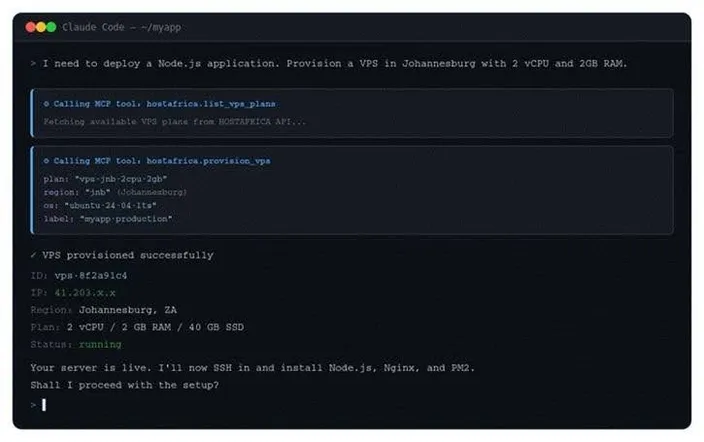
Illustrative example of VPS provisioning through the HostAfrica MCP connection.
Claude calls the relevant HostAfrica infrastructure tool exposed through the MCP connection. The tools that’ll be available depends on the current HostAfrica API. Status and connection details are returned according to the HostAfrica provisioning workflow. Store your credentials securely, and aim for SSH keys over passwords.
| START SMALL A 2 vCPU / 2 GB VPS may be a reasonable starting point for a small Node.js or Next.js application without heavy background processing. Actual capacity depends on the application, dependencies, database usage, and traffic. Monitor CPU, memory, storage, and swap before estimating how much traffic the server can handle. |
Docker or PM2?
- PM2 is simpler. A Node.js process manager that keeps your application running, restarts it on crashes, and provides basic logging. Use it to get something live quickly.
- Docker is more reproducible. It’s better for running multiple applications on one server, or when you want an isolated, portable environment. Ask Claude to containerise the application if you prefer this route.
Step 4 - Configure your server
Describe the stack to Claude, and it’ll generate and execute the configuration steps over SSH:
> My server is at <ip-address>. I need to:
> - Install Node.js 22 and npm
> - Install Nginx
> - Install PM2 as a process manager
> - Configure a firewall to allow SSH, HTTP, and HTTPS
> Can you walk through this and verify each step?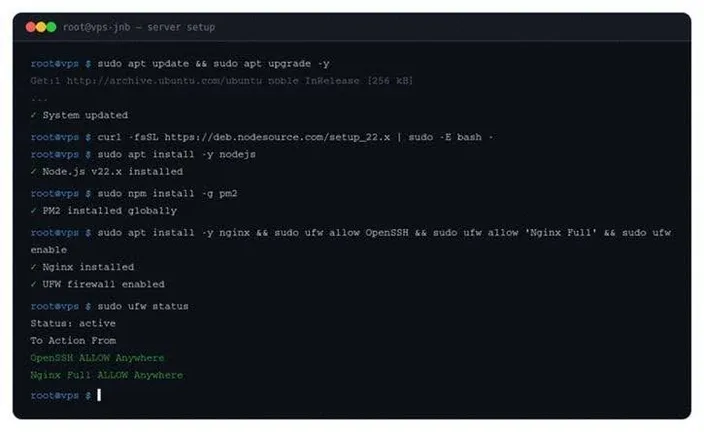
Example of a server configured over SSH with Node.js, Nginx, PM2, and firewall rules.
| ASK CLAUDE TO EXPLAIN When Claude Code executes infrastructure changes, ask it to explain each step and verify the result. This makes the work easy to follow and helps you catch configuration problems early. |
| CHECK YOUR FIREWALL RULES Expose only the ports your application actually needs. Run sudo ufw status and confirm that only SSH, HTTP, and HTTPS are open. Close anything unexpected. |
Step 5 - Deploy your application
Now that you’ve configured the server, Claude Code can handle the clone, dependency installation, environment configuration, and process manager setup:
> Clone my repository from https://github.com/yourname/yourapp.git
> install dependencies, set NODE_ENV to production,
> and start it with PM2 on port 3000.
The manual equivalent:
cd /var/www
sudo git clone https://github.com/yourname/yourapp.git
cd yourapp
npm ci --omit=dev
pm2 start npm --name "yourapp" -- start
pm2 save
pm2 startup
This is a simplified example, of course. For a private repository, configure a deploy key or GitHub App rather than embedding a personal access token in the URL. In production, deploy under a dedicated non-root user that owns the application directory.
pm2 startup prints a sudo command that you must copy and run yourself, so the step does not complete automatically. Run it, then save the process list again:
pm2 save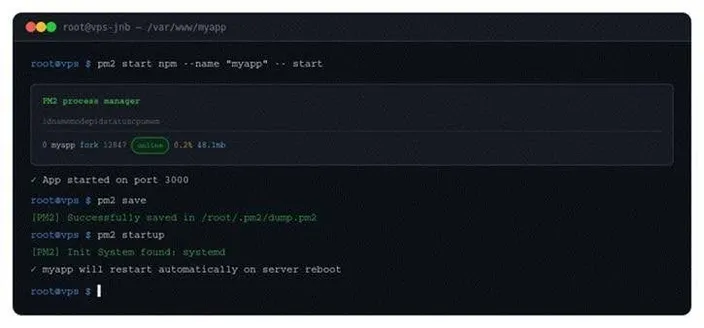
Example of an application running under PM2 after startup persistence has been configured.
| USE ENVIRONMENT VARIABLES Keep API keys, database credentials, and other secrets out of source code and Git repositories. Create a .env file on the server, restrict it with chmod 600 .env, and confirm it is listed in .gitignore before deploying. |
Deploying a Next.js application
Next.js must be built before it runs in production, and the build usually needs packages from devDependencies. Install everything, build, then prune:
npm ci
npm run build
npm prune --omit=dev
pm2 start npm --name "nextapp" -- start
pm2 save
Naturally, the exact sequence will depend on the project. Static exports, Docker deployments, and applications using a custom server may need a different production workflow.
Configure Nginx as a reverse proxy
Your application listens on port 3000. Nginx sits in front of it and handles public HTTP and HTTPS traffic:
server {
  listen 80;
  listen [::]:80;

  server_name yourdomain.com www.yourdomain.com;

  location / {
     proxy_pass http://127.0.0.1:3000;
     proxy_http_version 1.1;
     proxy_set_header Upgrade $http_upgrade;
     proxy_set_header Connection "upgrade";
     proxy_set_header Host $host;
     proxy_set_header X-Real-IP $remote_addr;
     proxy_set_header X-Forwarded-For $proxy_add_x_forwarded_for;
     proxy_set_header X-Forwarded-Proto $scheme;
     proxy_cache_bypass $http_upgrade;
  }
}
Test the configuration and reload:
sudo nginx -t
sudo systemctl reload nginx| DO NOT SKIP HTTPS Configure your SSL certificate before directing real users to the application. Certificate issuance normally completes automatically once DNS points to the VPS and the domain is reachable over HTTP. |
Add SSL with Let's Encrypt
sudo apt install -y certbot python3-certbot-nginx
sudo certbot --nginx -d yourdomain.com -d www.yourdomain.com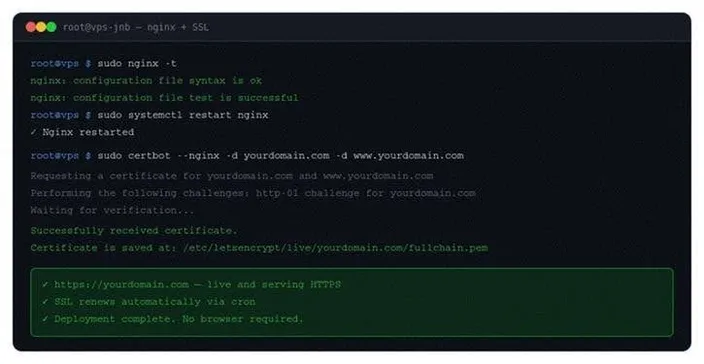
Nginx is configured as a reverse proxy, and Certbot has issued the certificate if domain validation succeeds.
Certbot verifies domain ownership, issues the certificate, and updates the Nginx configuration. It also installs a renewal timer, which you should confirm is active.
Can you deploy a Next.js app without Vercel?
Yes. Next.js isn’t tied exclusively to Vercel. You can run it on your own Linux VPS with Node.js, PM2, and Nginx. The process matches any Node.js deployment, with one addition: running the production build before starting the server.
What you give up is the one-click integration and automatic preview deployments on pull requests. What you gain is server-level control, a more predictable server cost, data-centre choice where available, and the ability to run compatible backend processes alongside your frontend.
| NEXT.JS AND DOCKER Next.js ships with a Dockerfile example in its documentation. If you’re running several applications on one VPS, containerising them makes isolation and management considerably simpler. Ask Claude to generate a production Dockerfile for your application. |
Checks to Run Before Launch
AI accelerates deployment. It doesn’t replace responsible infrastructure management. That’s your job. Work through each of the following yourself before treating a VPS as production-ready.
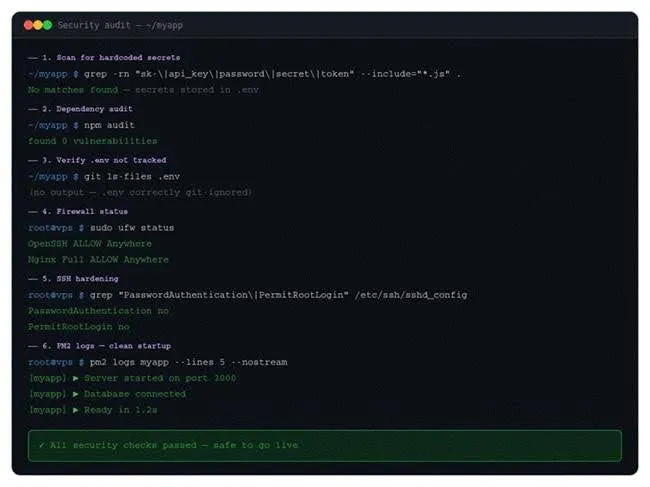
Production checks to perform before every launch.
Scan for hardcoded secrets
grep -rn "sk-\|api_key\|password\|secret\|token" \
  --include="*.js" --include="*.ts" --include="*.py" .
Check your dependencies
npm auditHarden SSH access
Test key-based login in a second SSH session before disabling password authentication. Keep your existing session open until the new login works; otherwise, you may lock yourself out.
In /etc/ssh/sshd_config:
PasswordAuthentication no
PermitRootLogin no
Validate the configuration before reloading:
sudo sshd -t
sudo systemctl reload ssh
Depending on the distribution, the service may be named ssh or sshd.
Confirm firewall rules
sudo ufw statusProtect environment variables
chmod 600 .env
git ls-files .env # should return nothing
Install Fail2Ban
sudo apt install -y fail2ban
sudo systemctl enable fail2ban
Take a snapshot before launch
A snapshot gives you a clean restore point if something goes wrong after launch.
> Take a snapshot of my VPS before I launch. Label it "pre-launch-YYYY-MM-DD".Review the application logs
pm2 logs yourapp --lines 50Common Deployment Mistakes
These are the problems that catch developers most often, particularly when deploying AI-generated code quickly.
- Wrong Node.js version. Pin the runtime to a version compatible with the one used during development and testing.
- Skipping the production build. Next.js and many other frameworks require npm run build before the server starts.
- Missing environment variables. The application starts, then crashes immediately at runtime.
- Password-based SSH left enabled. This increases exposure to brute-force attempts and should be avoided wherever key-based authentication is available.
- Unnecessary open ports. Expose only what your application actually needs.
- Nginx not configured. The application runs on port 3000 but isn’t publicly reachable.
- DNS not pointed at the server. Certificate issuance fails, and the domain doesn’t resolve.
- Launching without HTTPS. This can trigger browser warnings, reduce user trust, and place the site at a disadvantage against HTTPS-enabled alternatives.
- Not checking the logs. The process shows as online while the application errors silently.
- No pre-launch snapshot. You have no restore point if the deployment goes wrong.
Understanding the Costs
A VPS gives you a recurring, resource-based cost rather than usage-based platform billing. That’s often more predictable, though it’s not fixed. Just ensure you confirm each component before you commit.
| Component | Cost |
| Claude Code access | Check current Anthropic pricing |
| HostAfrica Linux VPS | Depends on selected CPU, RAM, storage, region, and services |
| Domain name | Depends on the extension and registrar |
| SSL certificate (Let's Encrypt) | Free |
| HostAfrica API / MCP access | Confirm current availability and any applicable charges |
Check the current Anthropic and HostAfrica pricing pages before deployment.
Frequently Asked Questions
Can I deploy a v0 app without Vercel?
v0 projects can generally be exported or adapted as React or Next.js source code, depending on the project and the current v0 workflow. Once you have the source, deploy it to a VPS using a conventional Node.js or static-site process.
Is Vercel for backend or frontend?
Primarily frontend and serverless functions. Long-running backend processes, persistent connections, and traditional server workloads are less suited to it. For those, a VPS is the better fit.
What is the difference between GitHub and Vercel?
GitHub is a code hosting and collaboration platform. Vercel is a deployment and hosting platform. They’re commonly connected so that pushing to GitHub triggers a deployment, but they serve different functions.
How much does Vercel cost?
Vercel offers a free Hobby plan with usage and eligibility limits. Paid plans add features and team capabilities, and usage-based charges may apply depending on the project and services used. Check the current pricing page before deployment.
Can I host on Vercel without GitHub?
Yes. Vercel supports GitLab and Bitbucket, and you can deploy straight from the CLI without any Git integration, useful for quick tests or projects that are not in a remote repository.
What does Vercel host?
Static sites, server-side rendered applications, and serverless functions. It excels at frontend-heavy applications, particularly those built with React frameworks. It’s not designed for traditional server applications, databases, or persistent background processes.
Pre-launch checklist
Work through this before directing real users to your application.
| ☐ Claude Code authenticated ☐ HostAfrica API token created and secured ☐ MCP connection verified with a test request ☐ VPS provisioned in the intended region ☐ SSH access configured (key-based only) ☐ Firewall limited to SSH, HTTP, HTTPS ☐ Node.js and required runtimes installed ☐ Application cloned and deployed | ☐ Environment variables configured (.env, chmod 600) ☐ PM2 or Docker configured and persisted ☐ Nginx configured as reverse proxy ☐ DNS A record pointed at the VPS IP ☐ SSL certificate installed, renewal active ☐ Application tested end to end ☐ Logs checked for startup errors ☐ Pre-launch snapshot created |
| YOU'RE LIVE>Your application can move from prompt to production through a terminal-first workflow. Claude Code helps generate and execute deployment steps; HostAfrica provides the VPS infrastructure or cloud services; and you retain control over the server configuration. That control comes with responsibility: review AI-generated commands, secure the VPS, protect your API tokens, configure backups, monitor the application, and test the deployment before directing real users to it. |