
A dedicated IP address is an IP address that’s assigned exclusively to your website or server. It’s not shared with anyone else. But why does this matter? What does this exclusivity entail? And do you need one? Let’s find out.
What is an IP address?
Let’s take a step back and first try to understand IP addresses and how they work.
The internet is a vast network of connected devices – laptops, phones, hosting servers, routers, and more. For these devices to send and receive information, they need a way to uniquely identify each other. This unique identification is achieved through IP addresses.
An IP (Internet Protocol) address is a unique string of numbers assigned to each device on the internet. It looks like this: 192.157.1.1.
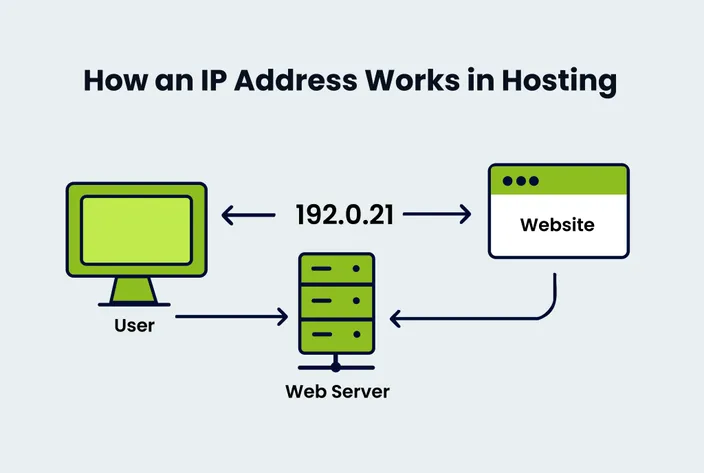
Think of it like a home address, but for a device. Just as the postal service needs your address to deliver a letter, the internet needs your IP address to send data to the right place.
Every time you visit a website, your device is communicating with a server using IP addresses. All internet traffic, including emails, video streams, and website visits, moves from one IP to another.
Static IP vs dynamic IP
Now that we know what an IP address is, it’s important to understand that not all IPs stay the same. Some are static, while others are dynamic.
A static IP address doesn’t change. It’s fixed and remains the same every time a device connects to the internet. Static IPs are often used by servers, business websites, remote access systems, and email services. Basically, whenever we need a stable and predictable address, we go with a static IP.
On the other hand, a dynamic IP address can change from time to time. Most of us get dynamic IPs from our Internet Service Providers (ISPs). Typically, when you turn on your router, your ISP automatically assigns it an available IP address from their pool. This assigned IP address can be different the next time you reboot your router; hence, it’s dynamic.
What is a dedicated IP address?
At this point, we’re ready to talk about dedicated IP addresses and how they differ from shared IPs.
A dedicated IP address is assigned to a single user, website, or account. No one else can have it. It’s yours alone, and all traffic going in or out is tied to your domain or server.
In contrast, a shared IP address, as the name indicates, is used by multiple websites or users at the same time. For example, on shared hosting plans, many websites can live on the same server and share one IP address.
Here’s a quick difference:
Dedicated IP = One user, one IP address
Shared IP = Multiple users, one IP address
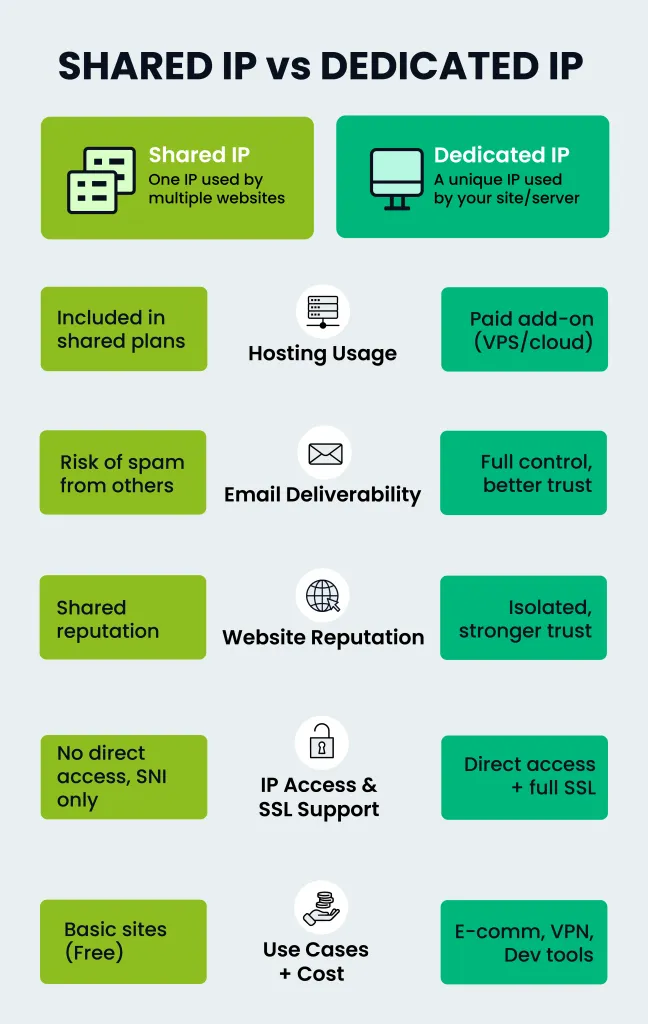
This difference can affect things like emails, site performance, and server access.
But wait. If more than one website has the same IP address, how does the internet know which website to display when a browser sends a request to that IP address?
For example, if xyz.com and abc.com both point to 182.111.112.112, and a browser attempts to access the site data hosted at this IP, how does the server know whether to show the content for xyz.com or abc.com?
The answer lies in host headers (also known as virtual hosts). When your web browser sends a request to a server, it includes information in the request header to specify the exact domain name it's trying to access (e.g., Host: xyz.com or Host: abc.com).
The web server reads these host headers and uses them to identify the correct website files to serve back to the user. It's like an apartment building where everyone shares the same street address, but the mail gets sorted to the right apartment number inside.
Benefits of a dedicated IP address
Here are some of the main benefits of using a dedicated IP:
- Better email deliverability: If you send emails from your domain (like newsletters or transaction emails), a dedicated IP will help keep your sender reputation clean. On a shared IP, someone else's spam emails can get your messages blocked.
- Improved VPN performance: VPNs with dedicated IPs are more stable and usually work better with services that block shared VPN traffic. You also avoid constant IP switching, which some services flag as suspicious.
- SSL certificates: While modern servers can use SSL on shared IPs (thanks to Server Name Indication), some older systems and apps still prefer or require a dedicated IP for SSL.
- FTP access: A dedicated IP can provide a more stable and reliable connection for uploading and downloading large files via FTP. It can also be necessary when you need to set up user-specific FTP access with IP-based restrictions.
- Easier access before DNS propagates: When you move or launch a site, DNS changes can take time to spread across the internet. With a dedicated IP, you can access your site directly by IP address even before DNS is fully updated.
- Fewer blacklisting risks: On shared IPs, one bad actor can get the whole IP blacklisted. With a dedicated IP, you're in control.
Who should consider a dedicated IP?
A dedicated IP isn’t for everyone, but it can be very useful in certain cases. For example:
- If you have an e-commerce site that collects sensitive information, you should get dedicated IPs to keep SSL and payment systems stable and secure.
- If your business uses VPNs or remote access servers, you can use a dedicated IP to ensure consistent and secure connections.
- For gamers, a dedicated IP can help reduce lag, avoid bans tied to shared IPs, and allow hosting of private game servers.
- Developers can whitelist dedicated IPs in firewalls and avoid having to update access settings constantly.
- If you are hosting APIs, a dedicated IP can simplify firewall rules and make sure external services always reach your app.
Dedicated IP address for VPN – is it worth it?
VPN users can enjoy a far more seamless experience by choosing a static IP over a shared one. But a shared IP has some benefits of its own too. Let’s dig deeper into this.
With a regular VPN setup, your IP address changes every time you connect. You also usually share that IP with many other users. This setup hides your identity, and makes it harder to trace anyone, which is good for privacy. But it also means:
- Some websites may block you or issue security challenges because the shared IP address has been flagged due to the activity of other users on it.
- Online services (like banks or streaming platforms) may see your login as suspicious.
- You can’t easily whitelist your IP for secure systems or remote access.
A dedicated VPN IP, on the other hand, is assigned only to you. It stays the same each time you connect. This makes it easier to:
- Access private systems (like internal tools, databases, or FTP servers).
- Avoid security checks or CAPTCHAs.
- Get more reliable streaming or gaming performance.
Many VPN providers offer dedicated IPs as an add-on. You usually pay a little more each month, but for many users, especially those who work remotely, or host servers, it is worth it.
That said, it all depends on your needs. If privacy and anonymity are your top priorities, a shared IP can still be the better choice. But if stability, access, and fewer disruptions matter more, a dedicated VPN IP can be a smart upgrade.
How to get a dedicated IP address in South Africa?
If you’re in South Africa and want a dedicated IP address, here’s how to get one:
Through your hosting provider
Most web hosting companies (like HostAfrica) offer dedicated IPs either as part of their premium plans or as optional add-ons. For example, a static/dedicated IPv4 address is included with all of HostAfrica’s VPS hosting plans.
If you have already signed up, you can usually also add a dedicated IP later from your hosting dashboard.
Through VPN services (for non-website use)
As discussed earlier, some VPN service providers offer dedicated IP addresses as part of their subscription packages. This option is suitable for individuals who want to use a dedicated IP for their general internet browsing, streaming, or gaming, rather than for hosting a website or server.
What about the cost?
Expect to pay between R20 and R100 per month extra for a dedicated IP, depending on your provider and the type of service (hosting or VPN).
FAQs about dedicated IP addresses
Finally, let’s answer some commonly asked questions about dedicated IPs:
How is a dedicated IP different from a static IP?
A static IP stays the same over time, while a dedicated IP is an IP that’s assigned exclusively to you. A dedicated IP is inherently static, but a static IP could theoretically (though rarely in typical web hosting scenarios) be shared.
Does a dedicated IP help SEO?
Not directly. SEO is more about content, backlinks, and site speed. However, the indirect benefits of a dedicated IP, such as improved email deliverability and potentially better website performance under heavy load, could support your SEO efforts over time, but they aren’t direct ranking factors.
Can I move my dedicated IP to another host?
Usually not. IP addresses are tied to the provider’s network, so you’ll need to get a new one from the new host.
Can I get one for my email server only?
Yes, many hosting and email service providers offer dedicated IPs just for email use. This can help improve your email deliverability and sender reputation.
Is a dedicated IP more secure?
Yes, it can be. Since it's used only by you, there’s less risk of being affected by other users' actions or being blacklisted.
Conclusion
A dedicated IP address can offer a range of handy benefits that you don’t get with a shared IP. Whether or not you need one depends on your specific use case and preferences. We hope that this post helped you understand what a dedicated IP really is, why it matters, and whether it’s the right choice for you.To explore dedicated IP options for your site or VPN, check out HostAfrica’s flexible hosting plans and add-on options today!
If this article helped explain dedicated IP addresses, these related resources can help readers understand hosting environments, dedicated infrastructure, and server options:
- What is Dedicated Web Hosting? Definition, Benefits and When To Use It
- Why You Should Be Considering Using a Web Hosting Provider
- Making The Right Choice: Shared Hosting vs Dedicated Servers
- Why Your Growing Business Needs a Dedicated Server
- What is Web Hosting? Detailed Definition, Types, and Pricing Explained
