For resellers in the web hosting industry, creating tailored hosting packages in WHM is an essential first step for managing multiple clients and offering plans that match different customer needs. WHM allows you to define resource limits such as disk space, bandwidth, email accounts, databases, and more, so you can build hosting packages for small businesses, bloggers, developers, or growing websites.
Whether you’re a WHM Hosting Reseller or new to the hosting reselling landscape, WHM’s dashboard gives you the tools to create, define, and manage packages without needing root access. This guide walks you through how to create a hosting package in WHM, assign resources, configure settings, and apply packages to client accounts.
Step 1: Create a Package
-
Log in to your Reseller WHM account. The URL will typically look something like
https://yourdomain.com:2087, where 'yourdomain.com' is your actual domain name. -
You may also be able to access WHM through your HostAfrica client area. Log in to your client area, go to Services > My Services > Manage, then look for the One Click Login section and select WHM panel. This will redirect you to Web Host Manager.
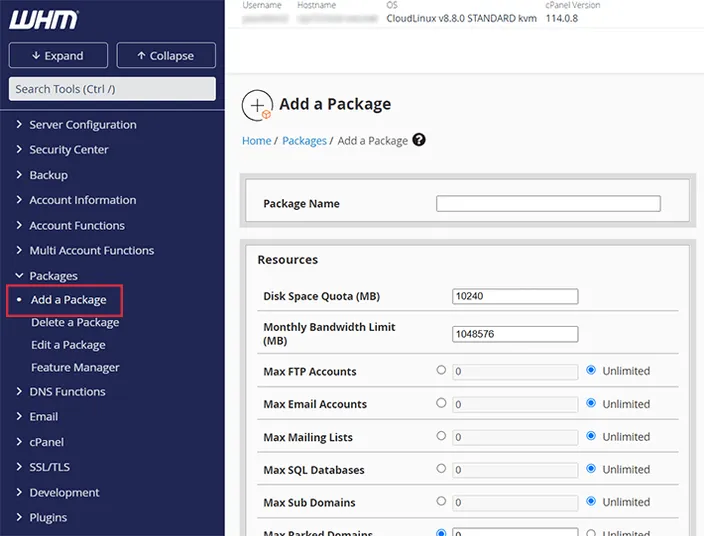
Once you are inside WHM, scroll to the Packages section in the left-hand menu and click Add a Package.
-
After logging in, find the 'Packages' section in the left-hand menu.
-
Click on 'Add a Package' to initiate the process of defining a new hosting package.
Step 2: Define Your Package Resources
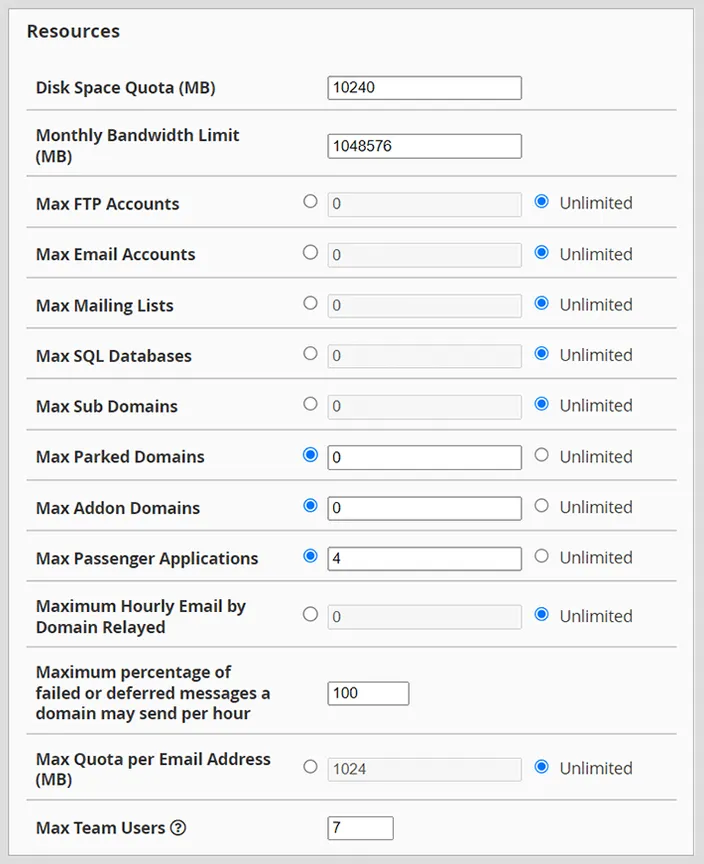
While defining the resources of a hosting package in WHM, you're provided with a comprehensive list of attributes that can be set for each package. Here's a breakdown of each option:
Disk Space Quota (MB): This is the total disk space allocated to the hosting account when it is created. WHM calculates disk space in MB, so if you want to allocate 1 GB of storage, you would enter around 1000 MB. For example, 10,240 MB equals roughly 10 GB.
- Monthly Bandwidth Limit (MB): This determines how much data can be transferred between a website and its visitors during a given month. WHM calculates bandwidth in MB. For example,
1,048,576 MBequals roughly 1 TB of monthly bandwidth. - Max FTP Accounts: This sets the maximum number of FTP accounts that can be created under the hosting package. FTP accounts allow users to upload and download files to and from the website’s server. You can set a specific number of FTP accounts or allow unlimited accounts, depending on the package you want to offer.
- Max Email Accounts: This sets the maximum number of email accounts that can be created under the hosting package. Email accounts allow website owners to create addresses using their own domain name, such as
name@yourwebsite.com. You can set a fixed limit or allow unlimited email accounts, depending on the package. - Max Mailing Lists: This sets how many mailing lists can be created under the package. Mailing lists are groups of email addresses used to send messages to multiple recipients at once. They can be useful for newsletters, announcements, marketing campaigns, or client updates.
- Max SQL Databases: This sets the maximum number of SQL databases a client can create under the hosting package. SQL databases are used to store, organise, and retrieve data for websites and web applications, such as WordPress sites, online stores, booking systems, and custom applications.
- Max Sub Domains: This sets the number of subdomains a client can create. Subdomains are used to create separate URLs for specific areas of a website, such as
blog.yourwebsite.com,shop.yourwebsite.com, orsupport.yourwebsite.com. - Max Parked Domains: This sets how many parked domains can be added to the account. Parked domains are additional domain names that point to the same website as the primary domain. For example, if the main domain is
example.com, a client may parkexample.netorexample.orgso they also point to the same website.
Max Addon Domains: This sets how many addon domains can be added to the hosting account. Addon domains allow clients to host additional websites with separate domain names, website content, and email accounts under the same cPanel account.
Max Passenger Applications: Passenger is a web server and application server. This setting determines how many passenger apps (such as Ruby on Rails, Node.js and Python) a client can run.
Maximum Hourly Email by Domain Relayed: This places a cap on the number of emails a domain can send within an hour. This limit helps prevent spam, protects email server performance, and reduces the risk of misuse from compromised or poorly configured accounts.
Maximum percentage of failed or deferred messages a domain may send per hour: To combat email abuse, this setting limits the percentage of failed or deferred emails a domain can send in an hour. In the provided example, it's set to 100%.
Max Quota per Email Address (MB): This sets the maximum amount of storage allocated to each email address under the hosting account. For example, 1,024 MB equals roughly 1 GB per mailbox. Setting a sensible email quota helps manage storage usage and supports email server performance and stability.
Max Team Users: Dictates the number of team users that can be added, which is 7 in the provided instance.
Your choices can also play a pivotal role in specialized cases, like if you plan coupled offerings such as an Acronis Backup Reseller where more data-focused parameters could be crucial. When defining a hosting package, the ideal settings for these resources would vary based on your target audience and the kind of websites or applications they're likely to host. Ensure that you strike a balance between offering attractive resources and maintaining server health and performance.
Step 3: Configure Other Settings
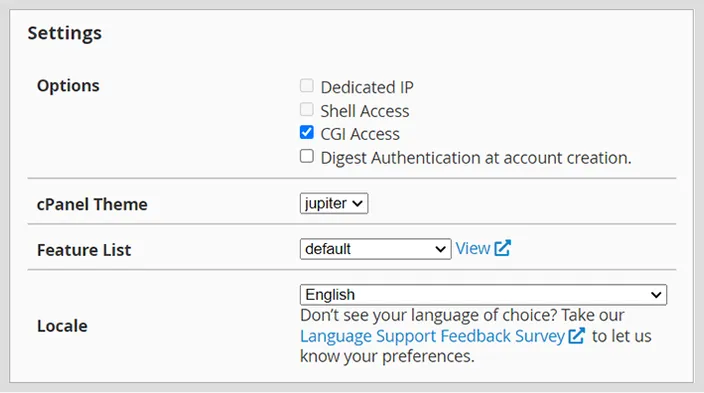
Options:
- Dedicated IP: If checked, this allows the assignment of a dedicated IP address to the cPanel account. Dedicated IPs can be essential for certain SSL certificates and for other specialised tasks.
- Shell Access: This permits the user to have SSH (Secure Shell) access to the server. SSH is a secure method to remotely access the server command line. However, granting this can be a security concern, so it's often reserved for advanced users or those with specific needs.
- CGI Access: When this option is enabled, the user will be allowed to execute CGI (Common Gateway Interface) scripts. CGI scripts are a way for web servers to interface with external content-generating programs.
- Digest Authentication at account creation: Enabling this provides additional security during account creation by requiring a more secure authentication method.
cPanel Theme: This dropdown lets you select the theme or appearance for the cPanel interface. Different themes might offer slightly different layouts or aesthetics. "Jupiter" is the selected theme in this case, but other themes might be available depending on the server setup.
Feature List: Feature lists in WHM define which cPanel features are available to users. By default, a list is provided, but custom lists can be created to offer specialised sets of features.
Locale: This dropdown lets you select the preferred language for the cPanel interface. It's set to 'English' by default. However, cPanel supports multiple languages, allowing users to work in their preferred language for better accessibility.
Step 4: Assigning Packages to Clients
- Once you've entered all the necessary information, click on 'Add' to save the package. You can now assign this package to your clients.
- To assign your new package to a cPanel account, navigate to 'List Accounts' in WHM.
- From here, you can assign the package to new cPanel accounts you create for your clients or modify existing accounts to use the new package.
Tips to Enhance Hosting Packages for Resellers
Understand Your Market: Identify the needs of your target clientele. Are they small businesses, bloggers, developers, or large enterprises?
Balance Resources: Ensure the packages you offer provide enough resources (like bandwidth and storage) to meet the needs of your clients without overcommitting.
Offer Essential Features: Include features that add value, such as SSL certificates, one-click app installers, or daily backups.
Transparent Pricing: Ensure your pricing is clear, competitive, and offers good value for the services provided.
Provide Excellent Support: Offering support, even if it's through ticketing or email, can be a major selling point.
Regularly Review and Update: Technology and client needs evolve. Periodically review and update your packages to stay competitive and relevant.
Conclusion
For Resellers, WHM offers a powerful platform to customise and manage hosting packages. By understanding your clients' needs and continually refining your offerings, you can build a successful reselling business.
Remember, it's not just about the resources but also about the value and trust you offer to your clients.
If this WHM hosting package guide was useful, these related resources can help you create custom packages, manage client accounts, navigate WHM, customise features, and configure WHMCS: